آموزش SOLIDWORKS برای مبتدیان و کاربران متوسط - آخرین آپدیت
دانلود SOLIDWORKS for Beginners and Intermediate Users
با دوره جامع "آموزش SolidWorks برای مبتدیان و کاربران متوسط" وارد دنیای طراحی سهبعدی شوید. این دوره به شما کمک میکند تا اصول اولیه و قابلیتهای متوسط SolidWorks را بهطور کامل فرا بگیرید. فرقی نمیکند مبتدی هستید یا میخواهید مهارتهای خود را ارتقا دهید، این دوره با راهنمایی گامبهگام، تواناییهای طراحی شما را به سطح بالاتری میرساند.
آنچه در این دوره خواهید آموخت:
تسلط بر رابط کاربری SolidWorks و CommandManager.
ایجاد و ویرایش اسکچها، قطعات سهبعدی، مونتاژها و نقشهها.
یادگیری ویژگیهای ضروری مانند Extrude، Revolve، Sweep، Loft، Fillet، Chamfer، Draft، Rib و Shell.
کار با ابزارهای پیشرفته از جمله منحنیهای Helical و Projected، تقسیمبندی سطح و Trimming.
درک رویکردهای مونتاژ و استفاده از Mates برای طراحیهای دقیق.
اختصاص مواد، اعمال ظاهر و محاسبه دقیق و کارآمد خواص جرم، و سایر مهارتهای ضروری.
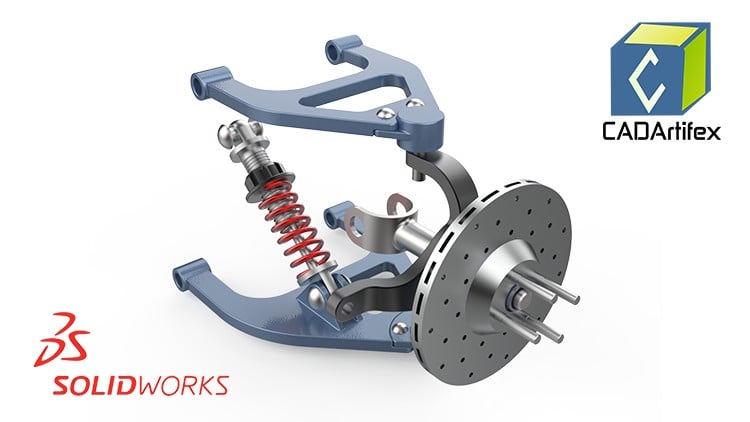
انجام یک پروژه عملی با طراحی یک سیستم تعلیق شامل 20 قطعه و مونتاژ آنها.
چه کسانی باید در این دوره ثبتنام کنند:
این دوره برای دانشجویان، متخصصان یا علاقهمندانی ایدهآل است که میخواهند SolidWorks را از ابتدا یاد بگیرند و در طول دوره از پشتیبانی کامل مدرس بهرهمند شوند.
پس از اتمام دوره:
شما قادر خواهید بود قطعات، مونتاژها و نقشههای مهندسی آماده برای تولید را برای قطعات و مونتاژهای جداگانه ایجاد کنید، و از رعایت مشخصات و استانداردهای طراحی اطمینان حاصل کنید.
چرا باید در این دوره ثبتنام کنید؟
با مثالهای دنیای واقعی، توضیحات واضح و تمرینهای عملی، این دوره به شما اطمینان میدهد که تجربه عملی کسب کنید و در عین حال مهارتهای خود را برای ایجاد یک نمونه کار حرفهای ارتقا دهید. در پایان، شما اعتمادبهنفس لازم برای به واقعیت پیوستن ایدههای خود در SolidWorks را خواهید داشت.
همین حالا بپیوندید و طراحی آینده خود را آغاز کنید!
ویژگیهای دوره:
- تسلط بر SolidWorks Part، Assembly و Drawings از پایه
- مثالهای عملی و کاربردی
- شامل پروژه طراحی سیستم تعلیق
پیشنیازها:
بدون نیاز به تجربه قبلی در CAD: مبتدیان نیز میتوانند شرکت کنند! این دوره با اصول اولیه شروع میشود و به مباحث پیشرفتهتر میپردازد.
برای تمرین و همراهی با درسها، به نرمافزار SolidWorks دسترسی داشته باشید.
Getting Started with SOLIDWORKS - شروع کار با سالیدورکس Getting Started with SOLIDWORKS
-
Course Overview - مرور کلی دوره Course Overview
-
Start a New Part File - شروع یک فایل قطعه جدید Start a New Part File
-
User Interface of SOLIDWORKS - رابط کاربری سالیدورکس User Interface of SOLIDWORKS
-
Specifying Units - مشخص کردن واحدها Specifying Units
Mastering Sketching Tools and Techniques in SOLIDWORKS - تسلط بر ابزارها و تکنیکهای اسکچینگ در سالیدورکس Mastering Sketching Tools and Techniques in SOLIDWORKS
-
Starting the Sketching Environment - شروع محیط اسکچینگ Starting the Sketching Environment
-
Specifying Grids and Snap Settings - مشخص کردن شبکهها و تنظیمات Snap Specifying Grids and Snap Settings
-
Creating a Line - ایجاد یک خط Creating a Line
-
Creating a Centerline and a Midpoint Line - ایجاد یک خط محور و یک خط نقطه میانی Creating a Centerline and a Midpoint Line
-
Creating Rectangles - ایجاد مستطیل Creating Rectangles
-
Creating Circles - ایجاد دایره Creating Circles
-
Creating Arcs - ایجاد کمان Creating Arcs
-
Drawing Polygons - رسم چندضلعیها Drawing Polygons
-
Drawing Slots - رسم شیارها Drawing Slots
-
Drawing Ellipses and Elliptical Arcs - رسم بیضیها و کمانهای بیضوی Drawing Ellipses and Elliptical Arcs
-
Drawing Parabolas and Conic Curves - رسم سهمیها و منحنیهای مخروطی Drawing Parabolas and Conic Curves
-
Drawing Splines - رسم Spline Drawing Splines
-
Quiz for Creating Sketches - آزمون برای ایجاد اسکچها Quiz for Creating Sketches
Editing and Modifying Sketches - ویرایش و اصلاح اسکچها Editing and Modifying Sketches
-
Download Lesson Files - دانلود فایلهای درس Download Lesson Files
-
Trimming Unwanted Sketch Entities - برش موجودیتهای ناخواسته اسکچ Trimming Unwanted Sketch Entities
-
Extending Sketch Entities - گسترش موجودیتهای اسکچ Extending Sketch Entities
-
Offsetting Sketch Entities - Offset کردن موجودیتهای اسکچ Offsetting Sketch Entities
-
Mirroring Sketch Entities - آینهسازی موجودیتهای اسکچ Mirroring Sketch Entities
-
Creating Sketch Fillets - ایجاد فیلههای اسکچ Creating Sketch Fillets
-
Creating Sketch Chamfers - ایجاد پخهای اسکچ Creating Sketch Chamfers
-
Creating a Linear Sketch Pattern - ایجاد یک الگوی خطی اسکچ Creating a Linear Sketch Pattern
-
Creating a Circular Sketch Pattern - ایجاد یک الگوی دایرهای اسکچ Creating a Circular Sketch Pattern
-
Quiz for Editing and Modifying Sketches - آزمون برای ویرایش و اصلاح اسکچها Quiz for Editing and Modifying Sketches
Applying Dimensions and Constraints - اعمال ابعاد و محدودیتها Applying Dimensions and Constraints
-
Download Lesson Files - دانلود فایلهای درس Download Lesson Files
-
Applying Geometric Relations/Constraints - اعمال روابط/محدودیتهای هندسی Applying Geometric Relations/Constraints
-
Applying Dimensions - اعمال ابعاد Applying Dimensions
-
Editing Dimensions - ویرایش ابعاد Editing Dimensions
-
Practice Exercise 1 - Creating a Fully Defined Sketch - تمرین عملی 1 – ایجاد یک اسکچ کاملاً تعریف شده Practice Exercise 1 - Creating a Fully Defined Sketch
-
Quiz for Applying Dimensions and Constraints - آزمون برای اعمال ابعاد و محدودیتها Quiz for Applying Dimensions and Constraints
Creating Basic Features and Manipulating Views - ایجاد ویژگیهای پایه و دستکاری نماها Creating Basic Features and Manipulating Views
-
Download Lesson Files - دانلود فایلهای درس Download Lesson Files
-
Creating an Extruded Feature - ایجاد یک ویژگی Extrude Creating an Extruded Feature
-
Creating a Revolved Feature - ایجاد یک ویژگی Revolve Creating a Revolved Feature
-
Navigating a 3D Model in the Graphics Area - پیمایش یک مدل سهبعدی در ناحیه گرافیکی Navigating a 3D Model in the Graphics Area
-
Manipulating View Orientation of a Model - دستکاری جهتگیری نمای یک مدل Manipulating View Orientation of a Model
-
Changing the Display Style of a Model - تغییر سبک نمایش یک مدل Changing the Display Style of a Model
-
Quiz for Basic Features and Manipulating Views - آزمون برای ویژگیهای پایه و دستکاری نماها Quiz for Basic Features and Manipulating Views
Creating Reference Planes and Cut Features - ایجاد صفحات مرجع و ویژگیهای برش Creating Reference Planes and Cut Features
-
Download Lesson Files - دانلود فایلهای درس Download Lesson Files
-
Creating Reference Planes - Part 1 - ایجاد صفحات مرجع - قسمت 1 Creating Reference Planes - Part 1
-
Creating Reference Planes – Part 2 - ایجاد صفحات مرجع – قسمت 2 Creating Reference Planes – Part 2
-
Creating Cut Features - Extruded Cut and Revolved Cut - ایجاد ویژگیهای برش – برش Extrude و برش Revolve Creating Cut Features - Extruded Cut and Revolved Cut
-
Quiz for Creating Reference Planes and Cut Features - آزمون برای ایجاد صفحات مرجع و ویژگیهای برش Quiz for Creating Reference Planes and Cut Features
Practice Exercises - تمرینهای عملی Practice Exercises
-
Download Lesson Files - دانلود فایلهای درس Download Lesson Files
-
Practice Exercise 1 - تمرین عملی 1 Practice Exercise 1
Editing and Managing Model Features and Sketches - ویرایش و مدیریت ویژگیها و اسکچهای مدل Editing and Managing Model Features and Sketches
-
Download Lesson Files - دانلود فایلهای درس Download Lesson Files
-
Editing a Feature and its Sketch - ویرایش یک ویژگی و اسکچ آن Editing a Feature and its Sketch
-
Displaying Earlier Model States and Reordering Features - نمایش حالتهای قبلی مدل و تغییر ترتیب ویژگیها Displaying Earlier Model States and Reordering Features
-
Projecting Edges onto the Sketching Plane - تصویر کردن لبهها بر روی صفحه اسکچ Projecting Edges onto the Sketching Plane
-
Quiz for Editing and Managing Model Features/Sketches - آزمون برای ویرایش و مدیریت ویژگیها/اسکچهای مدل Quiz for Editing and Managing Model Features/Sketches
Assigning Appearance and Material, and Calculating Mass Properties - اختصاص ظاهر و ماده، و محاسبه ویژگیهای جرم Assigning Appearance and Material, and Calculating Mass Properties
-
Download Lesson Files - دانلود فایلهای درس Download Lesson Files
-
Assigning an Appearance or Texture - اختصاص ظاهر یا بافت Assigning an Appearance or Texture
-
Applying Materials and Calculating Mass Properties - اعمال مواد و محاسبه ویژگیهای جرم Applying Materials and Calculating Mass Properties
-
Quiz for Assigning Appearance and Material, and Calculating Mass Properties - آزمون برای اختصاص ظاهر و ماده، و محاسبه ویژگیهای جرم Quiz for Assigning Appearance and Material, and Calculating Mass Properties
Creating Sweep and Lofted Features - ایجاد ویژگیهای Sweep و Loft Creating Sweep and Lofted Features
-
Download Lesson Files - دانلود فایلهای درس Download Lesson Files
-
Creating a Sweep Feature - ایجاد یک ویژگی Sweep Creating a Sweep Feature
-
Creating a Sweep Cut Feature - ایجاد یک ویژگی برش Sweep Creating a Sweep Cut Feature
-
Creating Lofted and Lofted Cut Features - ایجاد ویژگیهای Loft و برش Loft Creating Lofted and Lofted Cut Features
-
Quiz for Creating Sweep and Lofted Features - آزمون برای ایجاد ویژگیهای Sweep و Loft Quiz for Creating Sweep and Lofted Features
Creating Curves and 3D Sketches - ایجاد منحنیها و اسکچهای سهبعدی Creating Curves and 3D Sketches
-
Download Lesson Files - دانلود فایلهای درس Download Lesson Files
-
Creating Projected, Helical, and Spiral Curves - ایجاد منحنیهای Projected, Helical و Spiral Creating Projected, Helical, and Spiral Curves
-
Creating Curves by Specifying XYZ Points and Reference Points - ایجاد منحنیها با مشخص کردن نقاط XYZ و نقاط مرجع Creating Curves by Specifying XYZ Points and Reference Points
-
Creating a Composite Curve - ایجاد یک منحنی مرکب Creating a Composite Curve
-
Creating 3D Sketches - ایجاد اسکچهای سهبعدی Creating 3D Sketches
-
Quiz for Creating Curves and 3D Sketches - آزمون برای ایجاد منحنیها و اسکچهای سهبعدی Quiz for Creating Curves and 3D Sketches
Patterning and Mirroring Features - ایجاد الگو و آینهسازی ویژگیها Patterning and Mirroring Features
-
Download Lesson Files - دانلود فایلهای درس Download Lesson Files
-
Creating a Linear Pattern - ایجاد یک الگوی خطی Creating a Linear Pattern
-
Creating a Circular Pattern - ایجاد یک الگوی دایرهای Creating a Circular Pattern
-
Creating a Curve Driven Pattern - ایجاد یک الگوی هدایت شده توسط منحنی Creating a Curve Driven Pattern
-
Creating a Sketch-Driven Pattern - ایجاد یک الگوی هدایت شده توسط اسکچ Creating a Sketch-Driven Pattern
-
Creating a Table-Driven Pattern - ایجاد یک الگوی جدولمحور Creating a Table-Driven Pattern
-
Creating a Fill Pattern - ایجاد یک الگوی Fill Creating a Fill Pattern
-
Creating a Variable Pattern - ایجاد یک الگوی متغیر Creating a Variable Pattern
-
Mirroring Features, Faces, or Bodies - آینهسازی ویژگیها، سطوح یا بدنه Mirroring Features, Faces, or Bodies
Creating Advanced Features: Holes, Threads, Fillets, and More - ایجاد ویژگیهای پیشرفته: سوراخها، رزوه ها، فیلهها و موارد دیگر Creating Advanced Features: Holes, Threads, Fillets, and More
-
Download Lesson Files - دانلود فایلهای درس Download Lesson Files
-
Working with the Hole Wizard - کار با Hole Wizard Working with the Hole Wizard
-
Adding Cosmetic Threads - افزودن رزوههای Cosmetic Adding Cosmetic Threads
-
Creating Threads - ایجاد رزوه Creating Threads
-
Creating Fillets – Part 1 - ایجاد فیلهها – قسمت 1 Creating Fillets – Part 1
-
Creating Fillets – Part 2 - ایجاد فیلهها – قسمت 2 Creating Fillets – Part 2
-
Creating Chamfers - ایجاد پخ Creating Chamfers
-
Creating Rib Features - ایجاد ویژگیهای Rib Creating Rib Features
-
Creating Shell Features - ایجاد ویژگیهای Shell Creating Shell Features
-
Creating Wrap Features - ایجاد ویژگیهای Wrap Creating Wrap Features
Understanding Assembly Approaches, Standard Mates, and More - درک رویکردهای مونتاژ، اتصالات استاندارد و موارد دیگر Understanding Assembly Approaches, Standard Mates, and More
-
Download Lesson Files - دانلود فایلهای درس Download Lesson Files
-
Understanding Assembly Approaches and Creating Assemblies with Bottom-up - درک رویکردهای مونتاژ و ایجاد مونتاژها با رویکرد Bottom-up Understanding Assembly Approaches and Creating Assemblies with Bottom-up
-
Applying Relations or Mates – Standard Mates - اعمال روابط یا اتصالات – اتصالات استاندارد Applying Relations or Mates – Standard Mates
-
Moving and Rotating Individual Components - جابهجایی و چرخش اجزای جداگانه Moving and Rotating Individual Components
Working with Advanced Mates - کار با اتصالات پیشرفته Working with Advanced Mates
-
Download Lesson Files - دانلود فایلهای درس Download Lesson Files
-
Working with Advanced Mates and Applying a Profile Center Mate - کار با اتصالات پیشرفته و اعمال یک Profile Center Mate Working with Advanced Mates and Applying a Profile Center Mate
-
Applying a Symmetric Mate - اعمال یک Symmetric Mate Applying a Symmetric Mate
-
Applying a Width Mate - اعمال یک Width Mate Applying a Width Mate
-
Applying a Path Mate - اعمال یک Path Mate Applying a Path Mate
-
Applying a Linear/Linear Coupler Mate - اعمال یک Linear/Linear Coupler Mate Applying a Linear/Linear Coupler Mate
-
Applying a Limit Distance Mate - اعمال یک Limit Distance Mate Applying a Limit Distance Mate
-
Applying a Limit Angle Mate - اعمال یک Limit Angle Mate Applying a Limit Angle Mate
Working with Mechanical Mates - کار با اتصالات مکانیکی Working with Mechanical Mates
-
Download Lesson Files - دانلود فایلهای درس Download Lesson Files
-
Working with Mechanical Mates and Applying a Cam Mate - کار با اتصالات مکانیکی و اعمال یک Cam Mate Working with Mechanical Mates and Applying a Cam Mate
-
Applying a Slot Mate - اعمال یک Slot Mate Applying a Slot Mate
-
Applying a Hinge Mate - اعمال یک Hinge Mate Applying a Hinge Mate
-
Applying a Gear Mate - اعمال یک Gear Mate Applying a Gear Mate
-
Applying a Rack Pinion Mate - اعمال یک Rack Pinion Mate Applying a Rack Pinion Mate
-
Applying a Screw Mate - اعمال یک Screw Mate Applying a Screw Mate
-
Applying a Universal Joint - اعمال یک Universal Joint Applying a Universal Joint
Understanding Advanced Assembly Techniques and Management in SOLIDWORKS - درک تکنیکهای مونتاژ پیشرفته و مدیریت در سالیدورکس Understanding Advanced Assembly Techniques and Management in SOLIDWORKS
-
Download Lesson Files - دانلود فایلهای درس Download Lesson Files
-
Creating an Assembly Using the Top-down Assembly Approach - ایجاد یک مونتاژ با استفاده از رویکرد مونتاژ Top-down Creating an Assembly Using the Top-down Assembly Approach
-
Editing Assembly Components - ویرایش اجزای مونتاژ Editing Assembly Components
-
Editing Mates - ویرایش اتصالات Editing Mates
-
Patterning Assembly Components — Linear and Circular - ایجاد الگو برای اجزای مونتاژ — خطی و دایرهای Patterning Assembly Components — Linear and Circular
-
Mirroring Components of an Assembly - آینهسازی اجزای یک مونتاژ Mirroring Components of an Assembly
-
Creating Assembly Features - ایجاد ویژگیهای مونتاژ Creating Assembly Features
-
Suppressing or Unsuppressing Components - Suppress یا Unsuppress کردن اجزا Suppressing or Unsuppressing Components
-
Creating an Exploded View - ایجاد یک نمای Exploded Creating an Exploded View
-
Collapsing and Animating an Exploded View - جمع کردن و متحرکسازی یک نمای Exploded Collapsing and Animating an Exploded View
-
Editing an Exploded View and Adding Exploded Lines - ویرایش یک نمای Exploded و افزودن خطوط Exploded Editing an Exploded View and Adding Exploded Lines
-
Detecting Interference in an Assembly - تشخیص تداخل در یک مونتاژ Detecting Interference in an Assembly
-
Creating Bill of Material (BOM) of an Assembly - ایجاد جدول مواد (BOM) یک مونتاژ Creating Bill of Material (BOM) of an Assembly
Working with Drawings - کار با نقشهها Working with Drawings
-
Download Lesson Files - دانلود فایلهای درس Download Lesson Files
-
Invoking the Drawing Environment - فراخوانی محیط نقشه کشی Invoking the Drawing Environment
-
Creating the Base View of a Model - ایجاد نمای پایه یک مدل Creating the Base View of a Model
-
Invoking Drawing Environment from the Part or the Assembly - فراخوانی محیط نقشه کشی از قطعه یا مونتاژ Invoking Drawing Environment from the Part or the Assembly
-
Creating a Model View - ایجاد یک نمای مدل Creating a Model View
-
Creating Projected Views - ایجاد نماهای Projected Creating Projected Views
-
Creating 3 Standard Views - ایجاد 3 نمای استاندارد Creating 3 Standard Views
-
Working with the Angle of Projection - کار با زاویه تصویر Working with the Angle of Projection
-
Defining the Angle of Projection - تعریف زاویه تصویر Defining the Angle of Projection
-
Editing the Sheet Format - ویرایش فرمت شیت Editing the Sheet Format
-
Creating a Section View - Part 1 - ایجاد یک نمای Section - قسمت 1 Creating a Section View - Part 1
-
Creating a Section View - Part 2 - ایجاد یک نمای Section - قسمت 2 Creating a Section View - Part 2
-
Creating an Auxiliary View - ایجاد یک نمای Auxiliary Creating an Auxiliary View
-
Creating a Detail View - ایجاد یک نمای Detail Creating a Detail View
-
Creating a Removed Section View - ایجاد یک نمای Section حذف شده Creating a Removed Section View
-
Creating a Broken-out Section View - ایجاد یک نمای Broken-out Section Creating a Broken-out Section View
-
Creating a Break View - ایجاد یک نمای Break Creating a Break View
-
Creating a Crop View - ایجاد یک نمای Crop Creating a Crop View
-
Creating an Alternate Position View - ایجاد یک نمای Alternate Position Creating an Alternate Position View
-
Applying Dimensions and Modifying the Driving Dimension - اعمال ابعاد و اصلاح بعد اصلی Applying Dimensions and Modifying the Driving Dimension
-
Controlling the Default Dimension/Arrow Style and Adding Notes - کنترل سبک پیشفرض ابعاد/فلش و افزودن یادداشتها Controlling the Default Dimension/Arrow Style and Adding Notes
-
Adding Center Marks and Centerlines - افزودن علامت مرکز و خطوط محور Adding Center Marks and Centerlines
-
Creating the Bill of Material (BOM) and Adding Balloons - ایجاد جدول مواد (BOM) و افزودن Balloon Creating the Bill of Material (BOM) and Adding Balloons
-
Practice Exercise 1 - تمرین عملی 1 Practice Exercise 1
Student Project 1 - Creating Suspension System Parts (20 Individual Parts) - پروژه دانشجویی 1 – ایجاد قطعات سیستم تعلیق (20 قطعه جداگانه) Student Project 1 - Creating Suspension System Parts (20 Individual Parts)
-
Mounting Frame - Part 1 - قاب نصب - قسمت 1 Mounting Frame - Part 1
-
Lower A Arm - Part 2 - بازوی A پایینی - قسمت 2 Lower A Arm - Part 2
-
Upper A Arm - Part 3 - بازوی A بالایی - قسمت 3 Upper A Arm - Part 3
-
Joint Base - Part 4 - پایه مفصل - قسمت 4 Joint Base - Part 4
-
Knuckle - Part 5 - طبق - قسمت 5 Knuckle - Part 5
-
Ball Stud - Part 6 - گل میخ توپی - قسمت 6 Ball Stud - Part 6
-
Hub Outer Flanged Ring - Part 7 - حلقه فلنجی بیرونی توپی - قسمت 7 Hub Outer Flanged Ring - Part 7
-
Hub Inner Flanged Ring - Part 8 - حلقه فلنجی داخلی توپی - قسمت 8 Hub Inner Flanged Ring - Part 8
-
Bearing Cage - Part 9 - قفس بلبرینگ - قسمت 9 Bearing Cage - Part 9
-
Bearing Ball - Part 10 - ساچمه بلبرینگ - قسمت 10 Bearing Ball - Part 10
-
Wheel Stud - Part 11 - گل میخ چرخ - قسمت 11 Wheel Stud - Part 11
-
Drive Shaft - Part 12 - میل گاردان - قسمت 12 Drive Shaft - Part 12
-
Disc Brake - Part 13 - ترمز دیسکی - قسمت 13 Disc Brake - Part 13
-
Shock Housing - Part 14 - محفظه شوک - قسمت 14 Shock Housing - Part 14
-
Piston Rod - Part 15 - میله پیستون - قسمت 15 Piston Rod - Part 15
-
Spring - Part 16 - فنر - قسمت 16 Spring - Part 16
-
Nut - Part 17 - مهره - قسمت 17 Nut - Part 17
-
Caliper Body - Part 18 - بدنه کالیپر - قسمت 18 Caliper Body - Part 18
-
Mounting Bolt - Part 19 - پیچ نصب - قسمت 19 Mounting Bolt - Part 19
-
Rivet - Part 20 - پرچ - قسمت 20 Rivet - Part 20
Student Project 2 - Creating Suspension System Assembly - پروژه دانشجویی 2 – ایجاد مونتاژ سیستم تعلیق Student Project 2 - Creating Suspension System Assembly
-
Suspension System Assembly - Part 1 - مونتاژ سیستم تعلیق - قسمت 1 Suspension System Assembly - Part 1
-
Suspension System Assembly - Part 2 - مونتاژ سیستم تعلیق - قسمت 2 Suspension System Assembly - Part 2

https://donyad.com/d/fe2607




 CADArtifex LLC
پیشگامان آموزش و پرورش طراحی به کمک رایانه (CAD) و طراحی مبتنی بر پروژه
نمایش نظرات