آموزش فریم ورک بقا Unreal Engine 5 - توسعه بازی چند نفره - آخرین آپدیت
دانلود Unreal Engine 5 Survival Framework – Multiplayer Game Dev
آموزش ساخت بازی آنلاین بقا با Unreal Engine 5 (بخش چند نفره)
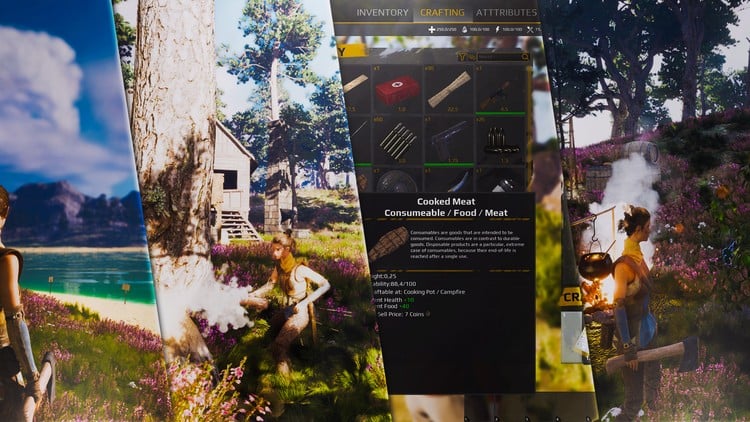
آیا میخواهید بازی آنلاین بقا (Multiplayer Survival Game) خودتان را بسازید؟ این دوره آموزشی شما را در تمام مراحل ساخت بازی، از طراحی ساختار تا پیادهسازی مکانیکهای پیچیده با استفاده از سیستم Blueprint در Unreal Engine 5 راهنمایی میکند. چه یک مبتدی باشید و چه یک توسعهدهنده با تجربه که به دنبال ارتقاء مهارتهای خود است، این دوره دانش و ابزارهای لازم را برای ساخت یک بازی آنلاین بقا کاملاً کاربردی در اختیار شما قرار میدهد.
آنچه در این دوره خواهید آموخت:
- معماری و راهاندازی بازی (Game Architecture & Setup): نحوه صحیح ساختاربندی یک بازی آنلاین بقا را از راهاندازی اولیه پروژه تا مکانیکهای اصلی گیمپلی یاد بگیرید.
- اسکریپتنویسی بصری با Blueprint (Blueprint Visual Scripting): بر سیستم اسکریپتنویسی بصری قدرتمند Unreal Engine مسلط شوید، از جمله توابع (Functions)، ماکروها (Macros)، رابطها (Interfaces) و متغیرها (Variables).
- بخش چند نفره و شبکه (Multiplayer & Networking): ویژگیهای بخش چند نفره را با استفاده از سیستم شبکه Unreal Engine پیادهسازی کنید و از گیمپلی آنلاین بدون نقص اطمینان حاصل کنید.
- بهینهسازی بازی و عملکرد (Game Optimization & Performance): با بهینهسازی Blueprints، داراییها (Assets) و اجزای شبکه، راندمان بازی را بهبود بخشید.
- آزمونها (Quizzes): دانش خود را با آزمونهای جذاب محک بزنید.
سیستمهای گیمپلی جامع (Comprehensive Gameplay Systems): ویژگیهای ضروری را پیادهسازی کنید، از جمله:
- حرکت و جابجایی (Locomotion & Movement): حرکت و ناوبری روان بازیکن.
- سیستم صدای پا (Footstep System): جلوههای صوتی پویا بر اساس نوع زمین.
- منو و رابط کاربری (Menu & UI): ایجاد رابطهای کاربری بصری برای تجربه کاربری یکپارچه.
- سیستم تعامل (Interaction System): پیادهسازی مکانیکهای تعامل با اشیاء.
- زیرسیستم تکثیر (Replication Subsystem): اطمینان از هماهنگسازی روان در بخش چند نفره.
مکانیکهای بقا و پیشرفت (Survival Mechanics & Progression): ویژگیهای اساسی بازی بقا را توسعه دهید:
- مدیریت ویژگیها (Attribute Manager): مدیریت آمار بازیکن مانند سلامتی، استقامت و گرسنگی.
- سیستم احیا (Respawn System): رسیدگی به مرگ بازیکن و مکانیکهای احیا.
- سیستم انبار (Inventory System): پیادهسازی یک انبار سازمانیافته برای مدیریت آیتمها.
- ساخت و تجهیزات (Crafting & Equipment): ساخت مکانیکهای ساخت و ساز و تجهیزات قابل استفاده.
- سیستم ساخت و ساز (Building System): اجازه دادن به بازیکنان برای ساخت سازهها در جهان بازی.
مبارزه و هوش مصنوعی (Combat & AI): بازی بقای خود را با موارد زیر بهبود بخشید:
- چارچوب مبارزه (Combat Framework): توسعه مکانیکهای مبارزه جذاب.
- سیستم Ragdoll (Ragdoll System): اضافه کردن واکنشهای شخصیتی مبتنی بر فیزیک واقعگرایانه.
- هوش مصنوعی پایه (Basic AI): ایجاد رفتارهای NPC هوشمندانه برای گیمپلی فراگیر.
تعامل محیطی و عمق گیمپلی (Environmental Interaction & Gameplay Depth): تعاملات جذاب با دنیای بازی را اضافه کنید:
- درختان قابل قطع (Choppable Trees): پیادهسازی جمعآوری منابع از طریق تخریب محیطی.
با پوشش دادن تمام این عناصر ضروری بازی بقا، مهارتهای لازم را برای ایجاد یک تجربه بقا کاملاً کاربردی در بخش چند نفره در Unreal Engine 5 به دست خواهید آورد.
چرا این دوره را بگذرانیم؟
- بهترین رویکرد ماژولار (Best Modular Approach): یاد بگیرید که چگونه یک بازی بقا ساختاریافته و ماژولار را توسعه دهید که امکان گسترش و انعطافپذیری آسان را فراهم میکند. فقط اجزای مورد نیاز خود را برای یک فرآیند توسعه کارآمد بسازید.
- کد با کیفیت بالا و سازماندهی شده (High-Quality, Organized Code): از کد درهم و برهم اجتناب کنید. این دوره بر Blueprints خوش ساختار و واضح و یک رویکرد قطعه قطعه به توسعه بازی تأکید دارد و مدیریت و مقیاسبندی آن را آسان میکند.
- سوابق اثبات شده (Proven Track Record): تکنیکهای آموزش داده شده در این دوره که بر اساس بهترین شیوههای صنعت ساخته شدهاند، منعکس کننده یک رویکرد توسعه قابل اعتماد و سازگار هستند که توسط متخصصان استفاده میشود.
- سیستمهای قوی و قابل اعتماد (Robust & Reliable Systems): بینشی در مورد طراحی مکانیکهای بازی با انعطافپذیری، قابلیت نگهداری، مقیاسپذیری، سازگاری، قابلیت استفاده و عملکرد به دست آورید.
- یادگیری عملی با کاربردهای دنیای واقعی (Hands-On Learning with Real-World Applications): هر چیزی را که یاد میگیرید مستقیماً در یک پروژه بازی بقا واقعی و چند نفره اعمال کنید.
این دوره به گونهای طراحی شده است که در عین عمیق بودن، در دسترس باشد و برای تازه واردان و کسانی که به دنبال اصلاح مهارتهای Unreal Engine خود هستند، ایدهآل باشد. در پایان این دوره، یک پایه قوی، ماژولار و مقیاسپذیر برای بازی بقای چند نفره خود خواهید داشت که آماده گسترش و اصلاح است.
همین حالا به ما بپیوندید و ساخت بازی آنلاین بقای خود را همین امروز شروع کنید!
با احترام،
اریک روتس
رهبر شرکت Games by Hyper
شروع کار Getting Started
-
مقدمه - دامنه Introduction - Scope
-
مقدمه - طرح کلی دوره Introduction - Course Outline
-
مقدمه - پروژه نمونه Introduction - Example Project
-
مقدمه - من کی هستم Introduction - Who am I
-
آزمون - شروع کار - چارچوب دوره بقا Quiz - Getting Started - Survival Course Framework
معماری Architecture
-
مقدمه Intro
-
سیستمها Systems
-
جریان داده Data flow
-
کلاسهای انتزاعی و ارسال پویا - مقدمه Abstract Classes and Dynamic Dispatching - Intro
-
کلاسهای انتزاعی و ارسال پویا - توضیح کلی Abstract Classes and Dynamic Dispatching - Generic Explanation
-
کلاسهای انتزاعی و ارسال پویا - استفاده از ماکروها برای دسترسی به کامپوننت انتزاعی Abstract Classes and Dynamic Dispatching - Use of Macros to access Abstract Comp
-
آزمون - کلاسهای انتزاعی و ارسال پویا Quiz - Abstract Classes and Dynamic Dispatching
راه اندازی پروژه Project Setup
-
مقدمه Intro
-
ایجاد پروژه Create Project
-
تنظیمات - تنظیمات موتور Settings - Engine Settings
-
تنظیمات - تنظیمات پروژه Settings - Project Settings
-
تنظیمات - پلاگینها Settings - Plugins
-
تنظیمات - بازخوانی همه نودها Settings - Refresh All Nodes
-
کلاسهای سفارشی Custom Classes
-
آزمون - راه اندازی پروژه Quiz - Project Setup
نقشه Map
-
مقدمه Intro
-
مقدمه - نتیجه این فصل Intro - Result of this chapter
-
منظره - افزودن منظره Landscape - Add Landscape
-
منظره - تولید کنندههای Heightmap Landscape - Heightmap Generators
-
منظره - وارد کردن Heightmap Landscape - Importing Heightmap
-
منظره - مرکزیت نقشه Landscape - Centering the map
-
متریال خودکار منظره - مقدمه Auto Landscape Material - Intro
-
متریال خودکار منظره - پوشهها Auto Landscape Material - Folders
-
متریال خودکار منظره - Slope Mask Auto Landscape Material - Slope Mask
-
متریال خودکار منظره - BlendOnHeight Auto Landscape Material - BlendOnHeight
-
متریال خودکار منظره - Macro Variation Auto Landscape Material - Macro Variation
-
متریال خودکار منظره - Material Master Auto Landscape Material - Material Master
-
متریال خودکار منظره - دریافت مشها و متریالها Auto Landscape Material - Getting Meshes and Materials
-
متریال خودکار منظره - نهایی سازی Material Master منظره Auto Landscape Material - Finalizing Landscape Master Material
-
متریال خودکار منظره - افزودن شاخ و برگ چمن Auto Landscape Material - Adding Grass Foliage
-
متریال خودکار منظره - نتیجه گیری Auto Landscape Material - Outro
-
فضاسازی - Post process Lightning Fog Clouds Skylight Ambiance - Post process Lightning Fog Clouds Skylight
-
آب - افزودن Water Volume Water - Adding Water Volume
-
دارایی های نمونه - منابع Example Assets - Sources
-
دارایی های نمونه - قرار دادن دارایی ها Example Assets - Placing Assets
-
دارایی های نمونه - صدای پس زمینه Example Assets - Background Sound
-
آزمون - نقشه Quiz - Map
جا به جایی Locomotion
-
مقدمه Intro
-
مقدمه - نتیجه این فصل Intro - Result of this chapter
-
کاراکتر - وارد کردن کاراکتر سفارشی Character - Importing Custom Character
-
کاراکتر - درایو انیمیشن کاراکتر پیش فرض UE Character - Drive Animation of Default UE Character
-
کامپوننت حرکت توسعه یافته - مقدمه Extended Movement Component - Intro
-
کامپوننت حرکت توسعه یافته - ایجاد نگاشت های ورودی و اقدامات ورودی Extended Movement Component - Creating Input Mappings and Input Actions
-
کامپوننت حرکت توسعه یافته - ایجاد تابع InputMapping و Actor Compo Extended Movement Component - Creating the InputMapping function and Actor Compo
-
کامپوننت حرکت توسعه یافته - افزودن Boolean غیرفعال کردن حرکت Extended Movement Component - Adding Disable Movement Boolean
-
کامپوننت حرکت توسعه یافته - مونتاژها و سکانس های انیمیشن Extended Movement Component - Montages and Animation Sequences
-
منابع - Mixamo Lyra و بیشتر Sources - Mixamo Lyra and More
-
آزمون - جا به جایی Quiz - Locomotion
سیستم ردپای پویا Dynamic Footstep System
-
مقدمه Intro
-
مقدمه - نتیجه این فصل Intro - Result of this chapter
-
آماده سازی - سطوح فیزیکی Preparations - Physical Surfaces
-
آماده سازی - صداها Preparations - Sounds
-
Animation Notify Animation Notify
-
کامپوننت ردپا - آماده سازی کامپوننت ردپا Footstep Component - Preparing Footstep Component
-
کامپوننت ردپا - تابع Trace Footstep Component - Trace function
-
کامپوننت ردپا - Spawn Sound Footstep Component - Spawn Sound
-
Landscape Physical Material Output Landscape Physical Material Output
منو Menu
-
مقدمه Intro
-
مقدمه - نتیجه این فصل Intro - Result of this chapter
-
آماده سازی - پلاگین و فایل های UI Preparations - Plugin and UI Files
-
آماده سازی - استایل های دکمه و متن Preparations - Button and Text Styles
-
آماده سازی - Menu Map و افزودن UI Preparations - Menu Map and adding UI
-
آماده سازی - باز کردن منوی درون بازی Preparations - Open In-Game Menu
-
Reuseable Widgets - دکمه ها Reuseable Widgets - Buttons
-
Reuseable Widgets - Confirm Dialogue Reuseable Widgets - Confirm Dialogue
-
Main Menu - Setting Widget Main Menu - Setting Widget
-
Main Menu - Options Main Menu - Options
-
Main Menu - Main Menu Widget Main Menu - Main Menu Widget
-
Main Menu - In-Game Menu Widget Main Menu - In-Game Menu Widget
زیرسیستم Replication Replication Subsystem
-
مقدمه Intro
-
مقدمه - نتیجه این فصل Intro - Result of this chapter
-
کامپوننت Replication - انیمیشن Replication Component - Animation
-
کامپوننت Replication - صدا Replication Component - Sound
سیستم تعامل Interaction System
-
مقدمه Intro
-
مقدمه - نتیجه این فصل Intro - Result of this chapter
-
آماده سازی - ایجاد کامپوننت ها Preparations - Creating the Components
-
آماده سازی - کانال برخورد سفارشی Preparations - Custom Collision Channel
-
آماده سازی - Interact Interface Preparations - Interact Interface
-
آماده سازی - Example Interaction Objects Preparations - Example Interaction Objects
-
Preparation - Interaction Input Mapping Preparation - Interaction Input Mapping
-
Interaction Component - Interaction Trace Interaction Component - Interaction Trace
-
Interaction Component - Interaction Trace Function Interaction Component - Interaction Trace Function
-
Interaction Component - روشن و خاموش کردن چراغ ها Interaction Component - Turning on Off Lights
-
Interaction Component - Try Interact Function و پایان دادن Interaction Component - Try Interact Function and finishing up
Attribute Manager Attribute Manager
-
مقدمه Intro
-
مقدمه - نتیجه این فصل Intro - Result of this chapter
-
آماده سازی - ایجاد Attribute Components و تنظیم Variables Preparations - Creating Attribute Components and set Variables
-
آماده سازی - Component Macro Preparations - Component Macro
-
UI - Progressbar UI - Progressbar
-
UI - Progressbars در HUD UI - Progressbars in HUD
-
UI - Bind Values از کامپوننت به UI UI - Bind Values from component to UI
-
Update Non Persistent Attributes - تغییر با مقدار Update Non Persistent Attributes - Change by Amount
-
Update Non Persistent Attributes - On Change Health Hydration and Food Update Non Persistent Attributes - On Change Health Hydration and Food
-
Update Non Persistent Attributes - On Damage Update Non Persistent Attributes - On Damage
-
Update Non Persistent Attributes - Update on Timer Update Non Persistent Attributes - Update on Timer
سیستم Ragdoll Ragdoll System
-
مقدمه Intro
-
مقدمه - نتیجه این فصل Intro - Result of this chapter
-
آماده سازی - ایجاد کامپوننت ها و تنظیم Variables Preparations - Creating Components and set Variables
-
Ragdolling - Set to Ragdoll Ragdolling - Set to Ragdoll
-
Ragdolling - On Die Ragdoll Ragdolling - On Die Ragdoll
Respawn Respawn
-
مقدمه Intro
-
مقدمه - نتیجه این فصل Intro - Result of this chapter
-
آماده سازی - ایجاد کامپوننت ها Preparations - Creating Components
-
Implementation - Respawn Location Implementation - Respawn Location
-
Implementation - Respawn Handler Implementation - Respawn Handler
-
Implementation - Reinitialize Implementation - Reinitialize
-
Implementation - Respawn Basic و تست Implementation - Respawn Basic and testing
Inventory Inventory
-
مقدمه Intro
-
مقدمه - نتیجه این فصل Intro - Result of this chapter
-
Architecture - UI Architecture - UI
-
Architecture - Datamodel Architecture - Datamodel
-
Architecture - Functions Architecture - Functions
-
Preparations - Components and Macros Preparations - Components and Macros
-
Preparations - Datamodel Preparations - Datamodel
-
Preparations - Get Item Info from Inventory Slot Preparations - Get Item Info from Inventory Slot
-
Preparations - Filling in the datatable Preparations - Filling in the datatable
-
Pickup Master - Creating and implementing Pickup Master Pickup Master - Creating and implementing Pickup Master
-
UI - Preparations UI - Preparations
-
UI - Inventory Panel UI - Inventory Panel
-
UI - Inventory Slot UI - Inventory Slot
-
UI - Adding slots to Inventory Grid and initialize UI - Adding slots to Inventory Grid and initialize
-
Inventory Functions - Intro Inventory Functions - Intro
-
Inventory Functions - Try Add Item to Inventory Automatically Inventory Functions - Try Add Item to Inventory Automatically
-
Inventory Functions - Drag and Drop - Move item to slot index Inventory Functions - Drag and Drop - Move item to slot index
-
Inventory Functions - Update UI Inventory Functions - Update UI
-
Inventory Functions - Inventory Action - Consume Inventory Functions - Inventory Action - Consume
-
Inventory Functions - Inventory Action - Drop Inventory Functions - Inventory Action - Drop
-
Inventory Functions - Inventory Replication Inventory Functions - Inventory Replication
-
Interact Location - Storage Chest Preparation Interact Location - Storage Chest Preparation
-
Interact Location - Storage Chest UI Interact Location - Storage Chest UI
-
Interact Location - Closing UI and testing replication Interact Location - Closing UI and testing replication
-
Outro - Recap Outro - Recap
Crafting Crafting
-
مقدمه Intro
-
مقدمه - نتیجه این فصل Intro - Result of this chapter
-
Architecture Architecture
-
Preparations - Components Macros and Datamodel Preparations - Components Macros and Datamodel
-
UI - Crafting Panel List and Recipe Slot UI - Crafting Panel List and Recipe Slot
-
UI - Generating Crafting Recipe Slots UI - Generating Crafting Recipe Slots
-
UI - Crafting Progressbar UI - Crafting Progressbar
-
Functions - Crafting Base Logic Functions - Crafting Base Logic
-
Functions - Whole array of items can be found in inventory Functions - Whole array of items can be found in inventory
-
Functions - Remove items automatically Functions - Remove items automatically
-
Replication - Set variables to replicate Replication - Set variables to replicate
-
Recap Recap
Equipment Equipment
-
مقدمه Intro
-
مقدمه - نتیجه این فصل Intro - Result of this chapter
-
Architecture - Datamodel and functions Architecture - Datamodel and functions
-
Preparations - Components and Macros Preparations - Components and Macros
-
Preparations - Datamodel Preparations - Datamodel
-
UI - Equipment Slot UI - Equipment Slot
-
Equipment Functions - Get Equipment info from inventory slot Equipment Functions - Get Equipment info from inventory slot
-
Equipment Functions - Equip Equipment Functions - Equip
-
Equipment Functions - Equip Visually Equipment Functions - Equip Visually
-
Equipment Functions - Unequip Equipment Functions - Unequip
-
Equipment Functions - Excecute Action on Equipment Equipment Functions - Excecute Action on Equipment
-
Equipment Functions - Equip on drop Equipment slot Equipment Functions - Equip on drop Equipment slot
-
Replication Replication
Combat Combat
-
مقدمه Intro
-
مقدمه - نتیجه این فصل Intro - Result of this chapter
-
Architecture Architecture
-
Architecture - Components and Macros Architecture - Components and Macros
-
Combat Functions - Melee Animation Combat Functions - Melee Animation
-
Combat Functions - Anim Notify Combat Functions - Anim Notify
-
Combat Functions - Try Apply Melee Damage Combat Functions - Try Apply Melee Damage
Treecutting Treecutting
-
مقدمه Intro
-
مقدمه - نتیجه این فصل Intro - Result of this chapter
-
Architecture - Setting up and introduction Architecture - Setting up and introduction
-
Treecutting Functions - Material Offset Mask Treecutting Functions - Material Offset Mask
-
Treecutting Functions - Initialization Treecutting Functions - Initialization
-
Treecutting Functions - On Damage apply mask Treecutting Functions - On Damage apply mask
-
Treecutting Functions - Process Hit - Apply Hit and Adapt Mask Treecutting Functions - Process Hit - Apply Hit and Adapt Mask
-
Treecutting Functions - Process Hit - Split Tree Treecutting Functions - Process Hit - Split Tree
-
Finishing Up - Mask adaption Placement in the world and Replication Finishing Up - Mask adaption Placement in the world and Replication
-
Finishing Up - Spawn Hit Sounds and Fall Sound Finishing Up - Spawn Hit Sounds and Fall Sound
Building System Building System
-
مقدمه Intro
-
مقدمه - نتیجه این فصل Intro - Result of this chapter
-
Architecture - Core Principles Architecture - Core Principles
-
Architecture - Datamodel Architecture - Datamodel
-
Architecture - Functions Architecture - Functions
-
Preparations - Components Blueprints and Macros Preparations - Components Blueprints and Macros
-
Preparations - Datamodel Preparations - Datamodel
-
Preparations - Filling in Datamodel Preparations - Filling in Datamodel
-
Preparations - Configure Modular Buildables Preparations - Configure Modular Buildables
-
Preparations - Craft and Try place buildable Preparations - Craft and Try place buildable
-
Building Functions - Start and Stop Buildmode Building Functions - Start and Stop Buildmode
-
Building Functions - Trace Build Location Building Functions - Trace Build Location
-
Building Functions - Spawn Buildable Building Functions - Spawn Buildable
-
Building Functions - Detect Snapping Points Building Functions - Detect Snapping Points
-
Building Functions - Check for Overlap Building Functions - Check for Overlap
-
Building Functions - Close UI after start buildmode Building Functions - Close UI after start buildmode
-
Outro Outro
Basic AI Basic AI
-
مقدمه Intro
-
مقدمه - نتیجه این فصل Intro - Result of this chapter
-
Preparations - Files and ABP Preparations - Files and ABP
-
Preparations - Setting up the AI Architecture - BB BT AIC and Char Preparations - Setting up the AI Architecture - BB BT AIC and Char
-
Preparations - Setting Blackboard Values Preparations - Setting Blackboard Values
-
Implementation - Creating behaviour tree Implementation - Creating behaviour tree
-
Implementation - Attack and Finishing up Implementation - Attack and Finishing up
Finshing Up Finshing Up
-
Extras - Chests Actor Foliage Die in Water Initial Equipment Extras - Chests Actor Foliage Die in Water Initial Equipment



https://donyad.com/d/050ce4




 Eric Ruts
لید گیمز (Lead Games) از هایپر (Hyper): پیشرو در بازیهای [زمینه بازی] توضیحات: بسته به نوع بازیهایی که لید گیمز تولید میکند، عبارت "[زمینه بازی]" را با کلماتی مانند "موبایلی"، "کامپیوتری"، "آنلاین" و غیره جایگزین کنید.
نمایش نظرات