آموزش نمودارهای تعاملی با D3 و Angular - آخرین آپدیت
دانلود Interactive charts with D3 and Angular
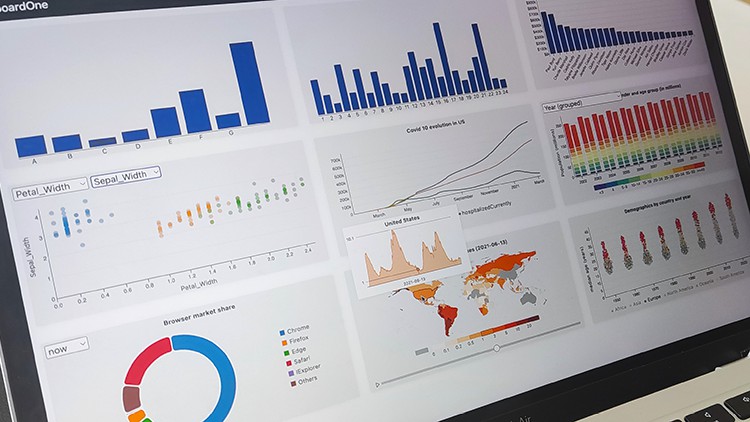
ایجاد چارتهای تعاملی پیشرفته با D3 و Angular
با قدرت D3.js و فریمورک Angular، چارتهای تعاملی بسیار پویا و پیشرفته خلق کنید.
این دوره آموزشی به شما یاد میدهد چگونه D3 و Angular را به صورت یکپارچه از مبتدی تا حرفهای ادغام کنید.
قابلیتهای بصری قدرتمند و تعاملی را به اپلیکیشنهای Angular خود اضافه کنید.
یادگیری D3 از ابتدا
ساخت چارتهای تعاملی پایه و پیشرفته با استفاده از D3js.
درک کامل نحوه عملکرد SVG و بهکارگیری دانش آن برای ساخت ویژوالسازیهای کارآمدتر.
استفاده مجدد و سادهسازی کدها و چارتها با استفاده از اصول وراثت و گسترش کلاسهای پایه.
ساخت کتابخانه چارت سفارشی
ایجاد کتابخانه چارتهای خود شامل نمودارهای خطی، مساحت، میلهای، ستونی، دایرهای، دونات، پراکندگی، نقشهها، زنبوری و ...
گسترش کتابخانه شخصی خود با افزودن چارتهای سفارشی.
اعمال تعاملات (Interactions) بر روی ویژوالسازیها.
ساخت یک داشبورد با استفاده از چارتهای توسعه داده شده در دوره.
تزریق لجند (Legends) و تولتیپ (Tooltips) به چارتها با استفاده از سرویسهای Angular.
پیشنیازها
- دانش کافی از جاوا اسکریپت (JavaScript).
- دانش پایه از Angular مزیت محسوب میشود.
این دوره از سطح مبتدی تا متوسط را پوشش میدهد و تمرکز اصلی بر روی ادغام D3 در Angular است.
چرا این دوره؟
D3 زبانی بسیار قدرتمند است، اما شروع کار با آن ممکن است چالشبرانگیز باشد.
Angular یک فریمورک فوقالعاده است اما در زمینه بصریسازی دادهها کمبودهایی دارد.
در این دوره، ما این دو دنیا را به هم متصل میکنیم و با هم چارتهای تعاملی شگفتانگیزی خلق میکنیم که صفحات شما را به سطحی بالاتر ارتقا میدهند.
برای مبتدیان مطلق، از صفر شروع میکنیم و به درک کتابخانه D3، نحوه عملکرد آن و چگونگی استفاده از آن میپردازیم. تحلیل عمیقی از الگوی بهروزرسانی D3 خواهیم داشت تا بتوانید بر کتابخانه مسلط شوید و از اشتباهات رایج مبتدیان جلوگیری کنید.
به سرویسهای API متصل خواهید شد و دادههای خود را برای هر چارت به فرمت مناسب تبدیل خواهید کرد.
قالب و استانداردهای SVG را یاد خواهید گرفت و چگونگی استفاده از آن برای ساخت ویژوالسازیهای داده سفارشی خود را فرا خواهید گرفت.
با استفاده از سرویسهای Angular و جریانهای داده ناهمزمان، دادهها را به چارتها تزریق خواهیم کرد.
اگر قبلاً با D3 آشنا هستید، مفاهیم پیشرفتهتر مانند استفاده از کتابخانههای مختلف D3 مانند d3-array، d3-force، پارتیشنهای Voronoi و موارد دیگر را یاد خواهید گرفت.
سرویسهای لجند و تولتیپ ایجاد خواهیم کرد، اکشنها را به چارتها ارسال و دریافت میکنیم و به ورودیهای کاربر واکنش نشان میدهیم.
با ایجاد چارتهای پایه و گسترش آنها با استفاده از وراثت، به سمت چارتهای قابل استفاده مجدد حرکت خواهیم کرد.
در نهایت، با پایهای مستحکم برای ساخت چارتهای قابل استفاده مجدد خود، که بر اساس مبانی مطالعه شده در این دوره بنا شدهاند، دوره را به پایان خواهید رساند.
به دنیای D3 و Angular خوش آمدید!
مقدمه Introduction
-
مقدمه Introduction
-
پروژه ما: کتابخانه نمودارها Our project: The Charts Library
-
راهاندازی محیط کاری Setting up the working environment
-
تنظیم محیط - افزودن Node و Angular Setting the environment - adding node and angular
-
ایجاد اولین برنامه Angular ما: DashboardOne Creating our first Angular application: DashboardOne
-
سرو کردن پروژه Angular Serving the angular project
-
افزودن نوار ناوبری Bootstrap Adding the bootstrap navbar
-
DashboardOne - ایجاد چارچوب DashboardOne - creating the framework
-
ساختار یک نمودار Anatomy of a chart
-
چرا SVG؟ Why SVG?
-
چرا SVG؟ Why SVG?
-
ایجاد یک کامپوننت نمودار Creating a chart component
-
افزودن مستطیل به SVG Adding rectangles to the svg
-
سیستم موقعیتیابی SVG - معکوس کردن محور Y SVG positioning system. Inverting the y
-
اتصال دادهها به نمودار با Angular ngFor Binding data to the chart with Angular ngFor
-
مقیاسبندی نمودار - بخش ۱ Scaling the chart - part 1
-
مقیاسبندی نمودار - بخش ۲ Scaling the chart - part 2
-
مقیاسبندی نمودار - بخش ۳ - مقیاسبندی عمودی Scaling the chart - part 3 - vertical scaling
-
افزودن فاصله بین مستطیلها Adding a padding between rectangles
-
چرا به حاشیه نیاز داریم؟ Why do we need margins?
-
افزودن حاشیه به نمودار Adding margins to the chart
-
عناصر SVG - اشکال پایه: خط SVG elements - Basic shapes: Line
-
عناصر SVG - اشکال پایه: مسیر (Path) SVG Elements - Basic shapes: Path
-
مسیر SVG - آموزش SVG Path - Tutorial
-
مسیر SVG - ایجاد پروژه و افزودن گرید SVG Path - creating the project and adding a grid
-
مسیر SVG - چندضلعیها SVG Path - polygons
-
مسیرهای SVG - منحنیهای Bezier درجه دوم [Q] و درجه سوم [C] SVG Path - The [Q] Quadratic and [C] Cubic Bezier curves
-
مسیرهای SVG - دستور A (قوسها) SVG Paths - A command - arcs
-
عناصر SVG - اشکال پایه: متن SVG Elements - Basic shapes: Text
-
افزودن برچسبها - برچسب محور X Adding labels - the x label
-
افزودن محورها به نمودار - محور افقی Adding axis to the chart - Horizontal axis
-
دریافت دادهها به عنوان ورودی Receiving data as input
-
دادهها از API - سرویس API Data from API - the API service
-
بهروزرسانی API: مهم!! Api update: Important!!
-
دادهها از API - دریافت و نمایش دادهها Data from API - getting and displaying data
مقدمهای بر D3 An introduction to D3
-
مقدمه Introduction
-
افزودن کامپوننت نمودار Adding the chart component
-
SVG به عنوان یک انتخابگر D3 The svg as a d3 selector
-
D3 select و selectAll D3 select and selectAll
-
الگوی بهروزرسانی D3 - اتصال داده و enter The d3 update pattern - data binding and enter
-
الگوی بهروزرسانی D3 - مشکلات احتمالی با سلکشنها. وضعیت فعلی D3 update pattern - possible issues with selections. Curent state
-
تنظیم صفات و استایلها: .attr() و .style() Setting attributes and styles: .attr() and .style()
-
استفاده از توابع بر روی صفات و استایلها Using functions on attributes and styles
-
استایلدهی به عناصر D3 با CSS Angular Styling d3 elements with angular css
-
الگوی بهروزرسانی D3: بهروزرسانی دادهها D3 update pattern: Updating data
-
الگوی بهروزرسانی D3: Exit D3 update pattern: Exit
-
بازآفرینی نمودار با استفاده از D3 Recreating the chart using d3
-
مقیاسهای D3: scaleLinear D3 scales: The scaleLinear
-
استفاده از scaleLinear Using the scaleLinear
-
مقیاس scaleBand The scaleBand
-
افزودن حاشیه به نمودار Adding margins to the chart
-
رفع اشکال Fixing a bug
-
عناصر SVG - کانتینر g SVG Elements - The g container
-
افزودن کانتینر دادهها Adding the data container
-
مقدمهای بر محورهای D3 Introduction to d3 Axis
-
افزودن محور افقی به نمودار ۳ Adding a horizontal axis to chart 3
-
تمرین D3: افزودن محور عمودی به نمودار ۳ d3 exercise: Adding a vertical axis to chart 3
-
D3 - پس از انتخاب - سفارشیسازی محور D3 - post selection - customizing axis
-
محور D3 - سفارشیسازی اندازه تیک و فرمت تیک D3 axis - customizing tick size and tick format
-
محور D3 - استایلدهی به گرید و افزودن برچسب محور D3 axis - styling the grid and adding an axis label
-
محور D3 - جایگزینی شناسهها با نام کارکنان D3 axis - Replacing the ids by the employee names
-
تکمیل الگوی بهروزرسانی D3 - مقدمه Completing the d3 update pattern - introduction
-
تکمیل الگوی بهروزرسانی D3 - تغییر و فیلتر کردن دادهها Completing the d3 update pattern - Changing and filtering the data
-
تکمیل الگوی بهروزرسانی D3 - تمرینها Completing the d3 update pattern - Exercises
-
تکمیل الگوی بهروزرسانی D3 - نهایی Completing the d3 update pattern - final
-
مرتبسازی دادهها Sorting data
-
انتقالهای D3 (Transitions) D3 transitions
-
انتقال محور Transitioning the axis
-
رفع اشکال Fixing a bug
ساخت نمودار پراکندگی (Scatterplot) Making a Scatterplot
-
مقدمه Introduction
-
افزودن مجموعه داده Iris به API Adding the Iris dataset to the API
-
افزودن دادههای Iris به کامپوننت برنامه Adding the iris data to the app component
-
افزودن منوهای کشویی به نمودار ۴ Adding dropdowns to chart 4
-
تکمیل منوهای کشویی Finishing the dropdowns
-
نمودار پراکندگی - ساختار نمودار Scatterplot - anatomy of the chart
-
افزودن D3 به نمودار پراکندگی Adding d3 to the scatterplot
-
افزودن متدها Adding the methods
-
بهروزرسانی نمودار پراکندگی Updating the scatterplot
-
پیادهسازی متد setDimensions Implementing the setDimensions method
-
پیادهسازی متد setElements Implementing the setElements method
-
مدل داده: متد scatterData Data model: The scatterData method
-
پیادهسازی setParams Implementing the setParams
-
پیادهسازی setLabels Implementing the setLabels
-
پیادهسازی setAxis Implementing the setAxis
-
عناصر SVG - اشکال پایه: دایره SVG elements - Basic shapes: Circle
-
پیادهسازی متد draw Implementing the draw method
-
رفع باگ حداکثر مقدار Fixing the max value bug
-
افزودن رنگها Adding colors
-
رنگ بر اساس دسته Colors by category
ساخت نمودار خطی Making a line chart
-
مقدمه Introduction
-
افزودن API دادههای کووید Adding the covid data api
-
افزودن کامپوننت نمودار Adding the chart component
-
ساختار نمودار خطی Anatomy of the line chart
-
درباره دادههای کووید About the covid data
-
افزودن D3 به نمودار Adding d3 to the chart
-
افزودن متدها Adding the methods
-
پیادهسازی متد setDimensions Implementing the setDimensions method
-
پیادهسازی setElements Implementing the setElements
-
مفاهیم D3: timeFormat d3 concepts: The timeFormat
-
مفاهیم D3: timeParse d3 concepts: timeParse
-
پیادهسازی setParams Implementing the setParams
-
مدل داده: فرمت داده خطی Data model: the line data format
-
تعریف دامنههای مقیاسها Defining the scales domains
-
پیادهسازی setAxis Implementing the setAxis
-
پیادهسازی متد draw Implementing the draw method
-
پیادهسازی setLabels Implementing the setLabels
-
راهنما (Legend): مقدمه Legend: Introduction
-
راهنما: افزودن عناصر Legend: Adding the elements
-
راهنما: جابجایی مجدد راهنما Legend: Repositioning the legend
-
راهنما: سادهسازی کد Legend: Simplifying the code
-
راهنما: الگوریتم کلیک توضیح داده شده Legend: onClick algorithm explained
-
راهنما: تنظیم عنصر فعال Legend: Setting the active element
-
راهنما: پیادهسازی متد onClick Legend: implementing the onClick method
-
راهنما: شناور شدن روی موارد راهنما Legend: hovering the legend items
-
راهنما: غیرفعال کردن یک مورد Legend: disabling an item
-
لمس نهایی Finishing touches
نمودار دایرهای/دونات Pie/Donut chart
-
مقدمه Introduction
-
منابع Resources
-
افزودن دادهها / تنظیم API Adding the data / setting the api
-
افزودن کامپوننت نمودار Adding the chart component
-
ساختار نمودار دایرهای Anatomy of the pie chart
-
ساختار دادههای دایرهای The pie data structure
-
تبدیل دادهها به یک دایره Converting data into a pie
-
افزودن منوی کشویی به نمودار Adding a dropdown to the chart
-
افزودن خصوصیات نمودار Adding the chart properties
-
اینترفیس پیکربندی The config interface
-
افزودن متدها Adding the methods
-
setDimensions setDimensions
-
setElements setElements
-
مفاهیم D3: d3.pie و d3.arc d3 concepts: d3.pie and d3.arc
-
setParams setParams
-
setLabels setLabels
-
متد draw draw method
-
رفع اشکال Fixing a bug
-
انتقالهای دایرهای: d3.attrTween و d3.interpolatrion Pie transitions: d3.attrTween and d3.interpolatrion
-
راهنمای دایرهای: مقدمه Pie legend: Introduction
-
setLegend setLegend
-
راهنما: تحلیل رویدادها Legend: analysis of the events
-
راهنما: پیادهسازی رویدادها Legend: implementing the events
-
بهبود استایلدهی نمودار Improving the styling of the chart
-
arcTween (نسخه دوم): تحلیل arcTween (2nd version): Analysis
-
arcTween: ورود arcTween: Enter
-
arcTween: خروج arcTween: Exit
-
رویداد hover قوس The arc hover event
-
افزودن دومین دایره با پیکربندی متفاوت Adding a second pie with a different config
-
ObjectHelper: بهروزرسانی جزئی یک شیء ObjectHelper: Partially updating an object
-
PieHelper: برونسپاری کد از نمودار به Helperها PieHelper: Outsourcing code from the chart into helpers
نمودار میلهای انباشته و گروهی Stacked and grouped bar chart
-
مقدمه Introduction
-
منابع Resources
-
افزودن دادهها / تنظیم API Adding the data / setting the api
-
افزودن کامپوننت نمودار Adding the chart component
-
اینترفیسهای داده The data interfaces
-
مفاهیم D3: کتابخانه d3-array d3 concepts: the d3-array library
-
StackHelper: تنظیم متدها برای تبدیل دادهها از API StackHelper: Setting the methods to convert data from the api
-
StackHelper: تنظیم اینترفیسها و دریافت دادهها StackHelper: Setting the interfaces and getting the data
-
ساختار نمودار Anatomy of the chart
-
افزودن D3 به نمودار Adding d3 to the chart
-
افزودن متدها Adding the methods
-
پیادهسازی ورودی پیکربندی Implementing the config input
-
ChartDimensions: تحلیل ساختار ChartDimensions: analysis of the structure
-
ChartDimensions: پیادهسازی متدها و خصوصیات ChartDimensions: Implementing the methods and properties
-
setDimensions setDimensions
-
setElements setElements
-
setParams: تحلیل setParams: analysis
-
DashboardOne: مرتبسازی مجدد نمودارها DashboardOne: reordering the charts
-
افزودن متدهای setScales adding the setScales methods
-
setXScale setXScale
-
setYScale setYScale
-
setGroupScale setGroupScale
-
setColorScale setColorScale
-
setLabels + استایلدهی درونخطی setLabels + inline styling
-
setAxis setAxis
-
StackHelper: افزودن فرمتکننده مقدار به SetStacks StackHelper: Adding a value formatter to SetStacks
-
استایلدهی به محورها Styling the axis
-
مفاهیم D3: انباشتن دادهها با d3.stack d3 concepts: Stacking data with d3.stack
-
انباشتن دادهها با مثالها (d3.stack در عمل) Stacking data with examples (d3.stack in practice)
-
setStackedData setStackedData
-
مرتبسازی استکها Sorting the stacks
-
setLegend: تحلیل setLegend: Analysis
-
setLegend: پیادهسازی setLegend: Implementation
-
setTooltip: تحلیل setTooltip: Analysis
-
Tooltip: افزودن قالب Tooltip Tooltip: Adding the tooltip template
-
Tooltip: مدیریت رویدادهای Tooltip Tooltip: Handling the tooltip events
-
سادهسازی دادههای انباشته Simplifying the stacked data
-
drawRectangles: بازسازی متد برای استفاده از دادههای انباشته سادهشده drawRectangles: Refactoring the method to use the simplified stacked data
-
Tooltip: اینترفیس داده Tooltip: data interface
-
Tooltip: تنظیم دادهها Tooltip: setting the data
-
Tooltip: تنظیم موقعیت Tooltip: setting the position
-
Tooltip: تنظیم پیکربندی Tooltip: setting the config
-
Tooltip: تکمیل پیادهسازی طراحی Tooltip: finishing the implementation of the design
-
Tooltip: متدهای show و hide Tooltip: show and hide methods
-
Tooltip: بهبود حرکت Tooltip Tooltip: improving the tooltip movement
-
Tooltip: بهبود show و hide Tooltip: Improving show and hide
-
برجسته کردن یک مستطیل Highlighting a rectangle
-
راهنما: رویداد هاور مورد Legend: Item hover event
-
راهنما: رویداد toggle مورد Legend: Item toggle event
-
راهنما: بهروزرسانی کد با hiddenIds Legend: Updating the code with hiddenIds
-
بهبود انتقالهای میلهها در رویداد toggle Improving the bars transitions on toggle event
-
راهنما: بهبود استایلدهی فعال/غیرفعال Legend: Improving the active/inactive styling
-
افزودن انتقال به محور Y Adding a transition to the yAxis
-
بهبود طراحی Improving the design
-
حالتهای میله گروهی و انباشته: تحلیل Grouping and stacking bar states: Analysis
-
افزودن منوی کشویی گروهی/انباشته Adding a grouped/stacked dropdown
-
رفع گروه و انباشت Fixing the group and stack
-
رفع Tooltip Fixing the tooltip
-
رفع برجستهسازی راهنما Fixing the legend highlight
نقشه Map
-
مقدمه Introduction
-
منابع Resources
-
افزودن کامپوننت نمودار Adding the chart component
-
قالبهای GeoJSON و TopoJSON The geojson and topojson formats
-
افزودن دادههای جغرافیایی / تنظیم API Adding the geodata / setting api
-
افزودن دادههای نقشه Adding the map data
-
ترکیب فایلهای داده Combining data files
-
MapHelper: تنظیم متدها برای تبدیل دادهها به فرمت نقشه MapHelper: Setting methods to convert the data to the map format
-
تنظیم اینترفیسهای داده نقشه Setting the map data interfaces
-
افزودن متدها - بخش اول Adding the methods - part I
-
سرویس ابعاد (Dimension Service) The dimension service
-
setElements setElements
-
setParams: تحلیل setParams: Analysis
-
پیشبینیهای نقشه و d3-geo-projection Map projections and d3-geo-projection
-
مفاهیم D3: کتابخانه d3-geo d3 concepts: d3-geo library
-
تنظیم Projection و Path Setting the projection and the path
-
حل مشکلی با TopoJSON Solving an issue with topojson
-
افزودن بسته TopoJSON به Angular و به نمودار Adding the topojson package to angular and to the chart
-
افزودن متدها و تنظیم updateChart Adding methods and setting the updateChart
-
مفاهیم D3: d3.geoPath و d3.projection. مقیاسبندی و ترجمه Projection d3 concepts: d3.geoPath and d3.projection. Scale and translate the projection
-
d3.projection: چرخش نقشه d3.projection: Rotating the map
-
d3.projection: fitSize d3.projection: fitSize
-
رنگها: مقدمه Colors: Introduction
-
یک مسیر در مقابل چندین مسیر One path vs multiple paths
-
setColors setColors
-
drawDataLayers drawDataLayers
-
setLabels setLabels
-
setLegend setLegend
-
برجستهسازیها: توضیحات Highlights: Description
-
برجستهسازیهای راهنما: تنظیم رویدادها و متدها Legend highlights: Setting the events and methods
-
برجستهسازیهای راهنما: برجسته کردن و بازنشانی ویژگیها Legend highlights: highlight and reset features
-
برجسته کردن یک ویژگی Highlighting a feature
-
Tooltip: متدهای نمایش و مخفی کردن Tooltip: Show and hide methods
-
Tooltip خط زمانی: نمای کلی Timeline tooltip: Overview
-
Tooltip خط زمانی: اقدامات Timeline tooltip: Actions
-
جریان رویداد Tooltip Tooltip event flow
-
افزودن کامپوننت Tooltip خط زمانی Adding the timeline tooltip component
-
ساختار Tooltip خط زمانی Anatomy of the timeline tooltip
-
Tooltip خط زمانی: تنظیم متدها و خصوصیات Timeline tooltip: setting up methods and properties
-
Tooltip خط زمانی: تعریف اینترفیسها Timeline tooltip: defining the interfaces
-
Tooltip خط زمانی: افزودن متدهای Tooltip به MapHelper Timeline tooltip: adding the tooltip methods to MapHelper
-
Tooltip خط زمانی: اعمال اینترفیسها به کامپوننت Tooltip Timeline tooltip: applying the interfaces to the tooltip component
-
Tooltip خط زمانی: تنظیم عناصر SVG Timeline tooltip: setting the svg elements
-
Tooltip خط زمانی: تنظیم موقعیت عناصر SVG Timeline tooltip: setting the positions of the svg elements
-
Tooltip خط زمانی: رفع overflow hidden Timeline tooltip: fixing the overflow hidden
-
Tooltip خط زمانی: مقادیر فعال و حداکثر Timeline tooltip: the active and max values
-
Tooltip خط زمانی: setScales Timeline tooltip: setScales
-
Tooltip خط زمانی: setArea و setLine Timeline tooltip: setArea and setLine
-
Tooltip خط زمانی: setLabels Timeline tooltip: setLabels
-
Tooltip خط زمانی: اعمال استایلها Timeline tooltip: applying the styles
-
Tooltip خط زمانی: setLines Timeline tooltip: setLines
-
Tooltip خط زمانی: drawLine و drawArea Timeline tooltip: drawLine and drawArea
-
Tooltip خط زمانی: بهروزرسانی شیء پیکربندی Timeline tooltip: updating the config object
-
Tooltip خط زمانی: تنظیم عناصر فعال Timeline tooltip: setting the asctive elements
-
رفع موقعیت Tooltip Fixing the tooltip position
-
اسلایدر پخش (Play slider): نمای کلی Play slider: Overview
-
افزودن بسته bootstrap-icons به Angular Adding the bootstrap-icons package to angular
-
اسلایدر پخش: افزودن کامپوننت Play slider: Adding the component
-
اسلایدر پخش: افزودن خصوصیات و متدها Play slider: Adding properties and methods
-
اسلایدر پخش: تنظیم نمایش و استایلها Play slider: setting the view and the styles
-
اسلایدر پخش: پیادهسازی متدها Play slider: implementing the methods
-
اسلایدر پخش: افزودن وضعیت به MapHelper Play slider: adding the state to MapHelper
-
Tooltip خط زمانی: رفع موقعیت تاریخ فعلی Timeline tooltip: Fixing the current date position
-
بهروزرسانی پیکربندی نقشه Update the map config
-
تغییر اندازه نمودار: تنظیم اشتراک (Subscription) Resizing the chart: Setting the subscritpion
-
تغییر اندازه نمودار: پیادهسازی resizeChart Resizing the chart: implementing the resizeChart
-
کد منبع پروژه Angular Angular project source code
فعالسازی حالت Strict در Angular Enabling strict mode in angular
-
مقدمه Introduction
-
افزودن بستههای تایپ به Angular Adding the types packages to angular
-
بهروزرسانی کامپوننت برنامه Updating the app component
-
بهروزرسانی کامپوننتهای نمودار Updating the charts components
-
بهروزرسانی Helperها Updating the helpers
-
بهروزرسانی سرویسها Updating the services
-
اشکالزدایی برنامه Debugging the application
-
رفع خطا در Tooltip نقشه Fixing an error on map tooltip
-
نکاتی در مورد حالت Strict Some notes on the strict mode
نمودار کندوی زنبور عسل (Bee swarm) Bee swarm
-
مقدمه Introduction
-
منابع Resources
-
ساختار کندوی زنبور عسل Anatomy of the bee swarm
-
افزودن کامپوننت نمودار Adding the chart component
-
افزودن دادههای جمعیتی / تنظیم API Adding demographics data / setting api
-
افزودن دادههای جمعیتی به کامپوننت برنامه Adding demographics data to the app component
-
مروری بر اینترفیسها و Helper Interfaces and helper overview
-
افزودن SwarmHelper Adding the SwarmHelper
-
تعریف اینترفیسها Defining the interfaces
-
افزودن اینترفیسها به Helper Adding interfaces to helper
-
تکمیل متد setData Finishing the setData method
-
اعمال SwarmHelper به کامپوننت برنامه Applying the SwarmHelper to the app component
-
مروری بر وراثت نمودار Chart inheritance overview
-
افزودن کلاس انتزاعی نمودار Adding the abstract chart class
-
گسترش نمودار Extending the chart
-
تنظیم متدهای نمودار - بخش اول Setting the chart methods - part I
-
تنظیم متدهای نمودار - بخش دوم Setting the chart methods - part II
-
setSVG setSVG
-
تکمیل نمودار انتزاعی Finishing the abstract chart
-
مطابقسازی کندوی زنبور عسل با کلاس والد Making the bee swarm compliant with the parent class
-
setElements setElements
-
positionElements positionElements
-
setParams setParams
-
setGroups setGroups
-
مقیاسها: مروری Scales: overview
-
setXScale setXScale
-
setYScale setYScale
-
setColorsScale setColorsScale
-
draw - نسخه اول draw - first version
-
setAxis setAxis
-
setLabels setLabels
-
مفاهیم D3: d3.forceSimulation d3 concepts: d3.forceSimulation
-
setScaledData setScaledData
-
شبیهسازی دادهها Simulating data
-
اجرای شبیهسازی Running the simulation
-
اینترفیس شبیهسازی شده The simulated interface
-
سرویسهای راهنما: مروری Legend services: overview
-
سرویسهای راهنما: ایجاد سرویسها Legend services: Creating the services
-
سرویسهای راهنما: افزودن خصوصیات و متدها Legend services: Adding properties and methods
-
setLegendItems setLegendItems
-
سرویسهای راهنما: افزودن موارد، تنظیم اینترفیسها Legend services: adding items, setting the interfaces
-
سرویسهای راهنما: موقعیتبندی راهنما Legend services: position the legend
-
سرویسهای راهنما: جابجایی مجدد موارد Legend services: Repositioning the items
-
سرویسهای راهنما: اقدامات و رویدادها Legend services: Actions and Events
-
سرویسهای راهنما: افزودن اقدامات Legend services: Adding actions
-
مشترک شدن در اقدامات راهنما Subscribing to legend actions
-
سرویسهای راهنما: onMouseClick Legend services: onMouseClick
-
متدهای برجستهسازی Highlight methods
-
سرویسهای راهنما: اقدام بازنشانی Legend services: The reset action
-
بهروزرسانی نمودار با hiddenIds update chart with hiddenIds
-
محدود کردن موارد غیرفعال Restricting inactive items
-
سرویسهای راهنما: onMouseClick - نسخه دوم: مروری Legend services: onMouseClick - 2nd version: Overview
-
سرویسهای راهنما - نسخه دوم: پیادهسازی متد Legend services - 2nd version: Implementing the method
-
سرویسهای راهنما: شیء پیکربندی Legend services: the config object
-
برجستهسازی دایرهها: مروری Circle highlights: overview
-
افزودن رویدادهای دایره Adding the circle events
-
برجستهسازی دایرهها Highlighting circles
-
افزودن خط برجسته شده Add the highlighted line
-
بهبود استایلدهی Improving the styling
-
سرویس Tooltip: مروری Tooltip service: overview
-
سرویس Tooltip: افزودن سرویس Tooltip service: Adding the service
-
سرویس Tooltip: جابجایی اینترفیسها Tooltip service: moving the interfaces
-
سرویس Tooltip: دادهها و پیکربندی Tooltip service: data and config
-
سرویس Tooltip: اتصال قالب به میزبان (host) Tooltip service: Binding the template to the host
-
setTooltip setTooltip
-
سرویس Tooltip: setElements Tooltip service: setElements
-
سرویس Tooltip: setPosition Tooltip service: setPosition
-
سرویس Tooltip: تنظیم برای padding پسزمینه Tooltip service: adjust for the background padding
-
سرویس Tooltip: تنظیم موقعیتهای Tooltip Tooltip service: setting the tooltip positions
-
سرویس Tooltip: افزودن موقعیتهای x و y Tooltip service: adding x and y positions
-
سرویس Tooltip: افزودن آفست به موقعیت Tooltip service: adding offsets to the position
-
تصمیمگیری در مورد تراز Tooltip Deciding on the tooltip alignment
-
سرویس Tooltip: نمایش و مخفی کردن Tooltip service: show and hide
-
تقسیمبندی Delaunay و Voronoi Delaunay and Voronoi partitions
-
افزودن یک پارتیشن Voronoi به نمودار Adding a Voronoi partition to the chart
-
رفع onMouseClick راهنما Fixing the legend onMouseClick
-
افزودن سلولهای Voronoi Adding the Voronoi cells
-
بهروزرسانی ورونوئی در اقدامات راهنما Updating the voronoi on legend actions
-
اعمال سرویس Tooltip به نمودار ۷ (میله انباشته): توضیحات Applying the tooltip service to chart 7 (stacked bar): description
-
تزریق سرویس Tooltip در نمودار ۷ Injecting the tooltip service on chart 7
-
افزودن رویداد onMouseLeave و رفع انتقال opacity Adding the onMouseLeave event and fixing the opacity transition




https://donyad.com/d/b87335




 Carlos Moura
تصویرسازی دادهها، برنامهنویس و آمارشناس در یک نفر
نمایش نظرات