آموزش توسعه بازی موبایل با یونیتی - نابودگر - آخرین آپدیت

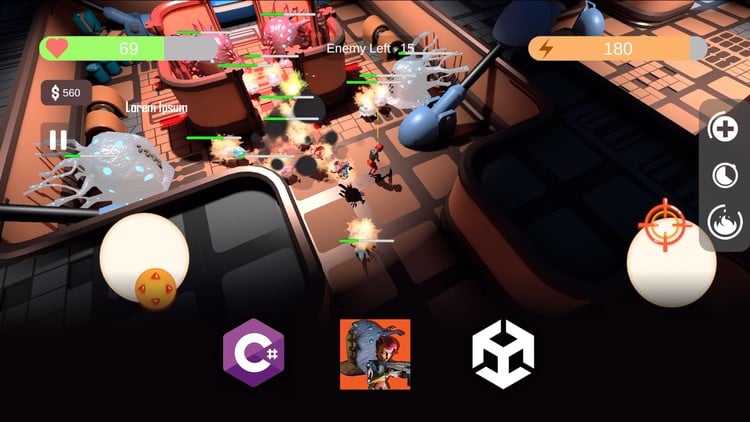
دانلود Unity Mobile Game Development - Exterminator

نکته: ممکن هست محتوای این صفحه بروز نباشد ولی دانلود دوره آخرین آپدیت می باشد.
نمونه ویدیوها:
توضیحات دوره:

آموزش پیشرفته ساخت بازی موبایل با Unity و C# - قسمت سوم

این دوره، قسمت سوم از سری آموزش‌های جامع ساخت بازی است و هدف آن پوشش مباحث پیشرفته Unity و ساخت بازی‌های موبایلی است.

آنچه در این دوره خواهید آموخت:

  • تکنیک‌های پیشرفته Unity
  • ساخت بازی موبایل برای اندروید و iOS
  • قابلیت‌های پیشرفته C#
  • روش‌های کدنویسی قوی و پایدار
  • پیاده‌سازی سیستم‌های پیچیده مانند ادراک هوش مصنوعی و درخت رفتار

پیش‌نیازها:

  • درک خوب از زبان برنامه‌نویسی C#
  • دانش پایه‌ای از Unity
  • اشتیاق به ساخت بازی
  • (پیشنهاد می‌شود) گذراندن قسمت اول و دوم این سری آموزش‌ها در صورت مبتدی بودن

دانشجویان در این دوره یاد خواهند گرفت که چگونه یک پروژه موبایل ایجاد کرده و محیط تست را راه‌اندازی کنند. سپس، روش کار ایجاد سطح به صورت ماژولار برای ساخت سطح بازی و نورپردازی اعمال می‌شود. کنترلر بازیکن مبتنی بر صفحه لمسی، همراه با مشاهده دوربین و کنترل دنبال کردن، ابتدا پیاده‌سازی می‌شود و پس از آن سیستم‌های گیم‌پلی متعددی مانند موجودی، سیستم سلامتی و آسیب، شناسه تیم عمومی، ادراک هوش مصنوعی، درخت رفتار هوش مصنوعی، پرتابه‌ها، سیستم توانایی، سیستم فروشگاه، مدیریت رابط کاربری، مدیریت سطح و موارد دیگر پیاده‌سازی می‌شوند.

این پروژه بر پیاده‌سازی سیستم‌های گیم‌پلی مستقل و ایجاد همکاری بین آن‌ها تمرکز دارد. بسیاری از ویژگی‌های پیشرفته C# مانند رابط‌ها و delegate‌ها برای بهبود قابلیت توسعه کد و همچنین کاهش تکرار و وابستگی کد مورد استفاده قرار می‌گیرند. الگوهای برنامه‌نویسی مانند recursion، tree و singleton برای تولید کد تمیزتر استفاده می‌شوند. ویژگی‌های پیشرفته Unity مانند scriptable objectها برای دستیابی به ذخیره‌سازی و بازیابی بهتر داده‌ها معرفی می‌شوند.

در پایان آموزش، فرآیند build برای iOS و Android پوشش داده می‌شود و دانشجویان با یک بازی موبایل کامل و همچنین دانش گسترده از Unity، C# و ساخت بازی فارغ‌التحصیل می‌شوند.


سرفصل ها و درس ها

Introduction and Setup-فصل 1-مقدمه و راه اندازی Introduction and Setup

  • Introduction-ویدیو 1-1-مقدمه Introduction

  • 02 Create the Project-ویدیو 1-2-02-ایجاد پروژه 02 Create the Project

  • 03_Setup Unity Remotes with iOS-ویدیو 1-3-03-راه اندازی Unity Remote با iOS 03_Setup Unity Remotes with iOS

  • 04 Setup Unity Remote with Android-ویدیو 1-4-04-راه اندازی Unity Remote با Android 04 Setup Unity Remote with Android

  • 05 Collect Assets-ویدیو 1-5-05-جمع آوری دارایی ها 05 Collect Assets

  • 06 Environment Pieces and Modular Workflow-ویدیو 1-6-06-قطعات محیطی و گردش کار ماژولار 06 Environment Pieces and Modular Workflow

  • 07 Composing the Environment-ویدیو 1-7-07-ترکیب محیط 07 Composing the Environment

  • 08 Basics of Lights-ویدیو 1-8-08-مبانی نورپردازی 08 Basics of Lights

  • 09 Baking-ویدیو 1-9-09-پخت نور 09 Baking

Basic Touch and Movement Control-فصل 2-کنترل لمسی و حرکتی پایه Basic Touch and Movement Control

  • 10 Structure the Joystick and Touch Events-ویدیو 2-1-10-ساختار جوی استیک و رویدادهای لمسی 10 Structure the Joystick and Touch Events

  • 11 Move the Joystick with Touch Input-ویدیو 2-2-11-حرکت جوی استیک با ورودی لمسی 11 Move the Joystick with Touch Input

  • 12 Move the Player using Joystick Input-ویدیو 2-3-12-حرکت بازیکن با استفاده از ورودی جوی استیک 12 Move the Player using Joystick Input

  • 13 Using the Camera Orientation to Calculate Move Directions-ویدیو 2-4-13-استفاده از جهت گیری دوربین برای محاسبه جهت های حرکت 13 Using the Camera Orientation to Calculate Move Directions

  • 14 Make the Camera Move and Turn with the Player and Input-ویدیو 2-5-14-حرکت و چرخش دوربین با بازیکن و ورودی 14 Make the Camera Move and Turn with the Player and Input

  • 15 Turn the Player Character to Moving Direction-ویدیو 2-6-15-چرخاندن کاراکتر بازیکن به سمت جهت حرکت 15 Turn the Player Character to Moving Direction

  • 16 Add Aiming Control-ویدیو 2-7-16-اضافه کردن کنترل هدف گیری 16 Add Aiming Control

  • 17 Refactor and Improve Aiming-ویدیو 2-8-17-بازسازی و بهبود هدف گیری 17 Refactor and Improve Aiming

Player Character Animation-فصل 3-انیمیشن کاراکتر بازیکن Player Character Animation

  • 18 Getting Additional Animations-ویدیو 3-1-18-دریافت انیمیشن های اضافی 18 Getting Additional Animations

  • 19 Create the Local Motion Blend Tree-ویدیو 3-2-19-ایجاد درخت ترکیبی حرکت موضعی 19 Create the Local Motion Blend Tree

  • 20 Update Blend Tree Paramaters-ویدیو 3-3-20-به روز رسانی پارامترهای درخت ترکیبی 20 Update Blend Tree Paramaters

  • 21 Update Turning-ویدیو 3-4-21-به روز رسانی چرخش 21 Update Turning

Weapons and Inventory-فصل 4-سلاح ها و فهرست Weapons and Inventory

  • 22 Layout the Weapon Class Basics-ویدیو 4-1-22-طرح بندی مبانی کلاس سلاح 22 Layout the Weapon Class Basics

  • 23 Create the Inventory Class-ویدیو 4-2-23-ایجاد کلاس فهرست 23 Create the Inventory Class

  • 24 Create the Pistol Class-ویدیو 4-3-24-ایجاد کلاس تپانچه 24 Create the Pistol Class

  • 25 Create Animation Override for Different Weapons-ویدیو 4-4-25-ایجاد لغو انیمیشن برای سلاح های مختلف 25 Create Animation Override for Different Weapons

  • 26 Implement Tab Weapon Switch-ویدیو 4-5-26-پیاده سازی تعویض سلاح با تب 26 Implement Tab Weapon Switch

  • 27 Add the Firing Animation-ویدیو 4-6-27-اضافه کردن انیمیشن شلیک 27 Add the Firing Animation

  • 28 Add the Weapon Switching Animations-ویدیو 4-7-28-اضافه کردن انیمیشن های تعویض سلاح 28 Add the Weapon Switching Animations

  • 29 Implement the Aim Component-ویدیو 4-8-29-پیاده سازی کامپوننت هدف گیری 29 Implement the Aim Component

  • 30 User Animation Event to Trigger Attack-ویدیو 4-9-30-استفاده از رویداد انیمیشن برای فعال کردن حمله 30 User Animation Event to Trigger Attack

  • 31 Create the Health Component-ویدیو 4-10-31-ایجاد کامپوننت سلامتی 31 Create the Health Component

  • 32 Create the Enemy Class and Animator-ویدیو 4-11-32-ایجاد کلاس دشمن و انیماتور 32 Create the Enemy Class and Animator

  • 33 Create the Health Bar-ویدیو 4-12-33-ایجاد نوار سلامتی 33 Create the Health Bar

  • 34 Update the Health Bar with Delegates-ویدیو 4-13-34-به روز رسانی نوار سلامتی با Delegate ها 34 Update the Health Bar with Delegates

  • 35 Create the Bullet Particle VFX-ویدیو 4-14-35-ایجاد VFX ذرات گلوله 35 Create the Bullet Particle VFX

  • 36 Create the Bullet Hit Effect-ویدیو 4-15-36-ایجاد افکت برخورد گلوله 36 Create the Bullet Hit Effect

AI Perception-فصل 5-ادراک هوش مصنوعی AI Perception

  • 37 Create the Sense Component-ویدیو 5-1-37-ایجاد کامپوننت حس 37 Create the Sense Component

  • 38 Create the Sight Sense-ویدیو 5-2-38-ایجاد حس بینایی 38 Create the Sight Sense

  • 39 Create the Forgetting Routine-ویدیو 5-3-39-ایجاد روتین فراموشی 39 Create the Forgetting Routine

  • 40 Perception Component and Picking a Data Structure-ویدیو 5-4-40-کامپوننت ادراک و انتخاب ساختار داده 40 Perception Component and Picking a Data Structure

  • 41 Implementing the Hit Sense-ویدیو 5-5-41-پیاده سازی حس ضربه 41 Implementing the Hit Sense

AI Behavior Tree-فصل 6-درخت رفتار هوش مصنوعی AI Behavior Tree

  • 42 Basics of the Behavior Tree-ویدیو 6-1-42-مبانی درخت رفتار 42 Basics of the Behavior Tree

  • 43 Create the Node Class-ویدیو 6-2-43-ایجاد کلاس Node 43 Create the Node Class

  • 44 Create the Behavior Tree and Wait Task-ویدیو 6-3-44-ایجاد درخت رفتار و وظیفه Wait 44 Create the Behavior Tree and Wait Task

  • 45 Basics of Compositors-ویدیو 6-4-45-مبانی Compositor ها 45 Basics of Compositors

  • 46 Create the Selector and the Sequencer-ویدیو 6-5-46-ایجاد Selector و Sequencer 46 Create the Selector and the Sequencer

  • 47 Create The Blackbard-ویدیو 6-6-47-ایجاد Blackbard 47 Create The Blackbard

  • 48 Create The Move To Target Task-ویدیو 6-7-48-ایجاد وظیفه Move To Target 48 Create The Move To Target Task

  • 49 Implement the Patrolling-ویدیو 6-8-49-پیاده سازی گشت زنی 49 Implement the Patrolling

  • 50 The Decorator Class-ویدیو 6-9-50-کلاس Decorator 50 The Decorator Class

  • 51 Implement the Check Condition and Notifies-ویدیو 6-10-51-پیاده سازی Check Condition و Notifies 51 Implement the Check Condition and Notifies

  • 52 Sort Priority-ویدیو 6-11-52-مرتب سازی بر اساس اولویت 52 Sort Priority

  • 53 Implement Abort Lower Priority-ویدیو 6-12-53-پیاده سازی Abort Lower Priority 53 Implement Abort Lower Priority

  • 54 Add Check Last Seen Location-ویدیو 6-13-54-اضافه کردن Check Last Seen Location 54 Add Check Last Seen Location

  • 55 Refactor Rotation Control and Add Behavior Interface-ویدیو 6-14-55-بازسازی کنترل چرخش و اضافه کردن رابط Behavior 55 Refactor Rotation Control and Add Behavior Interface

  • 56 Implement Rotate Toward Target-ویدیو 6-15-56-پیاده سازی Rotate Toward Target 56 Implement Rotate Toward Target

  • 57 Refactoring the Enemy and Chomper Prefab-ویدیو 6-16-57-بازسازی Prefab دشمن و Chomper 57 Refactoring the Enemy and Chomper Prefab

  • 58 Create the Attack Task-ویدیو 6-17-58-ایجاد وظیفه حمله 58 Create the Attack Task

  • 59 Add Running Animation to the Animator-ویدیو 6-18-59-اضافه کردن انیمیشن دویدن به انیماتور 59 Add Running Animation to the Animator

  • 60 Add Team-ویدیو 6-19-60-اضافه کردن تیم 60 Add Team

  • 61 Implement the Damager Component-ویدیو 6-20-61-پیاده سازی کامپوننت Damager 61 Implement the Damager Component

  • 62 Finish the Chomper Melee Attack-ویدیو 6-21-62-تکمیل حمله غوغا Chomper 62 Finish the Chomper Melee Attack

  • 63 Create the Health Bar For the Player-ویدیو 6-22-63-ایجاد نوار سلامتی برای بازیکن 63 Create the Health Bar For the Player

  • 64 Create the Damage Visualizer-ویدیو 6-23-64-ایجاد تجسم کننده آسیب 64 Create the Damage Visualizer

  • 65 Create the Damage Visualizer Material-ویدیو 6-24-65-ایجاد متریال تجسم کننده آسیب 65 Create the Damage Visualizer Material

  • 66 Add Camera Shake-ویدیو 6-25-66-اضافه کردن لرزش دوربین 66 Add Camera Shake

  • 67 Add Damage Visualizer the Enemy-ویدیو 6-26-67-اضافه کردن تجسم کننده آسیب به دشمن 67 Add Damage Visualizer the Enemy

  • 68 Add Death Animation to the Player-ویدیو 6-27-68-اضافه کردن انیمیشن مرگ به بازیکن 68 Add Death Animation to the Player

  • 69 Add the UI Manager-ویدیو 6-28-69-اضافه کردن مدیر UI 69 Add the UI Manager

  • 70 Create the Behavior Group Task-ویدیو 6-29-70-ایجاد وظیفه گروه رفتار 70 Create the Behavior Group Task

  • 71 Refactor Chomper Behavior to Groups-ویدیو 6-30-71-بازسازی رفتار Chomper به گروه‌ها 71 Refactor Chomper Behavior to Groups

Spitter-فصل 7-تف کننده Spitter

  • 72 Compose the Spitter Enemy-ویدیو 7-1-72-ترکیب دشمن تف کننده 72 Compose the Spitter Enemy

  • 73 Implement the Projectile Flight-ویدیو 7-2-73-پیاده سازی پرواز پرتابه 73 Implement the Projectile Flight

  • 74 Implement the Projectile Damage and Explode-ویدیو 7-3-74-پیاده سازی آسیب و انفجار پرتابه 74 Implement the Projectile Damage and Explode

  • 75 Add VFX to the Projectile-ویدیو 7-4-75-اضافه کردن VFX به پرتابه 75 Add VFX to the Projectile

  • 76 Implement the Cooldown Decorator-ویدیو 7-5-76-پیاده سازی Decorator Cooldown 76 Implement the Cooldown Decorator

Spawner-فصل 8-تولید کننده Spawner

  • 77 Compose the Spawner Prefab-ویدیو 8-1-77-ترکیب Prefab تولید کننده 77 Compose the Spawner Prefab

  • 78 Implement the Spawn Behavior-ویدیو 8-2-78-پیاده سازی رفتار Spawn 78 Implement the Spawn Behavior

  • 79 Update the Perception of the Spawned Enemy-ویدیو 8-3-79-به روز رسانی ادراک دشمن Spawn شده 79 Update the Perception of the Spawned Enemy

  • 80 Finish the Death Logic of the Spawner-ویدیو 8-4-80-تکمیل منطق مرگ تولید کننده 80 Finish the Death Logic of the Spawner

Gameplay Ability System-فصل 9-سیستم توانایی گیم پلی Gameplay Ability System

  • 81 Basics of Ability and Ability Component-ویدیو 9-1-81-مبانی توانایی و کامپوننت توانایی 81 Basics of Ability and Ability Component

  • 82 Create the Speed Boost Ability-ویدیو 9-2-82-ایجاد توانایی افزایش سرعت 82 Create the Speed Boost Ability

  • 83 Create the Ability UI Widget-ویدیو 9-3-83-ایجاد ویجت UI توانایی 83 Create the Ability UI Widget

  • 84 Create the Ability Doc and UI Class-ویدیو 9-4-84-ایجاد کلاس Doc توانایی و UI 84 Create the Ability Doc and UI Class

  • 85 Fire the Ability When Touched-ویدیو 9-5-85-شلیک توانایی هنگام لمس 85 Fire the Ability When Touched

  • Add the Scaling Effect to the Ability UI-ویدیو 9-6-افزودن اثر مقیاس بندی به UI توانایی Add the Scaling Effect to the Ability UI

  • 86 Implement the Health Regen Ability-ویدیو 9-7-86-پیاده سازی توانایی ترمیم سلامتی 86 Implement the Health Regen Ability

  • 87 Fire Ability Base Classes-ویدیو 9-8-87-کلاس های پایه توانایی شلیک 87 Fire Ability Base Classes

  • 88 Compose the Scanner and Fire Ability Assets-ویدیو 9-9-88-ترکیب دارایی های اسکنر و توانایی آتش 88 Compose the Scanner and Fire Ability Assets

  • 89 Apply Damage to the Enemy with the Fire Ability-ویدیو 9-10-89-اعمال آسیب به دشمن با توانایی آتش 89 Apply Damage to the Enemy with the Fire Ability

  • 90 Implement the Stamina Bar-ویدیو 9-11-90-پیاده سازی نوار استقامت 90 Implement the Stamina Bar

Shop System-فصل 10-سیستم فروشگاه Shop System

  • 91 Create the Based Class for the Shop System-ویدیو 10-1-91-ایجاد کلاس پایه برای سیستم فروشگاه 91 Create the Based Class for the Shop System

  • 92 Test the Shop System with the Rifle-ویدیو 10-2-92-تست سیستم فروشگاه با تفنگ 92 Test the Shop System with the Rifle

  • 93 Test the Shop System with the Fire Ability-ویدیو 10-3-93-تست سیستم فروشگاه با توانایی آتش 93 Test the Shop System with the Fire Ability

  • 94 Compose the Shop Item UI-ویدیو 10-4-94-ترکیب UI آیتم فروشگاه 94 Compose the Shop Item UI

  • 95 Compose and Test the Shop UI-ویدیو 10-5-95-ترکیب و تست UI فروشگاه 95 Compose and Test the Shop UI

  • 96 Create the Credit Button-ویدیو 10-6-96-ایجاد دکمه اعتبار 96 Create the Credit Button

  • 97 Update Credit and Add the Back Button in Shop UI-ویدیو 10-7-97-به روز رسانی اعتبار و اضافه کردن دکمه بازگشت در UI فروشگاه 97 Update Credit and Add the Back Button in Shop UI

  • 98 Implement the Purchase Mechanics-ویدیو 10-8-98-پیاده سازی مکانیک های خرید 98 Implement the Purchase Mechanics

  • 99 Convert All Weapon and Abilities to Items-ویدیو 10-9-99-تبدیل تمام سلاح ها و توانایی ها به آیتم 99 Convert All Weapon and Abilities to Items

  • 100 Implement the Reward System-ویدیو 10-10-100-پیاده سازی سیستم پاداش 100 Implement the Reward System

Menu-فصل 11-منو Menu

  • 101 Create the Pause Menu-ویدیو 11-1-101-ایجاد منوی مکث 101 Create the Pause Menu

  • 102 Create the Level Manager Class-ویدیو 11-2-102-ایجاد کلاس مدیریت سطح 102 Create the Level Manager Class

  • 103 Create the Game Over Menu-ویدیو 11-3-103-ایجاد منوی Game Over 103 Create the Game Over Menu

  • 104 Compose the Main Menu Scene-ویدیو 11-4-104-ترکیب صحنه منوی اصلی 104 Compose the Main Menu Scene

  • 105 Compose the Main Menu UI-ویدیو 11-5-105-ترکیب UI منوی اصلی 105 Compose the Main Menu UI

  • 106 Implement the Main Menu-ویدیو 11-6-106-پیاده سازی منوی اصلی 106 Implement the Main Menu

  • 107 Balance and Populate the Game Level-ویدیو 11-7-107-متعادل سازی و پر کردن سطح بازی 107 Balance and Populate the Game Level

Audio setup-فصل 12-راه اندازی صدا Audio setup

  • 108 Add Menu Audio-ویدیو 12-1-108-اضافه کردن صدای منو 108 Add Menu Audio

  • 109 Create the Audio Pooling-ویدیو 12-2-109-ایجاد Audio Pooling 109 Create the Audio Pooling

  • 110 Weapon and Enemy Hit Audio-ویدیو 12-3-110-صدای ضربه سلاح و دشمن 110 Weapon and Enemy Hit Audio

  • 111 Perception and Ability Audio-ویدیو 12-4-111-صدای ادراک و توانایی 111 Perception and Ability Audio

  • 112 Create the Win State-ویدیو 12-5-112-ایجاد حالت برد 112 Create the Win State

Build the Game-فصل 13-ساخت بازی Build the Game

  • 113 Build for Android-ویدیو 13-1-113-ساخت برای Android 113 Build for Android

  • 114 Build For iOS-ویدیو 13-2-114-ساخت برای iOS 114 Build For iOS

Final Remark-فصل 14-نکته پایانی Final Remark

  • 115 Congrats and Final Remarks-ویدیو 14-1-115-تبریک و نکات پایانی 115 Congrats and Final Remarks

نمایش نظرات

آموزش توسعه بازی موبایل با یونیتی - نابودگر
جزییات دوره
27 hours
116
Udemy (یودمی) Udemy (یودمی)
(آخرین آپدیت)
1,151
4.7 از 5
دارد
دارد
دارد
Jingtian Li
جهت دریافت آخرین اخبار و آپدیت ها در کانال تلگرام عضو شوید.

Google Chrome Browser

Internet Download Manager

Pot Player

Winrar

Jingtian Li Jingtian Li

بازی جادوگر