"آموزش کامل ساخت انیمیشن بازی از Blender تا موتور بازیسازی" - آخرین آپدیت
دانلود Complete game animators pipeline from Blender to engine
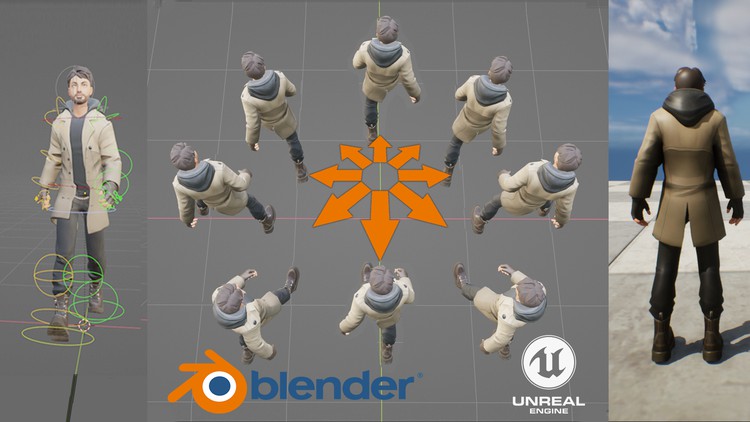
آموزش جامع ریگینگ سه بعدی، انیمیشن کاراکتر و پایپ لاین کامل انیمیشن بازی از بلندر تا آنریل انجین 5
مسیر کامل انیمیشن سازی کاراکتر بازی از Blender تا Unreal Engine.
یاد بگیرید چگونه ستهای انیمیشنی حرفهای و کامل برای کاراکترهای داخل بازی بسازید.
یک ریگ انیمیشن بازی حرفهای را از ابتدا خلق کنید.
نکات و ترفندهایی برای ساخت چرخههای راه رفتن بهتر و استفاده از لایههای انیمیشن برای ایجاد حرکات جذاب.
نحوه تنظیم گراف انیمیشن، حالتهای ترکیبی و موارد دیگر در Unreal Engine 5.
یک کاراکتر آماده برای بازی بسازید که بتواند راه برود، بدود، بپرد، به پهلو حرکت کند و کارهای بیشتری انجام دهد!
روش صحیح تنظیم ریگ کاراکتر و تنظیمات صحیح خروجی و وارد کردن از Blender به Unreal Engine را بیاموزید.
سازگار با تمام نسخههای 3.0 و 4.0 بلندر.
پیش نیازها:
بدون نیاز به تجربه قبلی. با ما همراه شوید و انیمیشنها را از ابتدا ایجاد کنید، یا از فایلهای انیمیشن موجود استفاده کنید و تئوری ایجاد یک مجموعه کامل از انیمیشنهای آماده بازی و نحوه تنظیم آنها را در یک گراف انیمیشن در Unreal Engine 5 بیاموزید.
تمام نرمافزارهای مورد نیاز برای این دوره (Blender و Unreal Engine 5) را میتوانید به صورت رایگان دانلود کنید، و مش کاراکتر* و فایلهای انیمیشن موجود به این معنی است که همه چیز برای تکمیل دوره در دسترس است. اگر قبلاً انیمیشن نکردهاید، این دوره شما را از طریق هر مرحله، در بخشهای آسان و قابل پیگیری راهنمایی میکند.
(اکنون شامل بهروزرسانیهای Blender 4.0 و بالاتر است)
این دوره برای کمک به دانشجویان یا هر کسی که میخواهد مسیر کامل انیماتوری بازی از Blender به Unreal را بیاموزد، ایجاد شده است. شما یاد خواهید گرفت که چگونه یک ریگ انیمیشن سفارشی حرفهای ایجاد کنید و با دست، یک مجموعه کامل از انیمیشنهای توقف، انتقال و حرکت را متحرک سازی کنید، و چگونه به درستی خروجی بگیرید و همه آنها را به موتور Unreal بیاورید.
از آنجا، شما یاد خواهید گرفت که چگونه یک گراف انیمیشن و طرح اولیه کاراکتر را تنظیم کنید و یک کنترلر کاراکتر سفارشی ایجاد کنید که به شما امکان راه رفتن، دویدن، خم شدن، پریدن و موارد دیگر را میدهد. بدون نیاز به تجربه قبلی، کل فرآیند در مراحل آسان و قابل پیگیری که به بخشهای منطقی تقسیم شدهاند، طی میشود، که هر کدام بر اساس آخرین مورد ساخته شدهاند، با نکات و ترفندهای فراوان برای اینکه انیمیشنهای شما به درستی به عنوان یک مجموعه کامل همانطور که در یک بازی مدرن AAA استفاده میشود، کار کنند.
هیچ دانش برنامه نویسی لازم نیست، زیرا همه چیز در سیستم blueprint Unreal با استفاده از گرهها ایجاد میشود، فقط به سادگی دنبال کنید و کنترلر کاراکتر را کم کم بسازید، و تا پایان دوره، یک کاراکتر کاملاً قابل بازی خواهید داشت که میتواند در اطراف حرکت کند. دنیای بازی، با رضایت و دانشی که شما کل آن را از ابتدا ایجاد کردهاید.
پس بیایید شروع کنیم!
* با تشکر از "BlendTek" برای استفاده از مش کاراکتر
Introduction-فصل-1-مقدمه Introduction
-
Introduction-ویدیو-1-1-مقدمه Introduction
Download and install Blender-فصل-2-دانلود و نصب بلندر Download and install Blender
-
Download and install Blender-ویدیو-2-1-دانلود و نصب بلندر Download and install Blender
Setting up the animation rig-فصل-3-راه اندازی ریگ انیمیشن Setting up the animation rig
-
Importance of scale-ویدیو-3-1-اهمیت مقیاس Importance of scale
-
Download the course resources-ویدیو-3-2-دانلود منابع دوره Download the course resources
-
Setting up the animation rig-ویدیو-3-3-راه اندازی ریگ انیمیشن Setting up the animation rig
-
Setting up the foot control bones and leg IK-ویدیو-3-4-راه اندازی استخوان های کنترل پا و IK پا Setting up the foot control bones and leg IK
-
Setting up the hip, spine and head control bones-ویدیو-3-5-راه اندازی استخوان های کنترل لگن، ستون فقرات و سر Setting up the hip, spine and head control bones
-
Setting up custom bone shapes (For 4.0 Versions of Blender)-ویدیو-3-6-تنظیم شکل های سفارشی استخوان (برای نسخه های 4.0 بلندر) Setting up custom bone shapes (For 4.0 Versions of Blender)
-
Setting up Custom Bone shapes (For 3.0 versions of Blender)-ویدیو-3-7-تنظیم شکل های سفارشی استخوان (برای نسخه های 3.0 بلندر) Setting up Custom Bone shapes (For 3.0 versions of Blender)
-
Creating finger drivers using animation actions-ویدیو-3-8-ایجاد درایورهای انگشت با استفاده از اکشن های انیمیشن Creating finger drivers using animation actions
Adding the character mesh to the armature rig-فصل-4-اضافه کردن مش کاراکتر به ریگ آرماتور Adding the character mesh to the armature rig
-
Quick basics of weight painting-ویدیو-4-1-مبانی سریع Weight Painting Quick basics of weight painting
-
Part 1: Adding the character mesh to the Armature-ویدیو-4-2-قسمت 1: اضافه کردن مش کاراکتر به آرماتور Part 1: Adding the character mesh to the Armature
-
Part 2: Adding the character mesh to the Armature-ویدیو-4-3-قسمت 2: اضافه کردن مش کاراکتر به آرماتور Part 2: Adding the character mesh to the Armature
-
Part 3: Adding the character mesh to the Armature-ویدیو-4-4-قسمت 3: اضافه کردن مش کاراکتر به آرماتور Part 3: Adding the character mesh to the Armature
-
Part 4: Adding the character mesh to the Armature-ویدیو-4-5-قسمت 4: اضافه کردن مش کاراکتر به آرماتور Part 4: Adding the character mesh to the Armature
Creating the main idle animations-فصل-5-ایجاد انیمیشن های اصلی Idle Creating the main idle animations
-
Section introduction-ویدیو-5-1-مقدمه بخش Section introduction
-
Animating the main stand idle animation-ویدیو-5-2-انیمیت کردن انیمیشن اصلی ایستاده Idle Animating the main stand idle animation
-
Animating the main crouched idle animation-ویدیو-5-3-انیمیت کردن انیمیشن اصلی خمیده Idle Animating the main crouched idle animation
Animating the walk cycles-فصل-6-انیمیت کردن چرخه های راه رفتن Animating the walk cycles
-
Section introduction-ویدیو-6-1-مقدمه بخش Section introduction
-
Animating with motion extraction in mind-ویدیو-6-2-انیمیت با در نظر گرفتن استخراج حرکت Animating with motion extraction in mind
-
Creating the forward walk cycle part 1-ویدیو-6-3-ایجاد چرخه راه رفتن به جلو قسمت 1 Creating the forward walk cycle part 1
-
Creating the forward walk cycle part 2-ویدیو-6-4-ایجاد چرخه راه رفتن به جلو قسمت 2 Creating the forward walk cycle part 2
-
Creating the left walk forward cycle-ویدیو-6-5-ایجاد چرخه راه رفتن به جلو به چپ Creating the left walk forward cycle
-
Creating the right walk forward cycle-ویدیو-6-6-ایجاد چرخه راه رفتن به جلو به راست Creating the right walk forward cycle
-
Creating the backwards walk cycles-ویدیو-6-7-ایجاد چرخه های راه رفتن به عقب Creating the backwards walk cycles
-
Creating the 45 degree walk cycles Part 1-ویدیو-6-8-ایجاد چرخه های راه رفتن 45 درجه قسمت 1 Creating the 45 degree walk cycles Part 1
-
Creating the 45 degree walk cycles part 2-ویدیو-6-9-ایجاد چرخه های راه رفتن 45 درجه قسمت 2 Creating the 45 degree walk cycles part 2
Exporting The Armature and animations-فصل-7-خروجی گرفتن از آرماتور و انیمیشن ها Exporting The Armature and animations
-
Setting up the idles ready for export-ویدیو-7-1-آماده سازی Idles برای خروجی Setting up the idles ready for export
-
Exporting the main skeleton-ویدیو-7-2-خروجی گرفتن از اسکلت اصلی Exporting the main skeleton
-
Exporting all our animations so far-ویدیو-7-3-خروجی گرفتن از تمام انیمیشن های تا به امروز Exporting all our animations so far
Animating the Run cycles-فصل-8-انیمیت کردن چرخه های دویدن Animating the Run cycles
-
Section introduction-ویدیو-8-1-مقدمه بخش Section introduction
-
Creating the forward run cycle part 1-ویدیو-8-2-ایجاد چرخه دویدن به جلو قسمت 1 Creating the forward run cycle part 1
-
Creating the forward run cycle part 2-ویدیو-8-3-ایجاد چرخه دویدن به جلو قسمت 2 Creating the forward run cycle part 2
-
Creating the left forward run cycle-ویدیو-8-4-ایجاد چرخه دویدن به جلو به چپ Creating the left forward run cycle
-
Creating the right forward run cycle-ویدیو-8-5-ایجاد چرخه دویدن به جلو به راست Creating the right forward run cycle
-
Creating the 45 degree forward right run cycle-ویدیو-8-6-ایجاد چرخه دویدن 45 درجه جلو راست Creating the 45 degree forward right run cycle
-
Creating the 45 degree forward left run cycle-ویدیو-8-7-ایجاد چرخه دویدن 45 درجه جلو چپ Creating the 45 degree forward left run cycle
-
Creating the run back cycle-ویدیو-8-8-ایجاد چرخه دویدن به عقب Creating the run back cycle
-
Creating the run back left cycle-ویدیو-8-9-ایجاد چرخه دویدن به عقب به چپ Creating the run back left cycle
-
Creating the run back right cycle-ویدیو-8-10-ایجاد چرخه دویدن به عقب به راست Creating the run back right cycle
-
Creating the run back right 45 cycle-ویدیو-8-11-ایجاد چرخه دویدن به عقب راست 45 درجه Creating the run back right 45 cycle
-
Student challenge: Creating the run back left 45 cycle-ویدیو-8-12-چالش دانشجو: ایجاد چرخه دویدن به عقب چپ 45 درجه Student challenge: Creating the run back left 45 cycle
Student challenge: Exporting the run animation cycles-فصل-9-چالش دانشجو: خروجی گرفتن از چرخه های انیمیشن دویدن Student challenge: Exporting the run animation cycles
-
Student challenge: Exporting the run animations-ویدیو-9-1-چالش دانشجو: خروجی گرفتن از انیمیشن های دویدن Student challenge: Exporting the run animations
Animating the crouched walk cycles-فصل-10-انیمیت کردن چرخه های راه رفتن خمیده Animating the crouched walk cycles
-
Section introduction-ویدیو-10-1-مقدمه بخش Section introduction
-
Creating the forward crouched walk cycle-ویدیو-10-2-ایجاد چرخه راه رفتن خمیده به جلو Creating the forward crouched walk cycle
-
Creating the left forward crouched walk cycle-ویدیو-10-3-ایجاد چرخه راه رفتن خمیده به جلو به چپ Creating the left forward crouched walk cycle
-
Creating the right forward crouched walk cycle-ویدیو-10-4-ایجاد چرخه راه رفتن خمیده به جلو به راست Creating the right forward crouched walk cycle
-
Creating the crouch left forward 45 cycle-ویدیو-10-5-ایجاد چرخه خمیده چپ جلو 45 درجه Creating the crouch left forward 45 cycle
-
Creating the crouch right forward 45 cycle-ویدیو-10-6-ایجاد چرخه خمیده راست جلو 45 درجه Creating the crouch right forward 45 cycle
-
Creating the backwards crouched walk cycle-ویدیو-10-7-ایجاد چرخه راه رفتن خمیده به عقب Creating the backwards crouched walk cycle
-
Creating the crouch right back cycle-ویدیو-10-8-ایجاد چرخه خمیده راست به عقب Creating the crouch right back cycle
-
Creating the crouch left back cycle-ویدیو-10-9-ایجاد چرخه خمیده چپ به عقب Creating the crouch left back cycle
-
Creating the left and right back 45 crouched walk cycles-ویدیو-10-10-ایجاد چرخه های راه رفتن خمیده 45 درجه چپ و راست به عقب Creating the left and right back 45 crouched walk cycles
Student challenge: Export the crouch animations-فصل-11-چالش دانشجو: خروجی گرفتن از انیمیشن های خمیده Student challenge: Export the crouch animations
-
Student challenge: Export the crouch animations-ویدیو-11-1-چالش دانشجو: خروجی گرفتن از انیمیشن های خمیده Student challenge: Export the crouch animations
Creating pose assets-فصل-12-ایجاد دارایی های Pose Creating pose assets
-
Creating pose assets and using the Blender asset browser (Blender versions 3.0)-ویدیو-12-1-ایجاد دارایی های Pose و استفاده از مرورگر دارایی بلندر (نسخه های 3.0 بلندر) Creating pose assets and using the Blender asset browser (Blender versions 3.0)
Creating the idle transition animations-فصل-13-ایجاد انیمیشن های انتقال Idle Creating the idle transition animations
-
Creating the transition animation from stand to crouched-ویدیو-13-1-ایجاد انیمیشن انتقال از ایستاده به خمیده Creating the transition animation from stand to crouched
-
Creating the transition animation from crouched to stand-ویدیو-13-2-ایجاد انیمیشن انتقال از خمیده به ایستاده Creating the transition animation from crouched to stand
Creating the soft stop from Run transitions-فصل-14-ایجاد توقف نرم از انتقال های دویدن Creating the soft stop from Run transitions
-
Creating the run fwd to stand soft stop-ویدیو-14-1-ایجاد توقف نرم دویدن به جلو به ایستاده Creating the run fwd to stand soft stop
-
Creating the run left fwd to stand soft stop-ویدیو-14-2-ایجاد توقف نرم دویدن چپ جلو به ایستاده Creating the run left fwd to stand soft stop
-
Creating the run right fwd to stand soft stop-ویدیو-14-3-ایجاد توقف نرم دویدن راست جلو به ایستاده Creating the run right fwd to stand soft stop
-
Creating the run fwd 45's to stand soft stop-ویدیو-14-4-ایجاد توقف نرم دویدن جلو 45 درجه به ایستاده Creating the run fwd 45's to stand soft stop
-
Creating the run back to stand soft stop-ویدیو-14-5-ایجاد توقف نرم دویدن به عقب به ایستاده Creating the run back to stand soft stop
-
Creating the run back 45's to stand soft stop-ویدیو-14-6-ایجاد توقف نرم دویدن عقب 45 درجه به ایستاده Creating the run back 45's to stand soft stop
Creating the soft stop from crouch transitions-فصل-15-ایجاد توقف نرم از انتقال های خمیده Creating the soft stop from crouch transitions
-
Creating the crouch fwd to crouch soft stop-ویدیو-15-1-ایجاد توقف نرم خمیده به جلو به خمیده Creating the crouch fwd to crouch soft stop
-
Creating the crouch back to crouch soft stop-ویدیو-15-2-ایجاد توقف نرم خمیده به عقب به خمیده Creating the crouch back to crouch soft stop
-
Creating the crouch left fwd to crouch soft stop-ویدیو-15-3-ایجاد توقف نرم خمیده چپ به جلو به خمیده Creating the crouch left fwd to crouch soft stop
-
Creating the crouch right fwd to crouch soft stop-ویدیو-15-4-ایجاد توقف نرم خمیده راست به جلو به خمیده Creating the crouch right fwd to crouch soft stop
-
Creating the crouch fwd 45's to crouch soft stop-ویدیو-15-5-ایجاد توقف نرم خمیده جلو 45 درجه به خمیده Creating the crouch fwd 45's to crouch soft stop
-
Creating the crouch back 45's to crouch soft stop-ویدیو-15-6-ایجاد توقف نرم خمیده عقب 45 درجه به خمیده Creating the crouch back 45's to crouch soft stop
Creating the soft stop from walk transitions-فصل-16-ایجاد توقف نرم از انتقال های راه رفتن Creating the soft stop from walk transitions
-
Creating the walk fwd to stand transition-ویدیو-16-1-ایجاد انتقال راه رفتن به جلو به ایستاده Creating the walk fwd to stand transition
-
Creating the walk left and right fwd to stand transition-ویدیو-16-2-ایجاد انتقال راه رفتن چپ و راست به جلو به ایستاده Creating the walk left and right fwd to stand transition
-
Creating the walk back to stand transition-ویدیو-16-3-ایجاد انتقال راه رفتن به عقب به ایستاده Creating the walk back to stand transition
-
Creating the walk back 45s to stand transition-ویدیو-16-4-ایجاد انتقال راه رفتن عقب 45 درجه به ایستاده Creating the walk back 45s to stand transition
-
Creating the walk fwd 45s to stand transition-ویدیو-16-5-ایجاد انتقال راه رفتن جلو 45 درجه به ایستاده Creating the walk fwd 45s to stand transition
Student challange: Export All the transition animations-فصل-17-چالش دانشجو: خروجی گرفتن از همه انیمیشن های انتقال Student challange: Export All the transition animations
-
Student challenge: Export all the transition animations for the main character-ویدیو-17-1-چالش دانشجو: خروجی گرفتن از همه انیمیشن های انتقال برای شخصیت اصلی Student challenge: Export all the transition animations for the main character
Creating the turn on spot animations-فصل-18-ایجاد انیمیشن های دور زدن درجا Creating the turn on spot animations
-
Section introduction-ویدیو-18-1-مقدمه بخش Section introduction
-
Creating the stand turn left 90 animation-ویدیو-18-2-ایجاد انیمیشن ایستاده دور زدن به چپ 90 درجه Creating the stand turn left 90 animation
-
Creating the stand turn right 90 animation-ویدیو-18-3-ایجاد انیمیشن ایستاده دور زدن به راست 90 درجه Creating the stand turn right 90 animation
-
Creating the Crouch turn left 90 animation-ویدیو-18-4-ایجاد انیمیشن خمیده دور زدن به چپ 90 درجه Creating the Crouch turn left 90 animation
-
Creating the crouch turn right 90 animation-ویدیو-18-5-ایجاد انیمیشن خمیده دور زدن به راست 90 درجه Creating the crouch turn right 90 animation
Creating the look around blends-فصل-19-ایجاد ترکیب های نگاه کردن به اطراف Creating the look around blends
-
Section introduction-ویدیو-19-1-مقدمه بخش Section introduction
-
Creating the stand look around blends-ویدیو-19-2-ایجاد ترکیب های ایستاده نگاه کردن به اطراف Creating the stand look around blends
-
Creating the crouch look around blends-ویدیو-19-3-ایجاد ترکیب های خمیده نگاه کردن به اطراف Creating the crouch look around blends
Creating the jumping and landing animations-فصل-20-ایجاد انیمیشن های پریدن و فرود آمدن Creating the jumping and landing animations
-
Section introduction-ویدیو-20-1-مقدمه بخش Section introduction
-
Creating the jump and land animations-ویدیو-20-2-ایجاد انیمیشن های پریدن و فرود آمدن Creating the jump and land animations
Creating our playable character in Unreal-فصل-21-ایجاد شخصیت قابل بازی ما در آنریل Creating our playable character in Unreal
-
Section introduction and resources-ویدیو-21-1-مقدمه بخش و منابع Section introduction and resources
-
Download and install Unreal engine 5-ویدیو-21-2-دانلود و نصب Unreal Engine 5 Download and install Unreal engine 5
-
Import the character rig-ویدیو-21-3-وارد کردن ریگ کاراکتر Import the character rig
-
Import the animation sets-ویدیو-21-4-وارد کردن مجموعه انیمیشن ها Import the animation sets
-
Create the movement blend spaces-ویدیو-21-5-ایجاد فضاهای ترکیبی حرکت Create the movement blend spaces
-
Create the soft stop animation blends-ویدیو-21-6-ایجاد ترکیب های انیمیشن توقف نرم Create the soft stop animation blends
-
Create the look around blends-ویدیو-21-7-ایجاد ترکیب های نگاه کردن به اطراف Create the look around blends
-
Create the animation blueprint-ویدیو-21-8-ایجاد Blueprint انیمیشن Create the animation blueprint
-
Create the character blueprint-ویدیو-21-9-ایجاد Blueprint شخصیت Create the character blueprint
-
Create the variables for the character blueprint-ویدیو-21-10-ایجاد متغیرها برای Blueprint شخصیت Create the variables for the character blueprint
-
Create the variables for the animation blueprint-ویدیو-21-11-ایجاد متغیرها برای Blueprint انیمیشن Create the variables for the animation blueprint
-
Set up the control input mappings-ویدیو-21-12-تنظیم نگاشت های ورودی کنترل Set up the control input mappings
-
Set up the character BP : Part 1-ویدیو-21-13-تنظیم BP شخصیت: قسمت 1 Set up the character BP : Part 1
-
Set up the character BP : Part 2-ویدیو-21-14-تنظیم BP شخصیت: قسمت 2 Set up the character BP : Part 2
-
Set up the animation BP : Part 1-ویدیو-21-15-تنظیم BP انیمیشن: قسمت 1 Set up the animation BP : Part 1
-
Set up the animation BP : Part 2-ویدیو-21-16-تنظیم BP انیمیشن: قسمت 2 Set up the animation BP : Part 2
-
Set up the animation BP : Part 3-ویدیو-21-17-تنظیم BP انیمیشن: قسمت 3 Set up the animation BP : Part 3
-
Adding the animations to the animation graph: part 1-ویدیو-21-18-اضافه کردن انیمیشن ها به گراف انیمیشن: قسمت 1 Adding the animations to the animation graph: part 1
-
Adding the animations to the animation graph: part 2-ویدیو-21-19-اضافه کردن انیمیشن ها به گراف انیمیشن: قسمت 2 Adding the animations to the animation graph: part 2
-
Adding the animations to the animation graph: part 3-ویدیو-21-20-اضافه کردن انیمیشن ها به گراف انیمیشن: قسمت 3 Adding the animations to the animation graph: part 3
-
Wrapping up and final thoughts-ویدیو-21-21-جمع بندی و افکار نهایی Wrapping up and final thoughts



https://donyad.com/d/cbc6e7




 Hamish Calthorpe
مربی انیمیشن
نمایش نظرات