آموزش تسلط بر گرههای هندسی در نرمافزار Blender - آخرین آپدیت
دانلود Mastering Geometry Nodes in Blender
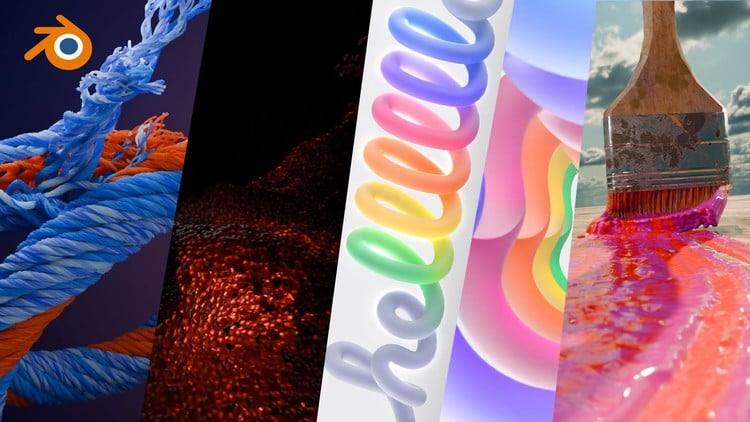
با دوره جامع گرههای هندسی، انیمیشنهای خیرهکننده و گرافیکهای حرکتی جذاب خلق کنید!
آیا به دنبال یادگیری گرههای هندسی (Geometry Nodes) در Blender هستید و میخواهید مهارتهای خود را در زمینههای مختلفی مانند گرافیک حرکتی (Motion Graphics)، طراحی بازی، جلوههای ویژه (VFX) و تجسم معماری ارتقا دهید؟ این دوره دقیقاً همان چیزی است که به آن نیاز دارید!
آنچه در این دوره یاد خواهید گرفت:
- ایجاد گرافیکهای حرکتی (Motion Graphics) پویا و جذاب
- استفاده از مولدهای رویهای (Procedural Generators) برای خلق محتوای متنوع
- آشنایی با قدرتمندترین گرههای هندسی (Geometry Nodes) و کاربردهای آنها
- ایجاد انیمیشنهای شگفتانگیز با استفاده از گرههای هندسی
- ساخت شبیهسازیهای رویهای (Procedural Simulations) پیشرفته
پیشنیازها: دانش پایه نرمافزار Blender
گرههای هندسی، Blender را به یکی از برترین نرمافزارهای سهبعدی در صنعت تبدیل کردهاند. این دوره جامع گرههای هندسی، بهترین راه برای ورود به دنیای این ابزار قدرتمند و همهکاره در Blender است. این دوره برای تمام کسانی طراحی شده است که میخواهند از پتانسیل مدلسازی رویهای استفاده کنند، چه علاقهمند به گرافیک حرکتی، طراحی بازی، جلوههای ویژه یا تجسم معماری باشید.
با شروع از مبانی، ما شما را با رابط کاربری گرههای هندسی آشنا میکنیم و مفاهیم ضروری مانند انواع گرهها، جریان داده و ویژگیها را شرح میدهیم. با کسب اعتماد به نفس، به کشف ایجاد هندسهی رویهای خواهید پرداخت و یاد میگیرید چگونه اشکال پیچیده بسازید، ویژگیها را دستکاری کنید و جلوههای بصری خیرهکنندهای ایجاد کنید - همه اینها با حفظ کنترل کامل و انعطافپذیری. در پایان مباحث پایه، شما قادر خواهید بود مناظر، داراییهای رویهای و گرافیکهای حرکتی را مانند یک حرفهای ایجاد کنید.
اما کار به همین جا ختم نمیشود! ما به قلمرو پیشرفتهتر میرویم و فرآیندهای کاری فیلدها (Fields workflows)، تکنیکهای شبیهسازی (simulation techniques) و نحوه ادغام گرههای هندسی با شیدرها را برای ایجاد جلوههای منحصربهفرد پوشش میدهیم. این دوره مملو از پروژههای عملی مانند تولید شهر رویهای و سیستمهای ذرات متحرک است، بنابراین میتوانید آنچه را که آموختهاید در سناریوهای واقعی به کار ببرید.
علاوه بر این، شما تجربه عملی در بخش تمرین خواهید داشت که در هر جلسه یک افکت، یک شبیهسازی یا یک رندر رضایتبخش ایجاد میکنیم که به ساختن نمونه کارها و به نمایش گذاشتن مهارتهای جدید شما کمک میکند. چه مبتدی باشید و چه یک هنرمند باتجربه، این دوره همه چیز را برای تسلط بر فرآیندهای کاری رویهای (procedural workflows) و آزاد کردن پتانسیل خلاقیت شما در Blender فراهم میکند. همین حالا ثبتنام کنید و شروع به خلق هنر سهبعدی پویا و جذاب کنید که تا به حال هرگز ندیدهاید!"
4o
Introduction-مقدمه Introduction
-
Mastering Geometry Nodes In blender_promo-تسلط بر گرههای هندسی در بلندر_تبلیغات Mastering Geometry Nodes In blender_promo
-
What you will learn-آنچه خواهید آموخت What you will learn
-
Introduction to the Geometry Nodes editor-معرفی ویرایشگر گرههای هندسی Introduction to the Geometry Nodes editor
-
Geometry Nodes Data types-انواع داده در گرههای هندسی Geometry Nodes Data types
-
How data flows between nodes-نحوه جریان دادهها بین گرهها How data flows between nodes
-
Point Clouds-ابر نقاط Point Clouds
-
Using Point Clouds For Instancing-استفاده از ابر نقاط برای نمونهسازی Using Point Clouds For Instancing
-
Creating Custom Inputs-ایجاد ورودیهای سفارشی Creating Custom Inputs
-
Data Visualization-تجسم دادهها Data Visualization
-
Geometry Attributes-ویژگیهای هندسی Geometry Attributes
-
Vertex Manipulation-دستکاری رئوس Vertex Manipulation
-
Forest Generator-تولیدکننده جنگل Forest Generator
Section 2 Curves in Geometry Nodes-بخش 2: منحنیها در گرههای هندسی Section 2 Curves in Geometry Nodes
-
Section Intro Curves-معرفی بخش منحنیها Section Intro Curves
-
Using Curves in Geometry Nodes-استفاده از منحنیها در گرههای هندسی Using Curves in Geometry Nodes
-
Instancing On Curves-نمونهسازی روی منحنیها Instancing On Curves
-
Animating Curves-متحرکسازی منحنیها Animating Curves
-
Curve End Point Selection-انتخاب نقطه انتهایی منحنی Curve End Point Selection
-
Using the Attribute Statistics Node-استفاده از گره آمار ویژگی Using the Attribute Statistics Node
-
Using Points to Curves Node-استفاده از گره Points to Curves Using Points to Curves Node
-
Make Objects Follow a Curve Path-اجسام را به دنبال مسیر منحنی حرکت دهید Make Objects Follow a Curve Path
-
Creating A Traffic Simulator in Geometry Nodes-ایجاد شبیهساز ترافیک در گرههای هندسی Creating A Traffic Simulator in Geometry Nodes
-
Creating A Simple Crowd Simulation in Geometry Nodes-ایجاد یک شبیهسازی ساده جمعیت در گرههای هندسی Creating A Simple Crowd Simulation in Geometry Nodes
-
Simple Crowd Simulation part 2-شبیهسازی ساده جمعیت قسمت 2 Simple Crowd Simulation part 2
-
Simple Crowd Simulation part 3-شبیهسازی ساده جمعیت قسمت 3 Simple Crowd Simulation part 3
-
UV Unwrapping in Geometry Nodes-باز کردن UV در گرههای هندسی UV Unwrapping in Geometry Nodes
Section 3: Powerful Nodes You Should Know About-بخش 3: گرههای قدرتمندی که باید بشناسید Section 3: Powerful Nodes You Should Know About
-
Section Intro Powerful Nodes-معرفی بخش گرههای قدرتمند Section Intro Powerful Nodes
-
Using the Proximity Node-استفاده از گره مجاورت Using the Proximity Node
-
Creating a Forest Path Using the Proximity Node-ایجاد مسیر جنگلی با استفاده از گره مجاورت Creating a Forest Path Using the Proximity Node
-
Making Environments with the Named Attribute-ساخت محیطها با ویژگی نامگذاریشده Making Environments with the Named Attribute
-
Using Group Nodes-استفاده از گرههای گروه Using Group Nodes
-
Using the Switch Node-استفاده از گره سوئیچ Using the Switch Node
-
Power of the Math Node-قدرت گره ریاضی Power of the Math Node
-
7_PW_MGNB_ Using the Raycast Node-7_PW_MGNB_ استفاده از گره Raycast 7_PW_MGNB_ Using the Raycast Node
-
Using the repeat zone-استفاده از ناحیه تکرار Using the repeat zone
-
Using the Simulation Zone-استفاده از ناحیه شبیهسازی Using the Simulation Zone
-
Using the Foreach Element Zone-استفاده از ناحیه Foreach Element Using the Foreach Element Zone
Section 4: Geometry Nodes Exercises-بخش 4: تمرینهای گرههای هندسی Section 4: Geometry Nodes Exercises
-
Section Intro Exercises-معرفی بخش تمرینها Section Intro Exercises
-
Making A Melting Effect with Geometry Nodes-ایجاد افکت ذوب با گرههای هندسی Making A Melting Effect with Geometry Nodes
-
Animating A Flower Garden With Geometry Nodes-متحرکسازی باغ گل با گرههای هندسی Animating A Flower Garden With Geometry Nodes
-
Making Satisfying Renders With GN-ایجاد رندرهای رضایتبخش با GN Making Satisfying Renders With GN
-
Creating Procedural Roots-ایجاد ریشههای رویهای Creating Procedural Roots
-
Creating A Particle Simulation-ایجاد شبیهسازی ذرات Creating A Particle Simulation
-
Creating Clones And Effectors-ایجاد کلونها و افکتورها Creating Clones And Effectors
-
Animating Particles to stick on a Surface-متحرکسازی ذرات برای چسبیدن به سطح Animating Particles to stick on a Surface
-
MGNB_Wavy Particles-MGNB_ذرات مواج MGNB_Wavy Particles
-
MGNB_Course Outro-MGNB_پایان دوره MGNB_Course Outro
Week one Exercises (More content is coming)-تمرینهای هفته اول (محتوای بیشتری در راه است) Week one Exercises (More content is coming)
-
Apple Motion Graphics-موشن گرافیک اپل Apple Motion Graphics
-
Creating Custom Forces with Geometry Nodes-ایجاد نیروهای سفارشی با گرههای هندسی Creating Custom Forces with Geometry Nodes
-
Motion Graphics with Geomerty Nodes-موشن گرافیک با گرههای Geomerty Motion Graphics with Geomerty Nodes
-
Creating an Assemble tool in geometry nodes-ایجاد یک ابزار Assemble در گرههای هندسی Creating an Assemble tool in geometry nodes
Making Procedural Generators-ایجاد تولیدکنندههای رویهای Making Procedural Generators
-
Rope and thread generator-تولیدکننده طناب و نخ Rope and thread generator
-
Making TV Like Motion Graphics Text Animation-ایجاد انیمیشن متن موشن گرافیک مانند تلویزیون Making TV Like Motion Graphics Text Animation
-
Making a Logo Reveal Animation in blender-ایجاد انیمیشن نمایش لوگو در بلندر Making a Logo Reveal Animation in blender
-
Procedural cloth threading animation-انیمیشن نخکشی رویهای پارچه Procedural cloth threading animation
-
Make A Cloud Generator With Geometry Nodes-ایجاد یک تولیدکننده ابر با گرههای هندسی Make A Cloud Generator With Geometry Nodes
-
5_W2_MGNB_procedural tied chains and ropes-5_W2_MGNB_ زنجیرها و طنابهای گرهخورده رویهای 5_W2_MGNB_procedural tied chains and ropes
Section 7 More Geometry Nodes Generators-بخش 7: تولیدکنندههای بیشتر گرههای هندسی Section 7 More Geometry Nodes Generators
-
Animated Procedural Tree part 1-درخت رویهای متحرک شده قسمت 1 Animated Procedural Tree part 1
-
Animated Procedural Tree part 2-درخت رویهای متحرک شده قسمت 2 Animated Procedural Tree part 2
-
2_Animated Procedural Tree part 3 uv unwrapping and materials-2_درخت رویهای متحرک شده قسمت 3 باز کردن UV و متریالها 2_Animated Procedural Tree part 3 uv unwrapping and materials
-
3_Animated Procedural Tree part 4 Adding flowers to the tree-3_درخت رویهای متحرک شده قسمت 4 اضافه کردن گل به درخت 3_Animated Procedural Tree part 4 Adding flowers to the tree
-
3_Animated Procedural Tree part 5 Adding flowers to the tree-3_درخت رویهای متحرک شده قسمت 5 اضافه کردن گل به درخت 3_Animated Procedural Tree part 5 Adding flowers to the tree
-
3_Animated Procedural Tree part 6 Adding flowers to the tree-3_درخت رویهای متحرک شده قسمت 6 اضافه کردن گل به درخت 3_Animated Procedural Tree part 6 Adding flowers to the tree
animating grass with wind-متحرکسازی چمن با باد animating grass with wind
-
01 instancing grass on a plane-01 نمونهسازی چمن روی صفحه 01 instancing grass on a plane
-
02 adding wind animation to the grass-02 افزودن انیمیشن باد به چمن 02 adding wind animation to the grass
-
03 creating wind deformation-03 ایجاد تغییر شکل باد 03 creating wind deformation
-
04 concluding and finalizing the animated grass project-04 نتیجهگیری و نهاییکردن پروژه چمن متحرکشده 04 concluding and finalizing the animated grass project
section 8 paint simulation with geometry nodes-بخش 8: شبیهسازی رنگ با گرههای هندسی section 8 paint simulation with geometry nodes
-
01 setting up-01 تنظیمات اولیه 01 setting up
-
02 setting up brush physics-02 تنظیم فیزیک قلممو 02 setting up brush physics
-
03 setting up the brush hairs-03 تنظیم موهای قلممو 03 setting up the brush hairs
-
04 multiplying the brush strands-04 ضرب کردن رشتههای قلممو 04 multiplying the brush strands
-
05 meshing the brush strands-05 مشبندی رشتههای قلممو 05 meshing the brush strands
-
06 creating the paint trail-06 ایجاد رد رنگ 06 creating the paint trail
-
07 meshing the paint-07 مشبندی رنگ 07 meshing the paint
-
08 adding paint to the brush-08 اضافه کردن رنگ به قلممو 08 adding paint to the brush
-
09 Mixing in extra colors and conclusion-09 ترکیب رنگهای اضافی و نتیجهگیری 09 Mixing in extra colors and conclusion




https://donyad.com/d/1b45e9




 Businge Ismail
توسعه دهنده وب و طراح گرافیک
نمایش نظرات