آموزش جامع توسعه اپلیکیشن iOS با سوئیفت (Swift) در سال ۲۰۲۵: UIKit و SwiftUI - آخرین آپدیت
دانلود Master iOS Swift App Development In 2025: UIKit & SwiftUI
آموزش جامع توسعه اپلیکیشن iOS با Swift: از پایه تا حرفهای
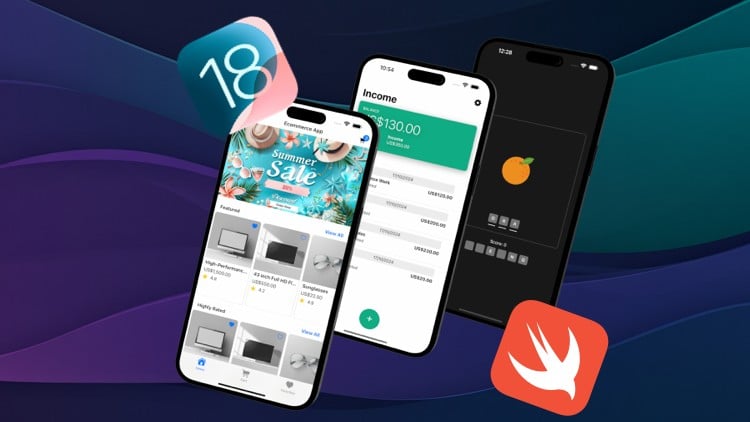
با این دوره جامع، ساخت اپلیکیشنهای iOS را با استفاده از Swift، UIKit و SwiftUI بیاموزید. تمرکز ویژه بر هوش مصنوعی (AI)، یادگیری ماشین (Machine Learning)، طراحی اپلیکیشن و توسعه برای macOS.
مهارتهای شغلی مورد نیاز بازار کار را کسب کنید
با یادگیری حرفهای SwiftUI و UIKit، برای موقعیت شغلی توسعهدهنده iOS در سطح جونیور تا میدلول آماده شوید. پروژههای واقعی و کاربردی، مسیر شغلی شما را هموار میکنند.
رزومه کاری قوی بسازید: ۱۸ اپلیکیشن کاربردی
یک پورتفولیو شامل ۱۸ اپلیکیشن حرفهای بسازید. از جمله یک اپلیکیشن فروشگاه آنلاین (Ecommerce) با Apple Pay، دستیار هوشمند تکالیف با هوش مصنوعی، شبکه اجتماعی و اپلیکیشن چت.
طراحی رابط کاربری زیبا و کاربرپسند (UI/UX)
اپلیکیشنهای iOS زیبا، تمیز و چشمنواز بسازید. اصول تایپوگرافی، انیمیشن، طراحی اپلیکیشن و بهترین شیوههای UI/UX را بیاموزید.
تسلط بر یادگیری ماشین با CoreML و Vision
با ساخت یک اپلیکیشن دوربین که قادر به شناسایی اشیاء است، نحوه ادغام یادگیری ماشین CoreML و Vision را بیاموزید.
آموزش ساخت و آموزش مدلهای یادگیری ماشین سفارشی
نحوه آموزش و ساخت مدلهای یادگیری ماشین سفارشی خود را با استفاده از CreateML یاد بگیرید.
اپلیکیشنهای مجهز به هوش مصنوعی با ChatGPT و Apple Intelligence
نحوه ساخت اپلیکیشنهای مبتنی بر هوش مصنوعی با استفاده از ChatGPT و Apple Intelligence را بیاموزید.
کسب درآمد از طریق فریلنسینگ
به یک فریلنسر موفق در پلتفرمهایی مانند Fiverr و Upwork تبدیل شوید.
بهروزترین تکنولوژیهای توسعه iOS
با دانش بهروز در مورد API های سازگار با iOS 18، در خط مقدم توسعه اپلیکیشن iOS باشید.
توسعه اپلیکیشنهای چندپلتفرمی
نحوه ساخت اپلیکیشنهای چندپلتفرمی که بر روی iPhone، iPad و macOS کار میکنند را بیاموزید.
پیشنیازها:
- هیچگونه دانش قبلی در زمینه کدنویسی یا برنامهنویسی لازم نیست.
- یک لپتاپ Apple MacBook یا iMac ترجیحاً با Apple Silicon.
- نصب Xcode که به صورت رایگان در App Store موجود است.
درباره دوره:
به جامعترین دوره iOS خوش آمدید! این دوره تمام آنچه برای توسعه اپلیکیشنهای iOS نیاز دارید را پوشش میدهد و شما را از یک مبتدی مطلق به یک توسعهدهنده ارشد iOS تبدیل میکند. بهجای گذراندن دورههای متعدد برای پر کردن شکافهای دانشی، اینجا همه چیز را در یک مکان خواهید یافت.
این دوره هر دو فریمورک UIKit و SwiftUI را آموزش میدهد. UIKit فریمورک تثبیت شده برای ساخت اپلیکیشنهای iOS است و همچنان در بازار کار بسیار مرتبط است (حدود ۷۰ تا ۸۰ درصد شرکتها همچنان به آن نیاز دارند). SwiftUI آینده توسعه اپلیکیشن iOS را رقم میزند و به سرعت در حال پذیرش است، بهخصوص در میان استارتاپها. شما میتوانید هر دو فریمورک را بیاموزید یا فقط بر روی یکی تمرکز کنید. چه قصد داشته باشید شغلی پیدا کنید که به UIKit نیاز دارد و چه بخواهید با SwiftUI اپلیکیشنهای خود را بسازید، این دوره با اهداف شما سازگار است.
این دوره برای کسانی ایدهآل است که هرگز اپلیکیشنی توسعه ندادهاند. با مبانی شروع کرده و با سرعتی ثابت به سمت موضوعات پیشرفتهتر پیش میرود. برنامه درسی ارائه شده در این دوره از طریق صدها جلسه منتورینگ یک به یک با دانشجویان من اصلاح شده است. این دوره شامل تکنیکهای تفکر کد با انیمیشن و تأکید بر ساخت اپلیکیشن عملی بهجای تئوری برای حفظ انگیزه شماست.
تمرین کلید موفقیت است! به همین دلیل، این دوره شامل بیش از ۱۸ اپلیکیشن حرفهای است که برای کسب تجربه عملی مورد نیاز در توسعه دنیای واقعی خواهید ساخت. شما طیف گستردهای از اپلیکیشنها از جمله یک اپلیکیشن فروشگاه آنلاین با Apple Pay، یک اپلیکیشن مبتنی بر موقعیت مکانی با استفاده از API گوگل، یک دستیار هوشمند تکالیف با هوش مصنوعی و موارد دیگر را ایجاد خواهید کرد. با ساخت اپلیکیشنهای حرفهای، شما یاد میگیرید که چگونه اپلیکیشنهای دنیای واقعی بسازید، نه فقط پروژههای آموزشی. هر اپلیکیشن از قراردادهای کدنویسی استاندارد صنعتی و اصول طراحی پیروی میکند.
هوش مصنوعی و یادگیری ماشین سنگ بنای اپلیکیشنهای مدرن امروزی هستند. این دوره شامل ماژولهای اختصاصی بر روی توسعه AI و یادگیری ماشین است. شما نحوه پیادهسازی مدلهای یادگیری ماشین موجود، آموزش مدلهای خود و ادغام LLM ها مانند ChatGPT برای ایجاد اپلیکیشنهای پیشرفته با هوش مصنوعی را خواهید آموخت.
چه هدف شما راهاندازی حرفه خود بهعنوان توسعهدهنده iOS، ساخت اپلیکیشنهای خود یا بهروزرسانی مهارتهای توسعه خود باشد، این دوره مجموعه ابزار کامل مورد نیاز شما را فراهم میکند. من هر جنبهای از این دوره را طراحی کردهام – از رویکرد یادگیری پروژهمحور گرفته تا برنامه درسی جامع – تا شما را به یک توسعهدهنده iOS با اعتماد به نفس و توانمند تبدیل کنم. اپل استور منتظر ایده بزرگ بعدی شماست و این دوره به شما کمک میکند تا آن را به واقعیت تبدیل کنید. همین امروز ثبتنام کنید!
خوش آمدید Welcome
-
مقدمه دوره Course Introduction
------ SwiftUI -------- ------ SwiftUI --------
-
مقدمه Introduction
از SwiftUI استفاده کن Head First Into SwiftUI
-
معرفی بازی حدس زدن Intro to Guess Game
-
منطق و استایل دکمه Button Logic and Style
-
گروه و فونت Group and Font
-
منطق بازی بخش اول Game Logic Part 1
-
منطق بازی بخش دوم Game Logic Part 2
-
منطق بازی بخش سوم Game Logic Part 3
-
منطق بازی بخش چهارم Game Logic Part 4
مبانی SwiftUI Fundamentals of SwiftUI
-
مقدمه Introduction
-
چاپ و کامنت ها Print and Comments
-
انواع و متغیرها بخش اول Types and Variables Part 1
-
انواع و متغیرها بخش دوم Types and Variables Part 2
-
بلاک ها، محدوده و فاصله گذاری Blocks, Scope and Spacing
-
آپشنال ها بخش اول Optionals Part 1
-
آپشنال ها بخش دوم Optionals Part 2
-
عملگرهای حسابی Arithmetic Operators
-
دستورات شرطی If-Else و عملگرهای مقایسه ای If-Else and Comparison Operators
-
عملگرهای منطقی Logical Operators
-
سایر عملگرها Other Operators
-
رشته ها و درون یابی بخش اول Strings and Interpolation Part 1
-
رشته ها و درون یابی بخش دوم Strings and Interpolation Part 2
-
شمارش ها و سوئیچ Enumerations and Switch
-
توابع بخش اول Functions Part 1
-
توابع بخش دوم Functions Part 2
-
آرایه ها Arrays
-
دیکشنری ها Dictionaries
-
حلقه های for و بازه ها For-Loops and Range
-
انواع نام گذاری شده Named Types
-
ساختارها بخش اول Structures Part 1
-
ساختارها بخش دوم Structures Part 2
-
کلاس ها Classes
-
ویژگی ها Properties
-
کنترل دسترسی Access Control
مقدمه ای بر SwiftUI Introduction to SwiftUI
-
مقدمه ای بر پروژه SwiftUI Introduction to a SwiftUI Project
-
@Main و نمونه برنامه @Main and App Instance
-
Scene و Window Groups Scene and Window Groups
-
Views و Previews Views and Previews
-
انواع بازگشتی مبهم (Opaque Return Types) Opaque Return Types
حل مسئله و تفکر هنگام ساخت اپلیکیشن Problem Solving and Thinking When Building Apps
-
تجزیه Decomposition
-
برنامه نویسی جعبه سیاه Black Box Programming
Views و چیدمان Views and Layout
-
مقدمه Introduction
-
VStack، HStack و ZStack VStack, HStack and ZStack
-
اندازه و موقعیت Size and Position
-
هم ترازی، فاصله گذاری و فریم Alignment, Spacing and Frame
-
Padding و Spacers Padding and Spacers
-
موقعیت یابی مطلق و نسبی Absolute and Relative Positioning
-
Geometry Reader Geometry Reader
Views و Modifierهای اساسی بخش اول Fundamental Views and Modifiers Part 1
-
مقدمه Introduction
-
متن (Text) Text
-
نمادهای SF SF Symbols
-
تصاویر Images
-
اشکال هندسی Shapes
-
رنگ ها Colors
-
دکمه ها Buttons
وضعیت و اتصال (State and Binding) State and Binding
-
مقدمه Introduction
-
وضعیت (State) State
-
اتصال (Binding) Binding
Views و Modifierهای اساسی بخش دوم Fundamental Views and Modifiers Part 2
-
TextField TextField
-
TextEditor TextEditor
-
ترتیب Modifierها Order of Modifiers
-
تمرین فرم ثبت نام بخش اول Sign Up Form Practice Part 1
-
تمرین فرم ثبت نام بخش دوم Sign Up Form Practice Part 2
SwiftUI چیست؟ What Is SwiftUI?
-
SwiftUI چیست؟ What Is SwiftUI?
-
SwiftUI در مقابل UIKit SwiftUI vs UIKit
-
آیا باید از SwiftUI یا UIKit استفاده کنید؟ Should You Use SwiftUI or UIKit?
اپلیکیشن Tap Tap App
-
مقدمه Introduction
-
تصاویر و تایمر Images and Timer
-
سطح دشواری Difficulty
-
ضربه زدن و نمایش نتیجه Tap and Present Result
اپلیکیشن کلمات درهم ریخته Scrambled Words App
-
مقدمه Introduction
-
رابط کاربری بخش اول User Interface Part 1
-
LetterView LetterView
-
رابط کاربری بخش دوم User Interface Part 2
-
ForEach ForEach
مبانی SwiftUI بخش دوم Fundamentals of SwiftUI Part 2
-
اکستنشن ها Extensions
-
پروتکل ها Protocols
-
قابل مقایسه (Equatable) Equatable
-
قابل هش کردن (Hashable) Hashable
-
هویت Identity
-
قابل شناسایی (Identifiable) Identifiable
-
انواع مبهم (Opaque Types) Opaque Types
اپلیکیشن کلمات درهم ریخته بخش دوم Scrambled Words App Part 2
-
مقدمه Introduction
-
حروف حدس زده شده Guessed Letters
-
شمارش حروف Enumerating Letters
-
مدل حرف Letter Model
-
برگرداندن یک حرف حدس زده شده Returning a Guessed Letter
-
بررسی درست یا غلط بودن حدس Checking If The Guess Is Right Or Wrong
-
بهینه سازی For-In با Map Refactor For-In With Map
-
هشدار درست یا غلط Right Or Wrong Alert
-
امتیاز Score
-
مدل سوال Question Model
-
اصلاح کوچک Small Fix
-
سوال فعال فعلی Current Active Question
-
رفتن به سوال بعدی Moving To The Next Question
-
نمای امتیاز Score View
-
شروع مجدد بازی Restarting The Game
Sheetها و ناوبری Sheets and Navigation
-
مقدمه Introduction
-
نمایش و بستن یک Sheet Presenting and Dismissing A Sheet
-
Sheet نمایش داده شده با آیتم Sheet Presented With Item
-
مقاطع نمایش (Presentation Detents) Presentation Detents
-
تمام صفحه Fullscreen
-
NavigationLink بخش اول NavigationLink Part 1
-
NavigationLink بخش دوم NavigationLink Part 2
-
NavigationDestination NavigationDestination
-
NavigationItem NavigationItem
-
NavigationDestination با مقدار Hashable NavigationDestination with Hashable Value
Git و Github Git and Github
-
مخزن Git Git Repo
-
تنظیمات Git Git Settings
-
مرحله بندی و کامیت ها Staging and Commits
-
تغییر به نسخه قبلی Switching to a Previous Version
-
شاخه ها Branches
-
ادغام Merge
-
حل تعارضات ادغام Resolving Merge Conflicts
-
ذخیره موقت تغییرات (Stashing) Stashing Changes
-
مقدمه ای بر Github Introduction to Github
-
ایجاد مخزن Git Creating a Git Repo
-
حساب Github Xcode و توکن دسترسی شخصی Xcode Github Account and Personal Access Token
-
ارسال به Github Pushing to Github
-
کلون کردن Cloning
-
دریافت کردن (Pulling) Pulling
-
Gitignore و افزودن بازی Tap به Github Gitignore and Adding Tap Game to Github
MVVM MVVM
-
مقدمه Introduction
-
مقدمه ای بر پروژه شروع Introduction to Starter Project
-
ایجاد ViewModel Creating a ViewModel
-
انتقال منطق به ViewModel Moving Logic Into ViewModel
-
SignUp ViewModel SignUp ViewModel
-
بهینه سازی PasswordView ثبت نام Refactor SignUp PasswordView
لیست ها و اسکرول ویو ها List and ScrollViews
-
مقدمه Introduction
-
لیست ها بخش اول Lists Part 1
-
لیست ها بخش دوم Lists Part 2
-
ScrollView ScrollView
اپلیکیشن درآمد Income App
-
مقدمه Introduction
-
ردیف تراکنش Transaction Row
-
قالببندهای تاریخ و عدد Date and Number Formatters
-
زیرویو TransactionView TransactionView SubView
-
BalanceView BalanceView
-
دکمه شناور Floating Button
-
عنوان ناوبری Navigation Title
-
فیلدهای متنی با قالببندهای عدد TextFields with Number Formatters
-
استفاده از Picker برای بیان گزینههای نوع تراکنش Using a Picker to Express Transaction Type Options
-
فیلد متنی عنوان تراکنش Transaction Title TextField
-
دکمه ایجاد تراکنش Create Transaction Button
-
افزودن تراکنش Adding a Transaction
-
ویرایش تراکنش Editing a Transaction
-
ویرایش تراکنش بخش دوم Editing a Transaction Part 2
-
ویرایش تراکنش بخش سوم Editing a Transaction Part 3
-
کل مجموع موجودی واکنشی Reactive Balance Total
-
بهینه سازی BalanceView با توابع مرتبه بالا Refactoring BalanceView with Higher Order Functions
-
حذف تراکنش Deleting a Transaction
لیست انجام کارها (To Do List) To Do List
-
مقدمه Introduction
-
فرآیند فکری Thought Process
-
راه حل اپلیکیشن لیست انجام کارها To Do List App Solution
-
اتصال به عناصر آرایه Binding to Array Elements
-
اتصال به عناصر آرایه در نمای دیگر Binding to Array Elements In Another View
چیدمان تطبیقی Adaptive Layout
-
کلاسهای اندازه چیدمان تطبیقی Adaptive Layout Size Classes
توسعه iPad iPad Development
-
توسعه iPad iPad Development
توسعه اپلیکیشن چند پلتفرمی Multiplatform Application Development
-
چند پلتفرمی Multiplatform
توسعه MacOS MacOS Development
-
ساخت اپلیکیشن برای MacOS Building Apps to MacOS
AppStorage AppStorage
-
مقدمه و SettingsView Introduction and SettingsView
-
پایدار سازی ترتیب در App Storage Persisting Order In App Storage
-
پایدار سازی ارز در App Storage Persisting Currency In App Storage
-
پایدار سازی حداقل تنظیم تراکنش در App Storage Persisting Minimum Transaction Setting In App Storage
Core Data Core Data
-
مقدمه Introduction
-
ایجاد Entity تراکنش Creating the Transaction Entity
-
ایجاد دستی کلاس های Core Data Manually Creating Core Data Classes
-
بارگذاری فروشگاه های پایدار سازی و ایجاد زمینه نما (View Context) Loading Persistence Stores and Creating View Context
-
ذخیره تراکنش ها Saving Transactions
-
به روز رسانی تراکنش ها Updating Transactions
-
حذف تراکنش ها Deleting Transactions
-
بازیابی داده های ذخیره شده Fetching Saved Data
-
بهینه سازی Refactoring
-
کار کردن CoreData با پیشنمایش ها Making CoreData Work With Previews
SwiftData SwiftData
-
مقدمه Introduction
-
ایجاد مدل Swift Data Creating a Swift Data Model
-
افزودن Codable Conformance به Enums Adding Codable Conformance to Enums
-
ایجاد کانتینر مدل Creating a Model Container
-
ایجاد داده Creating Data
-
خواندن داده Reading Data
-
به روز رسانی داده Updating Data
-
حذف داده Deleting Data
-
بهینه سازی Refactor
-
SwiftData در پیشنمایش ها SwiftData In Previews
Realm Realm
-
مقدمه Introduction
-
نصب Realm Installing Realm
-
Creating a Transaction Model
-
Fetching Data
-
Creating a Transaction
-
Editing a Transaction
-
Deleting a Transaction
iCloud iCloud
-
مقدمه Introduction
-
قابلیت ها و مجوزهای iCloud iCloud Capabilities and Entitlements
-
تغییر مدل ها Changing Models
-
تست iCloud Testing iCloud
مبانی شبکه Networking Fundamentals
-
مقدمه Introduction
-
بک اند سفارشی در مقابل BaaS Custom Backend vs BaaS
-
ثبت نام در Postman SignUp to Postman
-
بررسی Postman و ایجاد فضای کاری Exploring Postman and Creating a Workspace
-
Sending Our First Request
-
Important Parts of a Request
-
Exploring JSON In Greater Detail
-
API Endpoints In Greater Detail
-
Request Types GET and POST
-
Response Status Codes
همزمانی Concurrency
-
مقدمه Introduction
-
نخ ها و صف ها Threads and Queues
-
ناهمزمان در مقابل همزمان Asynchronous vs Synchronous
-
Async/Await Async/Await
-
MainActor MainActor
مبدل ارز Currency Convertor
-
مقدمه Introduction
-
رابط کاربری پایه Basic UI
-
ViewModel ViewModel
-
منوی ارز Currency Menu
-
Open Exchange Rates API Open Exchange Rates API
-
درخواست API با استفاده از تکمیل کننده (Completion Handler) API Request Using Completion Handler
-
درخواست API با استفاده از Async/Await API Request Using Async/Await
-
Codable Codable
-
Task Modifier Task Modifier
-
پیام های بارگذاری و خطا Loading and Error Messages
-
تبدیل ارزها Converting Currencies
-
FocusState FocusState
-
نرخ تبدیل Conversion Rate
-
MainActor MainActor
اپلیکیشن اماکن Places App
-
مقدمه Introduction
-
بررسی کلی پروژه شروع Starter Project Overview
-
Google Maps و تنظیمات API Google Maps and API Setup
-
تنظیمات کلاینت API API Client Setup
-
مولفه های URL URL Components
-
دریافت اماکن اطراف Fetching Nearby Places
-
مدل مکان Place Model
-
رمزگشایی JSON Decoding JSON
-
کلیدهای کد گذاری (CodingKeys) CodingKeys
-
PlacesViewModel PlacesViewModel
-
مقدمه ای بر CoreLocation Introduction to CoreLocation
-
دریافت موقعیت مکانی کاربر Fetching User Location
-
مجوز موقعیت مکانی حریم خصوصی Privacy Location Permission
-
رسیدگی به کد وضعیت پاسخ Handling Response Status Code
-
تست مجوز موقعیت مکانی Testing Location Authorization
-
ارسال درخواست با داده های موقعیت مکانی واقعی Making a Request with Real Location Data
-
نوع نتیجه (Result Type) Result Type
-
نام مستعار نوع (Type Alias) Type Alias
-
لیست افقی Horizontal List
-
نمایش اماکن Displaying Places
-
نمایش اماکن بخش دوم Displaying Places Part 2
-
تغییر کلمه کلیدی Changing Keyword
-
بارگذاری Loading
-
گزارش خطا به کاربران Reporting Errors to Users
-
پاکسازی Cleanup
اپلیکیشن کتاب آشپزی (نمونه اولیه) Cooking Book App (Prototype)
-
مقدمه Introduction
-
مقدمه ای بر پروژه شروع Introduction to Starter Project
-
LoginView بخش اول LoginView Part 1
-
LoginView بخش دوم LoginView Part 2
-
LoginViewModel LoginViewModel
-
مولفه TextField TextField Component
-
سبک AuthTextFieldStyle AuthTextFieldStyle
-
تغییر دید پذیری رمز عبور Toggle Password Visibility
-
نمای مولفه رمز عبور Password Component View
-
RegisterView RegisterView
-
مدیر جلسه (Session Manager) Session Manager
-
خروج از حساب کاربری SignOut
-
ردیف دستور پخت Recipe Row
-
مولفه ردیف دستور پخت Recipe Row Component
-
RecipeDetailView RecipeDetailView
-
نمای افزودن دستور پخت Add Recipe View
-
سبک دکمه سفارشی Custom Button Style
-
AddRecipeViewModel AddRecipeViewModel
-
انتقال به @Observable Transitioning to @Observable
-
نمونه اولیه تکمیل شده Finished Prototype
Grid ها Grids
-
مقدمه Introduction
-
Grid پایه Basic Grid
-
LazyGrid LazyGrid
-
عملکرد اسکرول و Grid Scroll and Grid Performance
UIViewRepresentable UIViewRepresentable
-
مقدمه Introduction
-
ساخت UIView MakeUIView
-
هماهنگ کننده (Coordinator) Coordinator
-
اتصال و به روز رسانی UIView Binding and UpdateUIView
اپلیکیشن کتاب آشپزی (با Firebase) Cooking Book App (with Firebase)
-
مقدمه Introduction
-
مرور کلی داشبورد Firebase Firebase Dashboard Overview
-
نصب Firebase Firebase Installation
-
فعال سازی احراز هویت Firebase Activating Firebase Authentication
-
ایجاد کاربر با FirebaseAuth Creating a User with FirebaseAuth
-
فعال سازی Firebase Firestore Activating Firebase Firestore
-
افزودن کاربر به Firebase Adding a User to Firebase
-
نمای بارگذاری Loading View
-
مدیریت خطای احراز هویت Authentication Error Handling
-
اعتبارسنجی نام کاربری Validating Username
-
بررسی منحصر به فرد بودن نام کاربری Checking If Username Is Unique
-
استفاده از Codable با Firestore Using Codable with Firestore
-
کاربر در SessionManager User In SessionManager
-
پایدار سازی جلسه Persisting Session
-
خروج از حساب کاربری Sign Out
-
ورود Login
-
گزینه های تصویر با گفتگوی تایید Image Options with Confirmation Dialog
-
انتخاب از کتابخانه عکس Picking From Photo Library
-
دوربین Camera
-
دوربین SwiftUI Camera SwiftUI
-
مجوزهای حریم خصوصی دوربین Camera Privacy Permissions
-
تست دوربین Testing Camera
-
مقدمه ای بر Google Cloud Storage Introduction to Google Cloud Storage
-
بارگذاری تصاویر بخش اول Uploading Images Part 1
-
بارگذاری تصاویر بخش دوم Uploading Images Part 2
-
بارگذاری تصاویر بخش سوم Uploading Images Part 3
-
ذخیره دستور پخت در پایگاه داده Firestore Saving Recipes Into Firestore Database
-
وضعیت های بارگذاری جداگانه Separate Loading States
-
هشدار خطای افزودن دستور پخت Add Recipe Error Alerts
-
Async/Await و Completion Handlers Async/Await and Completion Handlers
-
رفع اشکال پیش نمایش HomeView Solving the HomeView Preview Bug
-
استفاده از Grids Using Grids
-
بازیابی دستور پخت ها Fetching Recipes
-
Async Image Async Image
-
RecipeDetailView RecipeDetailView
-
بهینه سازی Fetch Recipe برای استفاده از توابع مرتبه بالا Refactor Fetch Recipe To Use Higher Order Functions
ViewBuilders و Modifiers سفارشی ViewBuilders and Custom Modifiers
-
درباره ViewBuilders About ViewBuilders
-
Modifiers سفارشی Custom Modifiers
اپلیکیشن تجارت الکترونیک Ecommerce App
-
مقدمه Introduction
-
NavigationBarView NavigationBarView
-
بنر Banner
-
سرتیتر ویژه Featured Heading
-
ردیف محصول Product Row
-
HomeViewModel HomeViewModel
-
محصولات با بالاترین امتیاز Highly Rated Products
-
اسکرول عمودی Vertical Scrolling
-
دکمه نمایش کاتالوگ کامل Show Full Catalog Button
-
نمای گرید محصول Product Grid View
-
گرید دو ستونه قابل استفاده مجدد Reusable Two Column Grid
-
نمای جزئیات محصول Product Detail View
-
TabView TabView
-
FavoritesView FavoritesView
-
FavoritesManager FavoritesManager
-
CartView CartView
-
CartManager CartManager
-
به روز رسانی تعداد اقلام در سبد خرید Updating Quantity of Items in Shopping Cart
-
افزودن هشدار به سبد خرید (قابل اتصال) Add to Shopping Cart Alert (Bindable)
-
نمایش کل تعداد اقلام سبد خرید Displaying Total Shopping Cart Count
-
TabManager TabManager
-
استفاده از Reduce برای دریافت کل اقلام سبد خرید Using Reduce to Get Total Cart Items
-
افزایش و کاهش Stepper Stepper Increment and Decrement
-
مجموع سبد خرید Shopping Cart Totals
-
دکمه Apple Pay Apple Pay Button
-
شناسه فروشگاه Apple Pay Apple Pay Merchant ID
-
ساخت اقلام خلاصه پرداخت Making Payment Summary Items
-
کل آیتم خلاصه پرداخت Total Payment Summary Item
-
درخواست پرداخت Payment Request
-
روش ارسال Shipping Method
-
کنترل کننده خلاصه پرداخت Payment Authorization Controller
-
آغاز پرداخت Initiating Payment
-
تست Apple Pay و حساب Sandbox Testing Apple Pay and Sandbox Account
اپلیکیشن چت Chat App
-
مقدمه Introduction
-
چت نمونه اولیه Prototype Chat
-
راهنمای داده Data Guide
-
راهنمای ساختار برنامه App Structure Guide
-
توضیح راه حل نمونه اولیه Prototype Solution Explained
-
توضیح راه حل داده Data Solution Explained
یادگیری ماشین و هوش مصنوعی Machine Learning and AI
-
مقدمه Introduction
-
مقدمه ای بر مدل های CoreML Introduction to CoreML models
-
مقدمه ای بر تشخیص دهنده اشیاء Introduction to Object Detector
-
ResNet 50 CoreML ResNet 50 CoreML
-
پردازشگر درخواست تصویر Image Request Handler
-
درخواست تحلیل تصویر Image Analysis Request
-
پردازش نتیجه تشخیص تصویر Processing the Image Detection Result
-
یادگیری انتقالی Transfer Learning
-
معرفی CreateML Introduction to CreateML
-
دادههای آموزشی Training Data
-
بهبود دقت آموزش Improving Training Accuracy
-
دادههای تست Testing Data
-
مقدمه ای بر Homework AI Introduction to Homework AI
-
بررسی پروژه آغازین Starter Project Walkthrough
-
بسته Swift OpenAI OpenAI Swift Package
-
تنظیمات OpenAI و کلیدهای API OpenAI Setup and API Keys
-
مدیریت کننده OpenAI OpenAI Manager
-
دریافت راه حل OpenAI Fetching OpenAI Solution
--------- UIKit ------------- --------- UIKit -------------
-
مقدمه Introduction
Swift مقدماتی Beginner Swift
-
مقدمه Introduction
-
کامنتها و دستورات چاپ Comments and Print Statements
-
انواع و متغیرها - تغییرپذیری Types and Variables - Mutability
-
انواع و متغیرها - نامگذاری Types and Variables - Naming
-
آپشنالها Optionals
-
آپشنالهای ضمنی و باز کردن اجباری Implicit Optionals and Force Unwrapping
-
اتصال آپشنال Optional Binding
-
بلوکها، دامنه و فاصلهگذاری Blocks, Scope and Spacing
-
اتصال آپشنال - If Let یا Var Optional Binding - If Let or Var
-
اتصال آپشنال - Guard Let یا Var Optional Binding - Guard Let or Var
-
عملگرهای حسابی Arithmetic Operators
-
عملگرهای مقایسه If Else If Else Comparison Operators
-
عملگرهای منطقی Logical Operators
-
عملگرهای دیگر Other Operators
-
رشتهها و درونیابی Strings and Interpolation
-
شمارشها و سوئیچ Enumerations and Switch
-
توابع قسمت ۱ Functions Part 1
-
توابع قسمت ۲ Functions Part 2
-
آرایهها Arrays
-
نامگذاری توابع Functions Naming
-
دیکشنریها Dictionaries
-
حلقهها قسمت ۱ Loops Part 1
-
حلقهها قسمت ۲ Loops Part 2
-
جریان کنترل Control Flow
روشهای حل مسئله و تفکر کدنویسی Problem Solving and Code Thinking Practices
-
تجزیه Decomposition
-
تفکر جعبه سیاه Black Box Thinking
مقدمهای بر Xcode Introuction to Xcode
-
باز کردن Xcode Opening Xcode
-
ناوبری، بازرس و منطقه اشکالزدایی Navigator, Inspector and Debug Area
نماها و لایهها Views and Layers
-
مقدمهای بر نماها Introduction to Views
-
مبانی نماها View Fundamentals
-
ویژگیهای نما View Attributes
-
استوریبردها Storyboards
-
IBOutlets و IBActions IBOutlets and IBActions
-
فریم و مرزها Frame and Bounds
-
اپلیکیشن شمارنده ضربه Tap Counter App
-
چالش اپلیکیشن شمارنده ضربه Tap Counter App Challenge
-
اپلیکیشن فرم ورود Login Form App
-
چالش اپلیکیشن فرم ورود Login Form App Challenge
-
اپلیکیشن تغییر تم Theme Change App
-
چالش اپلیکیشن تغییر تم Theme Change App Challenge
-
اپلیکیشن پایگاه داده دانشجو Student Database App
-
چالش اپلیکیشن پایگاه داده دانشجو Student Database App Challenge
-
AppDelegate و SceneDelegate AppDelegate and SceneDelegate
-
CALayer CALayer
Autolayout استوریبرد Storyboard Autolayout
-
مقدمه Introduction
-
محدودیتهای افقی Horizontal Constraints
-
محدودیتهای عمودی Vertical Constraints
-
اندازه استنباط شده Inferred Size
-
محدودیتهای تراز Alignment Constraints
-
اندازه محتوای ذاتی Intrinsic Content Size
-
اولویتهای چسبندگی محتوا Content Hugging Priorities
-
اولویتهای مقاومت فشردهسازی محتوا Content Compression Resistance Priorities
-
ضریب Multiplier
-
فرم ورود (تمرین Autolayout) Login Form (Autolayout Practice)
-
نسبت ابعاد Aspect Ratio
Swift پیشرفتهتر Further Swift
-
مقدمه Introduction
-
انواع نامگذاری شده Named Types
-
ساختارها Structures
-
کلاسها: معنای ارجاعی Classes: Reference Semantics
-
کلاسها: زیرکلاسدهی Classes: Subclassing
-
کلاسها: ریختشناسی نوع Classes: Type Casting
-
ساختارها در مقابل کلاسها Structures vs Classes
-
Properties
-
Access Control
-
برنامهنویسی شیءگرا (اختیاری) - ترکیببندی [OPTIONAL] Object Oriented Programming- Composition
-
برنامهنویسی شیءگرا (اختیاری) - تست کد ما تا به امروز [OPTIONAL] Object Oriented Programming- Testing Our Code So Far
-
برنامهنویسی شیءگرا (اختیاری) - چندریختی و ملاحظات نهایی [OPTIONAL] Object Oriented Programming- Polymorphism and Final Thoughts
-
پروتکلها Protocols
-
برنامهنویسی پروتکلمحور (اختیاری) [OPTIONAL] Protocol Oriented Programming
اپلیکیشن کوئیز Quiz App
-
مقدمه Introduction
-
ساخت رابط کاربری Creating the User Interface
-
مدل داده The Data Model
-
نگه داشتن امتیاز Keeping Score
-
رفتن به سوال بعدی Moving to the Next Question
-
نمایش یک هشدار در صورت درست یا غلط بودن پاسخ قسمت ۱ Presenting an Alert If The Answer Is Right or Wrong Part 1
-
نمایش یک هشدار در صورت درست یا غلط بودن پاسخ قسمت ۲ Presenting an Alert If The Answer Is Right is Wrong Part 2
-
بازنگری منطق پاسخ Refactoring the Answer Logic
-
هشدار نهایی امتیاز در پایان کوئیز End of Quiz Final Score Alert
-
بازنگری IBActions Refactoring IBActions
تطبیق با جهتهای افقی و عمودی Adapting to Landscape and Portrait Orientations
-
مسائل جهتگیری افقی Landscape Orientation Issues
-
مبانی کلاسهای اندازه Size Class Fundamentals
-
تطبیق اپلیکیشن کوئیز با جهت افقی Adapting the Quiz App to Landscape Orientation
توسعه برای آیفون و آیپد Developing for Both iPhone and iPad
-
مقدمهای بر آیپد Introduction to iPad
-
تطبیق اپلیکیشن کوئیز با آیپد Adapting the Quiz App to iPad
-
استفاده از مجموعههای صفت برای تغییر ظاهر Using Trait Collections to Change Appearance
چرخه حیات ViewController ViewController Life Cycle
-
چرخه حیات استوریبرد قسمت ۱ Storyboard Life Cycle Part 1
-
چرخه حیات استوریبرد قسمت ۲ Storyboard Life Cycle Part 2
-
چرخه حیات برنامهنویسی Programmatic Life Cycle
ارائه مودال Modal Presentation
-
تجربه مودال Modal Experience
-
برگه صفحه قسمت ۱ Page Sheet Part 1
-
برگه صفحه قسمت ۲ Page Sheet Part 2
-
تمام صفحه Fullscreen
-
برگه فرم Form Sheet
-
زمینه Context
-
زمینه قسمت ۲ Context Part 2
انتقال داده Passing Data
-
سگویها Segues
-
نمایندگان Delegates
-
اطلاعرسانی Notification
-
Vars Vars
ViewControllers کانتینر Container ViewControllers
-
ViewControllers ناوبری Navigation ViewControllers
ScrollViews, TableViews و CollectionViews ScrollViews, TableViews and CollectionViews
-
ScrollView ScrollView
-
صفحه کلید Keyboard
-
منبع داده TableView TableView DataSource
-
لیست محتوا ContentList
-
آرایهها و TableViews Arrays and TableViews
-
بخشها Sections
-
نمایندگان Delegates
-
سگوی نماینده Deleagtes Segue
-
TableView TableView
-
سلول TableView TableView Cell
-
ارتفاع Height
اپلیکیشن ToDoList ToDoList App
-
مقدمه Introduction
-
TitleView TitleView
-
TableView TableView
-
TaskCell TaskCell
-
سلولهای خود اندازهگیر Self Sizing Cells
-
منطقه امن Safe Area
-
دکمه اضافه کردن Add Button
-
ViewController وظیفه جدید New Task ViewController
-
XIB نمای مدل وظیفه جدید New Task Model View Xib
-
کلاس نمای مودال وظیفه جدید قسمت ۱ New Task Modal View Class Part 1
-
کلاس نمای مودال وظیفه جدید قسمت ۲ NewTaskModalView Class Part 2
-
نمونهسازی نمای مودال Instantiating Modal View
-
Nibs Nibs
-
بازنگری بارگذاری Nibs Refactoring Loading Nibs
-
دسترسی بازنگری شده به IBOutlets Refactor Access to IBOutlets
-
LayoutSubViews LayoutSubViews
-
بستن نمای مودال Close Modal View
-
مدل وظیفه Task Model
-
وظیفه جدید با اطلاعرسانی New Task with Notification
-
تغییرات UI جدول نمایش TableView UI Changes
-
بهروزرسانی وظیفه قسمت ۱ Update Task Part 1
-
بهروزرسانی وظیفه قسمت ۲ Update Task Part 2
-
تکمیل وظیفه Complete Task
-
حذف وظیفه Delete Task
تایپوگرافی Typography
-
تایپوگرافی چیست؟ What Is Typography?
-
بهترین روش قسمت ۱ Best Practice Part 1
-
بهترین روش قسمت ۲ Best Practice Part 2
-
نصب فونت سفارشی Install Custom Font
-
مدیریت تایپوگرافی قسمت ۱ Managing Typography Part 1
-
مدیریت تایپوگرافی قسمت ۲ Managing Typography Part 2
-
اپلیکیشن ToDoList به همراه بهترین روشهای تایپوگرافی ToDoList App Plus Typography Best Practices
رنگها Colors
-
سیستمهای رنگ Color Systems
-
فضاهای رنگ Color Spaces
-
مدیریت رنگها Managing Colors
-
کنتراست Contrast
-
اپلیکیشن ToDoList به همراه بهترین روشهای رنگ ToDoList App Plus Color Best Practices
حالت تاریک و حالت روشن Dark Mode and Light Mode
-
حالت تاریک قسمت ۱ Dark Mode Part 1
-
حالت تاریک قسمت ۲ Dark Mode Part 2
-
حالت تاریک ۳ Dark Mode 3
-
حالت تاریک ۴ Dark Mode 4
تصاویر Images
-
UIImage و کاتالوگ Assets UIImage and Assets Catalog
-
تصاویر Images
انیمیشنها Animations
-
آناتومی انیمیشن Anatomy of an Animation
-
تابع زمانبندی Timing Function
-
انواع انیمیشن Types of Animation
-
انیمیشنها در عمل Animations In Practice
-
CABasicAnimation قسمت ۱ CABasicAnimation Part 1
-
CABasicAnimation قسمت ۲ CABasicAnimation Part 2
کامپوننتها Components
-
ایجاد کامپوننتها Creating Components
-
IBDesignable و IBInspectable IBDesignable and IBInspectable
Git و Github Git and Github
-
مقدمه Introduction
-
کامیتها Commits
-
شاخه و ادغام Branch and Merge
-
راهاندازی Github Setting Up Github
-
Push Push
-
Pull Pull
-
مجوز و Readme License and Readme
-
Clone Clone
مستندسازی و ثبت وقایع Documentation and Logging
-
ایجاد مستندات Create Documentation
-
ساخت مستندات Build Documentation
-
ثبت وقایع Logging
Userdefaults Userdefaults
-
Userdefaults Userdefaults
Realm Realm
-
معرفی و راهاندازی Realm Realm Intro and Setup
-
مدل شیء Realm Realm Object Model
-
عملیات CRUD در Realm Realm CRUD
-
ایجاد در Realm Realm Create
-
خواندن در Realm Realm Read
-
بهروزرسانی در Realm Realm Update
-
حذف در Realm Realm Delete
Core Data Core Data
-
مقدمه و راهاندازی Introduction and Setup
-
بازنگری وظیفه CoreData به TaskModel Refactor CoreData Task to TaskModel
-
ایجاد CoreData CoreData Create
Core Graphics Core Graphics
-
وضعیت Context Context State
-
خطوط و پر کردنها Strokes and Fills
-
خطوط و پر کردنها قسمت ۲ Strokes and Fills Part 2
-
ساخت قوسها Making Arcs
-
ساخت گرادیانها Making Gradients
-
برش و حفظ وضعیت Clipping and Preserving State
-
سایهها Shadows
-
تبدیلات: تغییر ماتریس تبدیل فعلی Transformations: Modifying the Current Transformation Matrix
-
تبدیلات: تبدیلات آفین Transformations: Affine Transforms
-
نمودار میلهای: دادهها Bar Graph: The Data
-
نمودار میلهای: برچسبها Bar Graph: Labels
-
نمودار میلهای: میلهها Bar Graph: The Bars
CAShapeLayer CAShapeLayer
-
ایجاد اشکال Creating Shapes
-
ویژگیهای CAShapeLayer CAShapeLayer Properties
-
ماسکهای CAShapeLayer CAShapeLayer Masks
-
تبدیلات CAShapeLayer CAShapeLayer Transformations
-
نمودار حلقهای: پسزمینه RingGraph: The Backdrop
-
نمودار حلقهای: لایه پیشرفت Ring Graph: Progress Layer
-
نمودار حلقهای: خط گرادیان Ring Graph: Gradient Stroke
اپلیکیشن تناسب اندام Fitness App
-
مقدمه پروژه آغازین Starter Project Introduction
-
راهاندازی پایه TableView TableView Basic Setup
-
Xib سلول جدول برنامهنویسی شده Program Table View Cell Xib
-
کلاس سلول جدول برنامهنویسی شده Program Table View Cell Class
-
پیکربندی سلول جدول Table View Cell Configuration
-
مدلهای برنامه و تمرین Program and Exercise Models
-
Workout ViewController Workout View Controller
-
نمای حلقه Ring View
-
Lottie Lottie
-
صف تمرینها Queue Excercises
-
نتایج تمرین Workout Results
-
نمای مودال نتایج تمرین Workout Results Modal View
-
کد نمای نتایج تمرین Workout Results View Code
-
بستن نتایج تمرین Dismiss Workout Results
برنامهنویسی تابعی Functional Programming
-
مقدمه Introduction
-
توابع به عنوان شهروندان درجه اول Functions as First Class Citizens
-
بستها به عنوان شهروندان درجه اول Closures as First Class Citizens
-
عبارات بست Closure Expressions
-
بستهای فرار Escaping Closures
-
نام مستعار نوع Type Alias
-
توابع مرتبه بالا Higher Order Functions
-
برنامهنویسی تابعی در عمل Functional Programming In Practice
Grand Central Dispatch و حافظه Grand Central Dispatch and Memory
-
صفهای سریال و جهانی Serial and Global Queues
-
صفهای همزمان جهانی سفارشی Custom Global Concurrent Queues
-
ارجاعات ضعیف و بدون مالک Weak and Unowned References
مدیریت خطا Error Handling
-
مدیریت خطا Error Handling
Generics و پروتکلهای میانی Generics and Intermediate Protocols
-
پروتکل Equatable قسمت ۱ Equatable Protocol Part 1
-
پروتکل Equatable قسمت ۲ Equatable Protocol Part 2
-
پروتکل Comparable Comparable Protocol
-
پروتکل Hashable Hashable Protocol
-
Generics قسمت ۱ Generics Part 1
-
Generics قسمت ۲ Generics Part 2
اپلیکیشن چت به همراه Firebase Chat App Plus Firebase
-
Firebase چیست؟ What Is Firebase?
-
مقدمه پروژه آغازین Starter Project Introduction
-
نصب Firebase Installing Firebase
-
رشته خصوصیتیافته Attributed String
-
Git و امن کردن کلید API ما Git and Securing Our API Key
-
لینک ایجاد حساب کاربری Link to Creating an Account
-
لینک ورود به سیستم Link to Sign In
-
اطمینان از قابل مشاهده بودن فیلدهای متن ورود به سیستم هنگام نمایش صفحه کلید Making Sure SignIn TextFields are Visible When Keyboard Shows
-
اطمینان از عدم پنهان شدن فیلدهای متن ایجاد حساب کاربری هنگام ظاهر شدن صفحه کلید Making Sure Create Account Textfields Not Hidden When Keyboard Appears
-
ایجاد حساب کاربری و اعتبارسنجی Create Account and Validation
-
ذخیره نام کاربری در پایگاه داده بلادرنگ Saving Username to Realtime Database
-
هدایت کاربر به صفحه اصلی Routing User To Main Screen
-
خروج از سیستم Logout
-
بررسی استفاده از نام کاربری Checking If Username Is In Use
-
نمای بارگذاری Loading View
-
بهبود پیامهای خطا Improved Error Messaging
-
ذخیره نام کاربری در ویژگی DisplayName احراز هویت Save Username In DisplayName Property of Auth
-
ورود به سیستم Sign In
-
ProfileViewController ProfileViewController
-
ProfileViewController قسمت ۲ ProfileViewController Part 2
-
بازنگری ایجاد حساب کاربری برای استفاده از تکمیلکنندهها 21 Refactor Create Account To Use Completion Handlers
-
نخ اصلی Main Thread
-
چرخههای ارجاع قوی Strong Reference Cycles
-
بازنگری SignInViewController Refactor SignInViewController
-
UploadViewController UploadViewController
اپلیکیشن شبکه اجتماعی Social Networking App
-
توضیح پروژه آغازین Starter Project Explanation
-
نصب Firebase Installing Firebase
-
ورود با گوگل قسمت ۱ Google SignIn Part 1
-
ورود با گوگل قسمت ۲ Google SignIn Part 2
-
ورود با گوگل قسمت ۳ Google SignIn Part 3
-
ورود با گوگل قسمت ۴ Google SignIn Part 4
-
ورود با گوگل قسمت ۵ Google SignIn Part 5
-
مقدمهای بر CollectionView CollectionView Introduction
-
سلول UICollectionView UICollectionView Cell
-
UICollectionView به تفصیل UICollection View In Detail
-
منبع داده CollectionView CollectionView DataSource
-
چیدمان UICollectionView UICollectionView Layout
-
کنترلر TabBar TabBar Controller
-
بازنگری کنترلر TabBar Refactor TabBar Controller
-
نماینده کنترلر TabBar TabBar Controller Delegate
-
UI اپلیکیشن Post PostViewController UI
-
ورقه اقدامات پست Post Action Sheet
-
کارکرد دوربین Camera Functionality
-
کتابخانه عکس Photo Library
-
UI اپلیکیشن Post PostViewController UI
-
UI TextView TextView UI
-
نمای بارگذاری Upload View
-
بارگذاری تصویر در Firebase Upload Image to Firebase
-
مشاهده پیشرفت بارگذاری تصویر و لغو بارگذاری Observe Image Upload Progress and Cancel Upload
-
فعالسازی Google Cloud Storage Activating Google Cloud Storage
-
ذخیره پست در Firebase Saving The Post In Firebase
-
مدیریت خطای بارگذاری Upload Error Handling
-
فعال کردن FirebaseFirestore و تست بارگذاری پست Enabling FirebaseFirestore and Testing Post Upload
-
بستن PostViewController و UploadViewController Dismissing PostViewController and UploadViewController
-
اشکال در کپشن پست Post Caption Bug
-
بستن پس از لغو بارگذاری Dismiss After Cancel Upload
-
مدل پست Post Model
-
دریافت پستها از Firebase Getting Posts From Firebase
-
دریافت پستها از Firebase قسمت ۲ Getting Posts From Firebase Part 2
-
مرتبسازی پستها به ترتیب نزولی Sort Posts In Descending Order
-
بازنگری مشاهدهگر پست Refactor Post Observer
-
UI جزئیات پست Post Detail UI
-
سگوی به جزئیات پست Segue To Post Detail
-
تنظیمات جزئیات پست Post Detail Setup
-
UI معرفی Onboarding UI
-
منطق معرفی Onboarding Logic
-
تست معرفی Testing Onboarding
-
SplashViewController SplashViewController
-
دریافت پنجره از طریق نما Getting The Window Through The View
-
آواتار کاربر در معرفی User Avatar In Onboarding


https://donyad.com/d/f546a4




 Gwinyai Nyatsoka
توسعهدهنده اپلیکیشن، بازی و وب | کارآفرین
نمایش نظرات