آموزش یادگیری ++C و ساخت بازی از صفر - آخرین آپدیت
دانلود Learn C++ and Make a Game from Scratch
آموزش جامع ساخت بازی: قسمت 4 - یادگیری اصول C++، Git، CMake و ساخت بازی از صفر
در این دوره آموزشی جامع، اصول بنیادین زبان C++ را فرا بگیرید، مفاهیم اصلی زبان را بررسی کنید، اصول برنامهنویسی شیگرا را مطالعه کنید و بر پیچیدگیهای مدیریت حافظه مسلط شوید. این دوره فراتر از دانش تئوری رفته و به ایجاد و استفاده عملی از کتابخانهها و فایلهای اجرایی C++ میپردازد و به یادگیرندگان مهارتهای ملموس و کاربردی را ارائه میدهد. با تاکید بر ابزارهای مرتبط با صنعت، این دوره Git و CMake را بهطور یکپارچه در جریان کار ادغام میکند و اطمینان حاصل میکند که دانشآموزان ابزارهای ضروری را که بهطور گسترده در توسعه نرمافزار استفاده میشوند، به دست میآورند.
محتوای دوره:
- یادگیری مبانی زبان C++
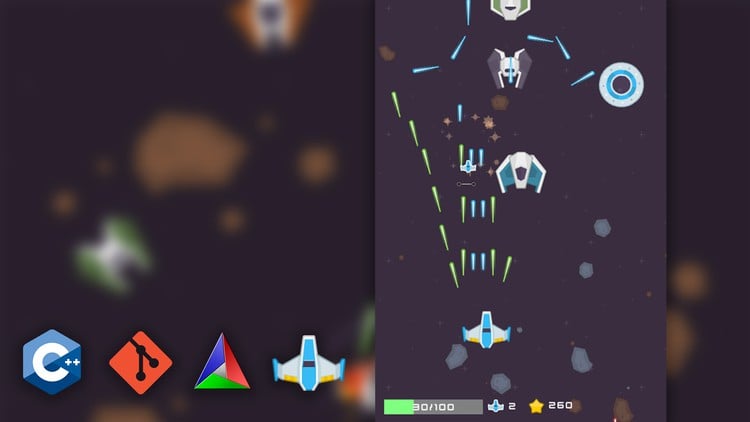
- ساخت یک بازی کامل با C++
- آشنایی با فرآیند توسعه نرمافزار با C++
- آشنایی با Git و GitHub (سیستم کنترل نسخه)
- آشنایی با ابزار ساخت CMake
پیشنیازها:
- صرف زمان و تعهد
- اشتیاق به توسعه بازی
- تجربه در برنامهنویسی یک امتیاز محسوب میشود، اما الزامی نیست.
پس از ایجاد یک پایه محکم، دوره به ایجاد پویا یک بازی کامل از ابتدا میپردازد. این مرحله هیجانانگیز شامل استفاده از C++ به همراه مجموعهای از کتابخانههای قدرتمند است. از طریق تجربیات عملی، دانشآموزان نه تنها درک عمیقی از C++ ایجاد میکنند، بلکه شاهد کاربردهای عملی آن در سناریوهای دنیای واقعی نیز خواهند بود.
پس از اتمام دوره، شرکتکنندگان بینشها و مهارتهای ارزشمندی کسب میکنند که به آنها این امکان را میدهد تا با اطمینان به دنبال مشاغل مهندسی نرمافزار برای توسعه بازی باشند. علاوه بر این، دانش به دست آمده به عنوان سکوی پرشی برای مطالعات بیشتر، شامل موضوعات پیشرفته مانند Unreal Engine و توسعه برنامههای کاربردی گستردهتر عمل میکند.
این دوره، چهارمین قسمت از مجموعه آموزش جامع توسعه بازی است و نقطه شروعی برای یادگیری C++ محسوب میشود. مهم است که بدانید دانشجویانی که مایل به یادگیری C++ و سپس Unreal Engine هستند، ملزم به گذراندن سه دوره قبلی در این مجموعه نیستند.
مقدمه Introduction
-
مقدمه Introduction
مبانی ++C Fundamentals of C++
-
نصب ویژوال استودیو و ++C Install Visual Studio and C++
-
اولین پروژه ما، ویژوال استودیو و نقطه ورود Our First Project, Visual Studio and the Entry Point
-
برنامه "Hello World"، دستورات و include The Hello World Program, Statements and include
-
متغیرها Variables
-
انواع دیگر متغیرها و جزئیات در مورد متغیرها Other Variable Types and Details about Variables
-
مبانی آرایه Baiscs of Array
-
نوع برداری (Vector) The Vector Type
-
نوع نگاشت (Map) The Map Type
-
عملگرها Operators
-
ورودیها Inputs
-
دستور شرطی If If Statement
-
حلقه For Foor Loop
-
استفاده از حلقه For با آرایهها و بردارها Using Foor Loop with Arrays and Vectors
-
حلقه While و Do While While and Do While Loop
-
انواع Switch و Enum Switch and Enum Types
-
تکالیف ساده 01 تبدیل مایل به کیلومتر Simple Tasks 01 Convert Miles to Kilos
-
تکالیف ساده 02 عدد زوج یا فرد Simple Tasks 02 Odd or Even Number
-
تکالیف ساده 03 شمارش کلمات تکراری 01 پاکسازی ورودی Simple Tasks 03 Count Repeated Words 01 Clean up Input
-
تکالیف ساده 03 شمارش کلمات تکراری 02 شمارش کلمات Simple Tasks 03 Count Repeated Words 02 Count the Words
-
تکالیف ساده 04 یافتن کوچکترین عدد Simple Tasks 04 Find the Smallest Number
-
تکلیف ساده 05 الگوریتم مرتب سازی حبابی Simple Task 05 The Bubble Sort Algorithm
-
مبانی توابع Fundamentals of Functions
-
ارسال با ارجاع و کلمه کلیدی const Pass by Reference and the const keyword
-
مبانی шаблонов (Templates) Basics of Templates
-
шаблон های Variadic و تخصصی سازی шаблон Variadic Templates and Template Specialization
ساختارهای یک پروژه ++C و پیوند کتابخانه Structures of a C++ Project and Library Linking
-
مراحل ساخت یک برنامه و فایلهای متعدد Building Stages of a Program and Multiple files
-
فایلهای Header و Inlines Header Files and Inlines
-
جدا کردن کد ابزار به یک پروژه کتابخانه Separate Utility Code into A Library Project
-
پیوند کتابخانه ابزار Link the Utility Library
-
پیوند کتابخانه ابزار با DLL Link the Utility Library with DLL
-
بسته بندی و استفاده از کتابخانه ما در راه حل های دیگر Package and Use Our Library in Other Solutions
حافظه و اشارهگرها Memory and Pointers
-
ساختار اساسی حافظه Basic Structure of Memory
-
اشارهگرها Pointers
-
اشکالزدایی و بررسی دقیق اشارهگرها Debugging and Detailed Examination of Pointers
-
نوع آرایه و اشارهگر The Array Type and Pointer
-
حافظه Stack The Stack Memory
-
حافظه Heap The Heap Memory
-
نقض دسترسی و نشت حافظه Access Violation and Memory Leaks
-
اشارهگر Unique Unique Pointer
-
اشارهگر Shared Shared Pointer
-
اشارهگر Weak Weak Pointer
کلاسها Classes
-
مبانی کلاسها Basics of Classes
-
سازندهها (Constructors) Constructors
-
مخربها (Destructors) Destructors
-
توابع عضو و جفتهای Setter و Getter Member Functions and Setter and Getter Pairs
-
کلمه کلیدی Const در کلاسها The Const Keyword in Classes
-
مبانی وراثت Basics of Inheritance
-
کلمه کلیدی Protected و بازنویسی تابع The Protected Keyword and Function Overriding
-
چند ریختی (Poly Morphism) و توابع مجازی محض Poly Morphism and Pure Virtual Functions
-
مشکلات با کپی سطحی Problems with Shallow Copy
-
کپی عمیق و Semantic انتقال Deep Copy and the Move Semantic
-
عملگر انتساب کپی The Copy Assignment Operator
-
سربارگذاری عملگر Operator Overloading
-
عملگر انتساب انتقال و Big Five Move Assignment Operator and the Big Five
-
انتقال کلاس به فایلهای Header و Cpp Move Class to Header and Cpp Files
-
کلاسهای шаблоны (Template) Template Classes
-
عملگرهای باینری و مشکل با کلمه کلیدی Friend Binary Operators and the Issue with the Friend Keyword
-
کلمه کلیدی Static در کلاس The Static Keyword in Class
Git Git
-
Git و GitHub Git and GitHub
-
ردیابی تاریخچه پایه با Git Basic History Tracking with Git
-
مبانی شاخهها (Branches) Basics of Branches
-
بازنشانی تاریخچه و Reflog Reset the History and Reflog
-
لغو Commit ها Revert Commits
-
تداخل Merge Merge Conflict
-
ارسال Repo ما به GitHub Push our Repo to GitHub
-
به روز رسانی مخازن محلی و از راه دور با Push و Pull Update Local and Remote Repositories with Push and Pull
-
نادیده گرفتن Git Git Ignore
موتور Light Years Light Years Engine
-
نصب CMake Install CMake
-
استفاده از CMake برای ساخت پروژه ما Using CMake to Make Our Project
-
راهاندازی در لینوکس Setup in Linux
-
افزودن پروژه بازی Light Years Add Light Years Game Project
-
بازسازی فایلهای منبع CMake و راهاندازی Git Refactor the CMake Source Files and Setup Git
-
دریافت SFML به پروژه ما Fetch SFML to Our Project
-
افزودن دستور Post Build برای کپی کتابخانههای اشتراکی به Build Target Add Post Build Command to Copy Shared Libraries to Build Target
-
راهاندازی کلاس Application Setup the Application Class
-
راهاندازی حلقه بازی Setup the Game Loop
-
راهاندازی رندرینگ Setup the Rendering
-
نقطه ورود و جداسازی کد موتور و بازی Entry Point and Separate Engine and Game Code
-
ایجاد Core و Macro ورود به سیستم Create the Core and the Logging Macro
-
تعریف انواع داده های مشترک Defining Common Data Types
-
پیاده سازی کلاس World Implement the World Class
-
پیاده سازی کلاس Actor Implement the Actor Class
-
کلاس Object و مدیریت تخریب Object The Object Class and Handle Object Destruction
-
افزودن Sprite رندرینگ به Actor Add Rendering Sprite to Actor
-
استفاده از یک فایل Config برای راهاندازی مسیر Asset Use a Config File to Setup Asset Path
-
ایجاد Asset Manager Create the Asset Manager
-
راهاندازی چرخه پاکسازی Asset Setup Asset Clean Cycle
-
پیاده سازی رابط تبدیل Actor Implement the Actor Transformation Interface
فضاپیما و بازیکن Spaceship and Player
-
ایجاد کلاس Spaceship Create the Spaceship Class
-
فضاپیمای بازیکن و ورودی حرکت Player Spaceship and Move Input
-
نرمال سازی ورودی بازیکن Normalize Player Input
-
جلوگیری از خروج بازیکن از پنجره Prevent Player from Going Beyond the Window
گلوله و تشخیص فیزیک Bullet and Physics Detection
-
مکانیک اولیه تیراندازی Basic Shooting Mechanics
-
ایجاد کلاس Bullet و Spawn کردن گلولهها Create the Bullet Class and Spawn the Bullets
-
تخریب گلوله و چرخه پاکسازی Actor Bullet Destruction and Actor Clean Cycle
-
دریافت موتور فیزیک Box2D Fetch the Box2D Physics Engine
-
افزودن سیستم فیزیک Add the Physics System
-
ایجاد تابع Add Listener Create the Add Listener Function
-
راهاندازی مقداردهی اولیه فیزیک Actor Setup Actor Physics Initialization
-
اتصال رویدادهای Overlap Connect Overlap Events
-
100 پیاده سازی حذف بدنه فیزیکی 100 Implement Physics Body Removal
خسارت و Delegates Damage and Delegates
-
پیاده سازی Component سلامتی Implement the Health Component
-
معرفی Lambda و کلاس تابع Std Introduction to the Lambda and the Std Function Class
-
فعال کردن Get Weak Pointer از This Enable Get Weak Pointer from This
-
ایجاد کلاس Delegate و رابط Bind Action Create the Delegate Class and the Bind Action Interface
-
تکمیل کلاس Delegate Finish the Delegate Class
-
استفاده از ID تیم و اعمال آسیب گلوله Using Team ID and Apply Bullet Damage
-
امکانات Hit Blink و Lerp Hit Blink and Lerp Facilities
-
ایجاد کلاس Particle Create the Particle Class
-
ایجاد کلاس Explosion Create the Explosion Class
دشمن و تایمرها Enemy and Timers
-
110 دشمن و Vanguard 110 Enemy and Vanguard
-
111 ایجاد کلاس Game Level One 111 Create the Game Level One Class
-
112 ایجاد رابط پایه Timer Manager 112 Create the Base Interface of the Timer Manager
-
پیاده سازی کلاس Timer و ارسال Callback Implement the Timer Class and Issue the Callback
-
ایجاد قابلیت Clear Timer Create the Clear Timer Functionality
-
بازسازی کلید تایمرها به کلاس Timer Handle خودمان Refactor the Key of the Timers to Our Own Timer Handle Class
-
ایجاد کلاس Base Game Stage Create the Base Game Stage Class
-
استفاده از World برای مدیریت Stage ها Use the World to Manage the Stages
-
ایجاد Vanguard Stage Create the Vanguard Stage
-
ایجاد دشمن Twin Blade Create the Twin Blade Enemy
-
ایجاد Twin Blade Stage Create the Twin Blade Stage
-
ایجاد Wait Stage و اصلاح کنترل پاکسازی Stage Create the Wait Stage and Refine the Stage Cleanup Control
-
ایجاد دشمن Hexagon Create the Hexagon Enemy
-
ایجاد Hexagon Stage Create the Hexagon Stage
-
ایجاد کلاس UFO Create the UFO Class
-
ایجاد UFO Stage Create the UFO Stage
سلاح و پاداشها Weapon and Rewards
-
پیاده سازی Three Way Shooter Implement the Three Way Shooter
-
پیاده سازی Frontal Wiper Implement the Frontal Wiper
-
ایجاد کلاس Reward Create the Reward Class
-
ایجاد توابع کارخانه Reward Create the Reward Factory Functions
-
Spawn کردن پاداشها هنگام مرگ دشمن Spawn Rewards When Enemy Dies
-
افزودن سطوح سلاح Add Weapon Levels
-
افزودن کلاس Player Add the Player Class
-
پیاده سازی کلاس Player Manager Implement the Player Manager Class
-
پیاده سازی Respawning Player Implement Player Respawning
HUD و Widgets HUD and Widgets
-
ایجاد کلاس HUD Create the HUD Class
-
مدیریت HUD در کلاس World Handle HUD in the World Class
-
ایجاد کلاس Widget Base Create the Widget Base Class
-
ایجاد کلاس Text Widget و بارگذاری فونت از طریق Asset Manager Create the Text Widget Class and Load Font Through the Asset Manager
-
بازسازی کلاس Asset Manager Refactor the Asset Manager Class
-
افزودن گیم پلی HUD و نمایش نرخ فریم بازی Add the Gameplay HUD and Show Frame Rate of the Game
-
پیاده سازی Value Guage و Health Bar Implement the Value Guage and Health Bar
-
به روز رسانی سلامتی Player به Health Bar Update Player Health to the Health Bar
-
143 اصلاح Health Bar بازیکن 143 Refine the Player Health Bar
-
افزودن Image Widget و آیکون Life Player Add the Image Widget and Player Life Icon
-
نمایش تعداد Life در UI Display the Life Count on the UI
-
بازسازی Casting به None Casting در کلاس Reward Refactor the Casting to None Casting in the Reward Class
-
نمایش امتیاز Player Display the Player Score
-
افزودن پاداش Life و تنظیم نرخ Spawn پاداش Add the Life Reward and Adjust Reward Spawn Rate
-
چیدمان ساختار اساسی کلاس Button Layout the Basics Structure of the Button Class
-
پیاده سازی رفتار Button و رویداد Click Implement the Button Behavior and Click Event
-
ایجاد کلاسهای Main Menu Create the Main Menu Classes
-
بارگذاری Game Level با Main Menu Load the Game Level with the Main Menu
Chaos و Boss Stage Chaos and Boss Stage
-
چیدمان امکانات اولیه Chaos Stage Layout the Basic Facilities of the Chaos Stage
-
تکمیل Chaos Stage Finish the Chaos Stage
-
افزودن حالت آسیب ناپذیر Player Add Player Invulnerable State
-
افزودن کلاس Boss و Boss Stage Add the Boss and Boss Stage Class
-
افزودن حرکت Boss و تیراندازهای پایه Add Boss Movement and Base Shooters
-
افزودن Stage های مختلف به Boss Add Different Stages to the Boss
-
متعادل کردن سختی Boss Balance the Boss Difficulty
حالتهای پایانی و ظاهری Ending States and Cosmetics
-
افزودن UI Game Over و Win Add Game Over and Win UI
-
بازنشانی Player و سیستم فیزیک هنگام شروع مجدد Reset Player and Physics System when Retarting
-
تست حالت Win Test the Win State
-
افزودن Actor پسزمینه Add the Backdrop Actor
-
ایجاد کلاس لایه پسزمینه Create the Background Layer Class
-
بارگذاری بافتها و مقداردهی اولیه Sprite ها با بافتهای تصادفی Load Textures and Initialized the Sprites with Random Textures
-
تبدیل و سرعت Sprite تصادفی Random Sprite Transform and Velocity
-
راهاندازی حرکت و رندرینگ Sprite ها Setup Moving and Rendering of the Sprites
-
افزودن لایه پس زمینه Planets و Meteors Add the Planets and Meteors Background Layer
ساخت در Mac OS Building on Mac OS
-
استفاده از Homebrew برای نصب Git و CMake در MacOS Use Homebrew to Install Git and CMake on MacOS
-
ساخت بازی ما در MacOS Build Our Game on MacOS
-
تکمیل نهایی Final Touches
نکات پایانی Final Remark
-
نکات پایانی Final Remarks
تنظیمات لینوکس Linux Setup
-
ساخت با Cmake Build With Cmake
-
توسعه با VSCode Develop with VSCode




https://donyad.com/d/747a45




 Jingtian Li
بازی جادوگر
نمایش نظرات